

Smuxi is an Irssi-inspired, flexible, user-friendly and cross-platform IRC client for sophisticated users, targeting the GNOME desktop. It’s also a client for Twitter, XMPP, Campfire, and JabbR.
The special feature of Smuxi is that it can be used like the typical irssi+screen combo. The IRC session can run on a server (using `smuxi-server’) and a frontend (like `smuxi-frontend-gnome’) then can connect to that. The frontend can then be detached and re-attached at some later point without losing any IRC connections or messages.
Similar to Quassel IRC, it therefore allows users to split the frontend from the backend which manages the actual connections to the IRC servers.
Key Features
-
- Detachable Frontend (frontend can be detached from a smuxi-server).
- Desktop Notifications (with full support of actions, icons, updates, append and sound).
- Messaging Menu / Indicators (as provided by Ubuntu’s Ayatana project).
- Integrated Spell Checking (Linux-only).
- Unified Nickname Colors (identical color across channels and networks).
- Caret-Mode (keyboard navigation through messages).
- Browse Mode (allows to navigate through tabs without moving the markerline).
- Regular and Bash-Style Nickname Completion.
- Full Keyboard Control.
- Message / Command History.
- Configurable Command Character.
- Quick Connect Dialog (simply connect to any server).
- Join Bar (easily connect/join to servers/chats).
- Find Group Chat Dialog.
- Alphabetically sorted chats grouped by network.
- Favicons for Server chats.
- Colors are checked and adjusted for optimum contrast.
- Clickable URLs.
- Word Wrapping.
- Indention of multi-line messages.
- Configurable Highlight Words.
- Markerlines which divide old messages from new messages.
- Toggle-able menubar / status bar.
- Full screen mode.
- Theming Support:
- Configurable Font.
- Foreground / Background Color.
- Chat Activity Colors.
- Configurable Timestamps.
- Configurable Tray-Icon Support.
- IRC:
- Configurable Encoding (ISO-8859-1/15, UTF-8, etc).
- Automatic UTF-8 recode.
- Stripping Colors and/or Formatting from Messages.
- Showing mIRC Colors.
- Splitting oversized messages.
- Channel List / Search.
- CTCP Support including a Menu.
- Invite To Menu.
- Lag Indicator.
- Flood detection and prevention.
- Multi identity support.
- Multiplexed engine.
- Multiple user support.
- Multiple server connections.
- Message patterns.
- Message persistence.
- Counters.
- Also handles Twitter, Facebook Chat, Google Talk, Jabber / XMPP, Campfire and SignalR’s JabbR natively.
- Cross-platform support – runs under Linux, FreeBSD Mac OS X, and Windows. There’s also support for the Raspberry Pi.
Website: smuxi.im
Support: Documentation, FAQ
Developer: Mirco Bauer, Jeffrey Richardson, Giacomo Di Ciocco
License: GNU General Public License v2.0
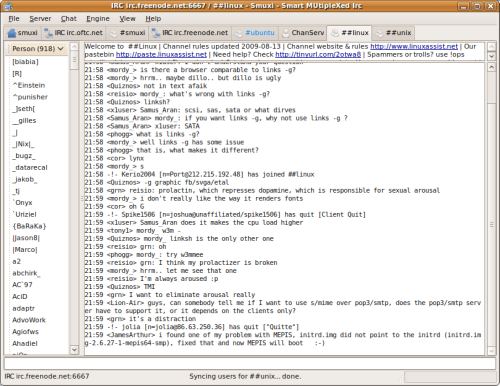
Smuxi is powered by C# and Mono. The libraries used include SmartIrc4net, Newtonsoft.Json, ServiceStack, Twitterizer, agsXMPP, STFL, GTK#, and many others.
Related Software
| IRC Clients | |
|---|---|
| Konversation | User friendly client for KDE Plasma |
| Smuxi | Smart MUltipleXed Irc - the IRC client for sophisticated users |
| Pidgin | Easy to use and free chat client supporting lots of protocols |
| KVIrc | KDE based next generation IRC client with module support |
| Quassel IRC | Distributed, KDE4/Qt based |
| Halloy | IRC client written in Rust |
| Polari | Simple to use IRC Client |
| MERK | Cross-platform graphical IRC client |
| Srain | Modern IRC client written in GTK |
| HexChat | Multi-network IRC client based on XChat |
| dxirc | Simple yet capable cross-platform IRC client |
| Grumpy | Advanced IRC client |
| Tithon | Modern, cross-platform IRC client |
| Communi | Simple and elegant cross-platform IRC client |
Read our verdict in the software roundup.
 Explore our carefully curated directory of recommended free and open source software, covering every major software category. Explore our carefully curated directory of recommended free and open source software, covering every major software category.The directory forms part of our extensive collection of articles for Linux enthusiasts. It includes hundreds of detailed reviews, together with free and open source alternatives to proprietary software from companies such as Google, Microsoft, Apple, Adobe, IBM, Cisco, Oracle, and Autodesk. LinuxLinks also covers interesting projects worth exploring, Linux-compatible hardware, free programming books and tutorials, and much more. Know a useful free and open source Linux application that we haven’t covered? Tell us about it using our submission form. |
Please read our Comment Policy before commenting.