

The file renaming utilities (renameutils for short) are a set of programs designed to make renaming of files faster and less cumbersome.
The file renaming utilities consists of five programs – qmv, qcp, imv, icp and deurlname.
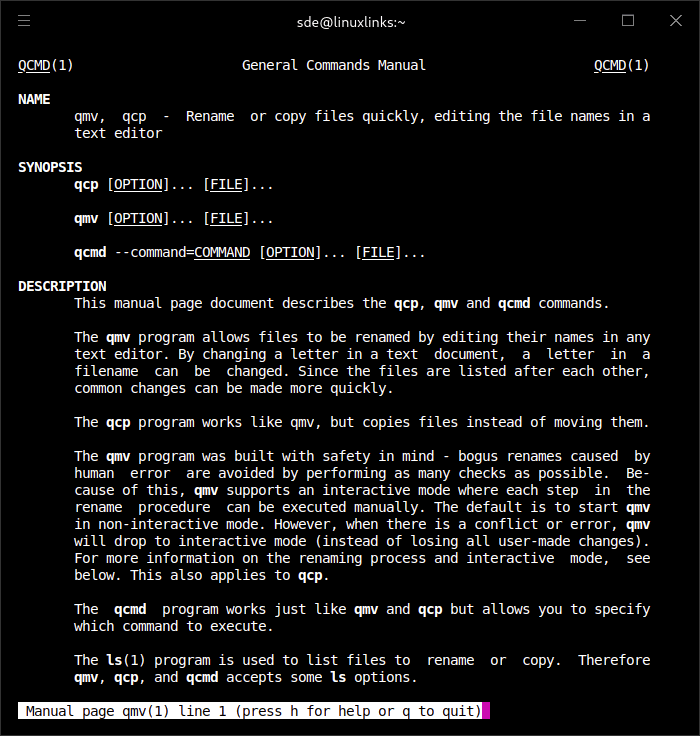
The qmv (“quick move”) program allows file names to be edited in a text editor. The names of all files in a directory are written to a text file, which is then edited by the user. The text file is read and parsed, and the changes are applied to the files.
The qcp (“quick cp”) program works like qmv, but copies files instead of moving them.
The imv (“interactive move”) program, is trivial but useful when you are too lazy to type (or even complete) the name of the file to rename twice. It allows a file name to be edited in the terminal using the GNU Readline library. icp copies files.
The deurlname program removes URL encoded characters (such as %20 representing space) from file names. Some programs such as w3m tend to keep those characters encoded in saved files.
Website: www.nongnu.org/renameutils
Support:
Developer: Oskar Liljeblad
License: GNU General Public License v3.0
renameutils is written in C. Learn C with our recommended free books and free tutorials.
Related Software
| Console Batch Renamers | |
|---|---|
| RnR | Securely rename multiple files and directories |
| F2 | Command-line batch renaming tool. Fast and safe to use. It's written in Go |
| vimv | Mass rename files using Vim |
| massren | Rename multiple files using a text editor |
| mmv | Rename multiple files with editor |
| nomino | Batch rename utility for developers |
| rename | Rename multiple files using Perl expressions |
| brename | Batch renaming safely |
| tempren | Template-based file renaming utility |
| edir | Utility to rename, remove, and copy filenames and directories |
| vidir | Edit of the contents of a directory in a text editor |
| renameutils | Five programs – qmv, qcp, imv, icp and deurlname |
| rename-cli | Rename files quickly |
| ren | Takes find-formatted lines via standard input, and batch renames them |
| renux | Regex, placeholders, and text transformations |
| moove | Manipulate file names and locations |
| Bren | Bulk file renaming software |
| brn2 | Fork of brn |
Read our verdict in the software roundup.
| Alternatives to rename | |
|---|---|
| RnR | Securely rename multiple files and directories |
| renameutils | Set of programs designed to make renaming files faster and less cumbersome |
| rename.pl | Rename files using Perl expressions |
| rename | Rename multiple files |
| vimv | Mass rename files using Vim |
| detox | Clean up filenames |
| regname | Mass renamer utility with a text user-interface |
| Alternatives to mv | |
|---|---|
| pycp | cp and mv with a progressbar |
| RnR | Securely rename multiple files and directories |
| renameutils | Set of programs designed to make moving files faster and less cumbersome |
| Alternatives to cp | |
|---|---|
| xcp | Extended cp written in Rust |
| fcp | Significantly faster alternative to cp |
| gcp | Goffi's cp, a fancy file copier |
| pycp | cp and mv with a progressbar |
| rsync | Fast incremental file transfer |
| Fast Unix Commands | Provides alternatives for rm and cp |
| renameutils | Make copying files faster and less cumbersome |
| cpy-cli | Accepts globs and creates non-existent destination directories. |
| cpz | Zippy alternative to cp |
| lunas | Syncing tool handling more than two directories locally and remotely |
| BCMR | Better Copy Move Remove |
 Explore our comprehensive directory of recommended free and open source software. Our carefully curated collection spans every major software category. Explore our comprehensive directory of recommended free and open source software. Our carefully curated collection spans every major software category.This directory is part of our ongoing series of informative articles for Linux enthusiasts. It features hundreds of detailed reviews, along with open source alternatives to proprietary solutions from major corporations such as Google, Microsoft, Apple, Adobe, IBM, Cisco, Oracle, and Autodesk. You’ll also find interesting projects to try, hardware coverage, free programming books and tutorials, and much more. Discovered a useful open source Linux program that we haven’t covered yet? Let us know by completing this form. |