

Pick is a colour picker app for Ubuntu and other Linux distributions which allows picking any colour on the screen.
It remembers the last few colours you picked.
This is free and open source software.
Website: www.kryogenix.org/code/pick
Support: GitHub Code Repository
Developer: Stuart Langridge
License: MIT License
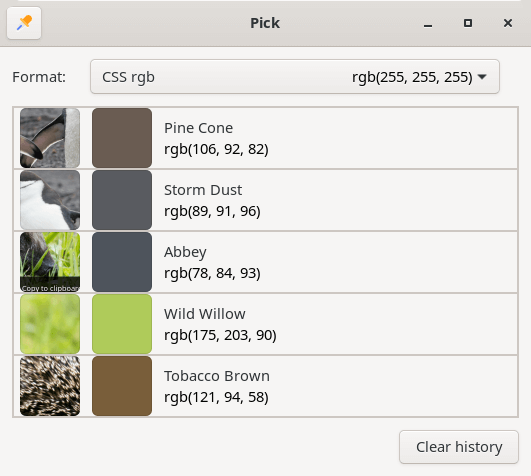
Pick is written in Python. Learn Python with our recommended free books and free tutorials.
Related Software
| Color Pickers | |
|---|---|
| pastel | Generate, analyze, convert and manipulate colors |
| Gpick | Advanced color picker and palette editor |
| hyprpicker | wlroots-compatible Wayland colour picker for Linux |
| Eyedropper | Pick and format colors; this tool is geared towards advanced users |
| KColorChooser | Color picker designed for KDE but runs on any desktop environment |
| Pick | Python-based color picker |
| Rickrack | User-friendly color editor. |
| Gcolor3 | Color selection dialog written in GTK+ 3 |
| xcolor | Lightweight color picker written in Rust |
| epick | Color picker for creating harmonic color palettes |
| Colorpicker | Minimal but complete colorpicker Electron-based desktop app |
| Picket | Screen color picker with magnifier and custom/user defined formats |
| Paleta | Generates color palettes with ease |
| Xgrabcolor | Basic color picker |
| sxcs | Minimal X11 color picker and magnifier |
| Pigment | Extracts color palettes from your images |
| delicolour | Lightweight color finder |
| Deepin Picker | Simple color picker |
| ColorSmith | Color picker tool |
| Bella | Simple eye dropper and color picker |
| pik | Terminal-based color picker |
| wl-color-picker | Shell script for Wayland and wlroots sessions |
| cpick | Extensive color picker for the terminal |
| Coulr | Color box to help developers and designers |
| Wayland Color Picker | GTK4 application for Wayland desktops |
Read our verdict in the software roundup.
 Explore our carefully curated directory of recommended free and open source software, covering every major software category. Explore our carefully curated directory of recommended free and open source software, covering every major software category.The directory forms part of our extensive collection of articles for Linux enthusiasts. It includes hundreds of detailed reviews, together with free and open source alternatives to proprietary software from companies such as Google, Microsoft, Apple, Adobe, IBM, Cisco, Oracle, and Autodesk. LinuxLinks also covers interesting projects worth exploring, Linux-compatible hardware, free programming books and tutorials, and much more. Know a useful free and open source Linux application that we haven’t covered? Tell us about it using our submission form. |
Please read our Comment Policy before commenting.