

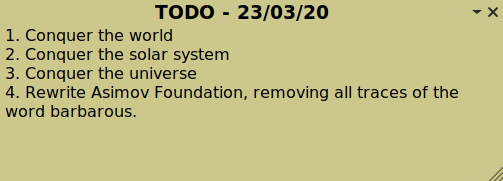
MyNotes is a sticky note application. An icon appears in the system tray and from it you can create and manage your sticky notes.
Notes can be organized in categories and you can set a default color for each category.
Checkboxes and images can be incorporated in the notes. If your desktop environment supports compositing, the opacity of the notes can be modified.
Key Features
- Create sticky notes.
- Highly customizable configure title font, size, text, and more.
- Categories.
- Several predefined colors.
- Text formatting (style, alignment, color).
- Customizable note opacity.
- Backup/restore notes.
- Show/hide all notes from a category.
- Lock note to avoid editing it by mistake.
- Insert date, pictures, symbols, links.
- Mode list / todolist / enumeration.
- Export to .txt or .html.
- Autocorrection.
- Choose from Gtk or Qt as the GUI toolkit for the system tray icon.
- Internationalization support – translations for Catalan, Dutch, French, German, and Spanish.
Website: sourceforge.net/projects/my-notes
Support: GitHub Code Repository
Developer: Juliette Monsel
License: GNU General Public License version 3.0
MyNotes is designed for Linux. It’s written in Python 3. Learn Python with our recommended free books and free tutorials.
Related Software
| Note Taking Software | |
|---|---|
| Sticky | Very simple utility offering a good range of features |
| PrimeNote | Modern and highly customizable sticky note application |
| NoteSH | Terminal-based sticky notes app |
| KNotes | A simple Qt-based application |
| Xpad | Sticky note application for jotting down things to remember |
| GloboNote | Simple and easy to use open source note taking application |
| Sticky Notes | Simple note taking program designed for GNOME |
| Notejot | Billed as a stupidly simple sticky notes applet. |
| MyNotes | Customizable sticky notes program |
| redthread | Sticky-note pegboard for your terminal |
| Jorts | Colourful sticky notes program |
| Indicator Stickynotes | Write reminders on notes |
| LinSticky | Modern sticky notes application |
| Clues | Sticky notes app with connections |
Read our verdict in the software roundup.
 Explore our carefully curated directory of recommended free and open source software, covering every major software category. Explore our carefully curated directory of recommended free and open source software, covering every major software category.The directory forms part of our extensive collection of articles for Linux enthusiasts. It includes hundreds of detailed reviews, together with free and open source alternatives to proprietary software from companies such as Google, Microsoft, Apple, Adobe, IBM, Cisco, Oracle, and Autodesk. LinuxLinks also covers interesting projects worth exploring, Linux-compatible hardware, free programming books and tutorials, and much more. Know a useful free and open source Linux application that we haven’t covered? Tell us about it using our submission form. |
Please read our Comment Policy before commenting.