

matcha is a powerful, feature-rich email client for your terminal.
Built with Go and the Bubble Tea TUI framework, Matcha brings a beautiful, modern email experience to the command line with support for rich content, multiple accounts, and advanced terminal features.
This is free and open source software.
Key Features
- Email Management:
- Inbox & Sent Mail: View and manage emails from both inbox and sent folders.
- Multi-Account Support: Manage multiple email accounts with an elegant tabbed interface.
- Smart Caching: Instant inbox display with background refresh for optimal performance.
- Real-time Refresh: Manually refresh your inbox at any time with a single keypress.
- Infinite Scroll: Automatically loads more emails as you scroll through your inbox.
- Search & Filter: Built-in filtering to quickly find emails by subject, sender, or content.
- Rich Email Viewing:
- HTML email rendering with proper formatting.
- Markdown support for plain-text emails.
- Styled headers and body text.
- Proper handling of quoted-printable encoding.
- Reply to Emails: Quick reply with automatic quoting of original message.
- Delete & Archive: Manage your inbox by deleting or archiving messages.
- Attachment Support:
- Download email attachments to your Downloads folder.
- Automatic file opening after download.
- Smart filename handling (prevents overwrites with auto-numbering).
- Support for various attachment encodings.
- Rich Content Display:
- Matcha supports modern terminal image protocols for displaying images directly in your terminal:
- Image Protocol Support:
- Kitty Graphics Protocol: Full support for Kitty, Ghostty, WezTerm, Wayst, and Konsole terminals.
- iTerm2 Inline Images: Native support for iTerm2 and Warp terminals.
- Inline Email Images: Display images embedded in HTML emails (including CID references).
- Remote Image Fetching: Automatically fetches and displays remote images from URLs.
- Data URI Support: Renders base64-encoded inline images.
- Smart Fallback: Gracefully falls back to clickable links when images aren’t supported.
- Terminal Hyperlinks (OSC 8).
- Clickable Links: Full OSC 8 hyperlink support for modern terminals.
- Supported Terminals: Kitty, Ghostty, WezTerm, Alacritty, iTerm2, Hyper, VS Code terminal, GNOME Terminal, and more.
- Smart Detection: Automatically detects terminal capabilities.
- Fallback Mode: Shows plain text URLs in unsupported terminals.
- Composing Emails:
- Compose New Emails: Clean, intuitive interface for writing emails.
- Markdown Support: Write emails in Markdown that automatically converts to HTML.
- Inline Images: Embed images in your emails using Markdown syntax .
- File Attachments: Attach files with an integrated file picker.
- Contact Autocomplete: Smart suggestions from your contact history.
- Auto-save Drafts: Never lose your work – drafts are automatically saved.
- Multi-Account Sending: Choose which account to send from with a simple picker.
- Reply Threading: Proper email threading with In-Reply-To and References headers.
- Rich Formatting: Send both plain text and HTML versions of your emails.
- Draft Management:
- Automatic Draft Saving: Drafts are saved when you exit the composer.
- Draft Library: View all your saved drafts in one place.
- Resume Editing: Pick up where you left off by reopening any draft.
- Draft Cleanup: Delete drafts you no longer need.
- Time Tracking: See when each draft was last modified.
- Search Drafts: Filter through your drafts by subject or recipient.
- Account Management:
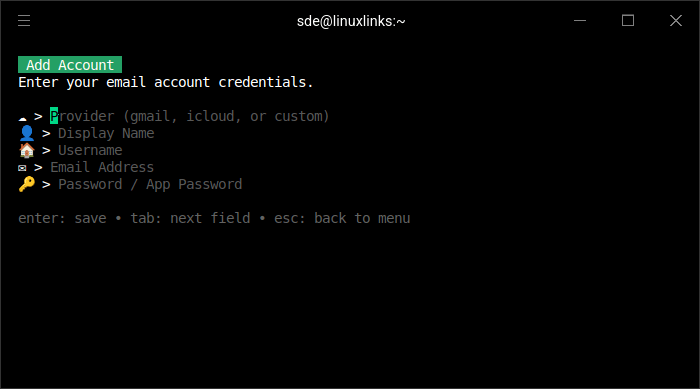
- Multiple Accounts: Configure and manage multiple email accounts.
- Easy Switching: Switch between accounts with keyboard shortcuts or tabs.
- Provider Presets: Built-in support for:
- Gmail (imap.gmail.com / smtp.gmail.com).
- iCloud (imap.mail.me.com / smtp.mail.me.com).
- Custom IMAP/SMTP: Configure any email provider with custom server settings.
- Account Settings:
- Add new accounts.
- Remove existing accounts.
- Edit account details.
- Configure separate fetch and send addresses.
- Secure Storage: Credentials stored locally in ~/.config/matcha/config.json.
- Contact Management:
- Automatic Contact Saving: Email addresses are automatically saved from:
- Emails you receive.
- Emails you send.
- Smart Search: Fuzzy search through your contacts while composing.
- Quick Autocomplete: Contact suggestions appear as you type in the “To” field.
- Persistent Storage: Contacts are saved locally for offline access.
- Automatic Contact Saving: Email addresses are automatically saved from:
- User Interface
- Beautiful TUI: Clean, modern terminal interface built with Bubble Tea.
- Vim-like Keybindings: Efficient keyboard navigation (j/k, h/l, etc.).
- Responsive Design: Adapts to your terminal window size.
- Focus Management: Clear visual indication of focused elements.
- Tabbed Interface: Switch between accounts with tab navigation.
- Styled Elements: Color-coded interface elements for better readability.
- Contextual Help: Built-in help text shows available commands for each screen.
- Advanced Features
- Automatic Updates: Built-in update checker notifies you of new releases.
- Self-Update Command: Update Matcha with a simple matcha update command.
- Smart Image Rendering: Automatically calculates terminal cell size for proper image display.
- Debug Mode: Environment variables for debugging image protocol issues.
- Flexible Configuration: JSON-based configuration with automatic migration from legacy formats.
- Performance Optimized: Concurrent email fetching for faster inbox loading.
- Email Caching: Instant inbox display on startup with background refresh.
Website: github.com/floatpane/matcha
Support:
Developer: floatpane
License: MIT License
matcha is written in Go. Learn Go with our recommended free books and free tutorials.
Related Software
| Console Email Clients | |
|---|---|
| NeoMutt | Brings together many patches to extend Mutt |
| mu4e | An extension of mu that runs a full-featured email client within Emacs |
| Himalaya | CLI email client written in Rust |
| Sup | Curses threads-with tags style email client |
| Mutt | Small but very powerful text based program |
| Alpine | Alternatively Licensed Program for Internet News and Email |
| meli | Configurable and extensible e-mail client with sane defaults |
| nmail | User interface similar to alpine / pine |
| alot | Lets notmuch handle your mailindex and uses a toolkit to render its display |
| Wanderlust | Mail/news management system with IMAP4rev1 support for Emacs |
| aerc | Billed as a "pretty good email client" |
| Cone | COnsole Newsreader And Emailer |
| bower | Curses frontend for the Notmuch email system |
| Vmail | Vim interface to Gmail |
| neatmail | Non-interactive email client |
Read our verdict in the software roundup.
 Explore our comprehensive directory of recommended free and open source software. Our carefully curated collection spans every major software category. Explore our comprehensive directory of recommended free and open source software. Our carefully curated collection spans every major software category.This directory is part of our ongoing series of informative articles for Linux enthusiasts. It features hundreds of detailed reviews, along with open source alternatives to proprietary solutions from major corporations such as Google, Microsoft, Apple, Adobe, IBM, Cisco, Oracle, and Autodesk. You’ll also find interesting projects to try, hardware coverage, free programming books and tutorials, and much more. Know a useful open source Linux program that we haven’t covered yet? Let us know by completing this form. |