
Understanding top
The image below is cropped output from the top utility. When running top, we pressed 1 to show all the Cpu entries.
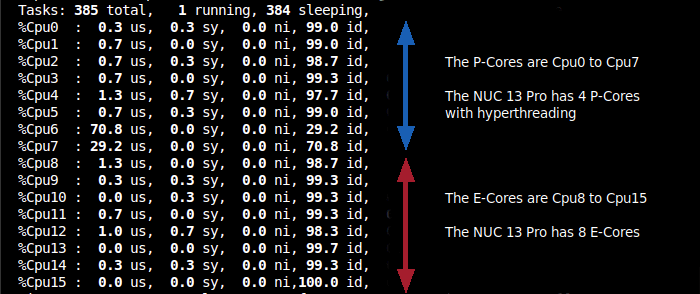
There’s conflicting information on the net about how top shows the P-Cores. Some sources say that Linux first lists all physical cores, then their HT/SMT siblings. That’s not the case with this NUC. They are, in fact, listed in pairs i.e. Cpu0 is P-Core 0 Thread 1, Cpu1 is P-Core 0 Thread 2, Cpu2 is P-Core 1 Thread 1, Cpu 3 is P-Core 1 Thread 2 etc.
This pairing is confirmed by the lscpu command.
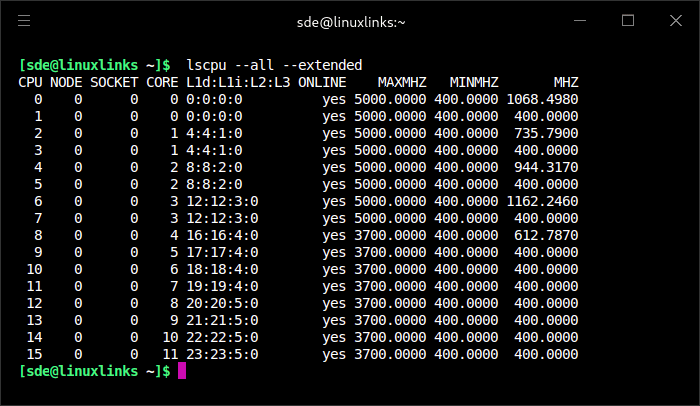
As the output shows CPU 0 and CPU 1 are sharing Core 0, CPU 2 and CPU 3 are sharing Core 1 etc.
The output also confirms the E-Cores are CPU 8 to 15 with their slower 3700 max turbo MHz.
Next page: Page 3 – How much faster is a P-Core compared to an E-Core?
Pages in this article:
Page 1 – P-Cores and E-Cores
Page 2 – Interpret output from top
Page 3 – How much faster is a P-Core compared to an E-Core?
Page 4 – Forcing programs to run on the P-Cores or E-Cores
Complete list of articles in this series:
| Intel NUC 13 Pro Mini PC | |
|---|---|
| Part 1 | Introduction to the series with interrogation of system |
| Part 2 | Benchmarking the Mini PC |
| Part 3 | Installing Ubuntu 23.10 Desktop |
| Part 4 | Configuring Ubuntu 23.10 Desktop |
| Part 5 | Power Consumption |
| Part 6 | P-Cores and E-Cores |
| Part 7 | Gaming |
| Part 8 | Installing and Configuring Manjaro |
| Part 9 | BIOS options |