

heynote is a dedicated scratchpad for developers. It functions as a large, persistent text buffer divided into blocks where you can write down anything you like. The software works well for a Slack message you don’t want to accidentally send, a JSON response from an API you’re working with, notes from a meeting, your daily to-do list, etc.
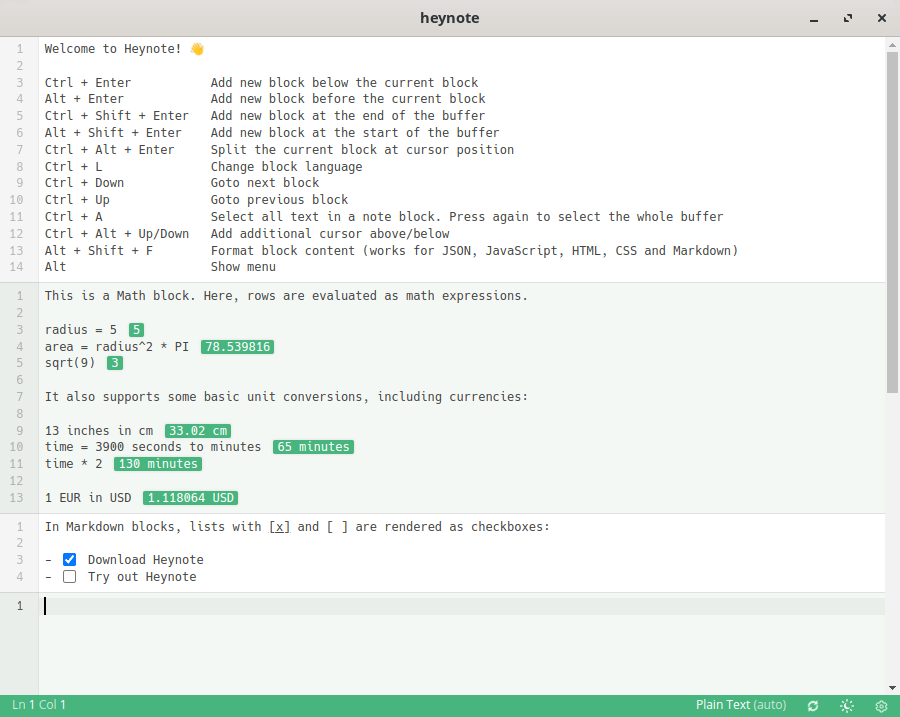
The heynote buffer is divided into blocks, and each block can have its own Language set (e.g. JavaScript, JSON, Markdown, etc.). This gives you syntax highlighting and lets you auto-format that JSON response.
This is free and open source software.
Key Features
- Persistent text buffer.
- Block-based.
- Each block has its own language set. Syntax highlighting for a wide range of languages:
- C++, C#, Clojure, CSS, Erlang, Dart, Go, Groovy, HTML, Java, JavaScript, JSX, Kotlin, TypeScript, TOML, TSX, JSON, Lezer, Markdown, PHP, Python, Ruby, Rust, Shell, SQL, Swift, Vue, XML, YAML.
- Language auto-detection.
- Auto-formatting.
- Math/Calculator mode – math blocks are calculator scratch pads that can be used for simple calculations. They also support variables, functions and unit conversions (including currencies).
- Currency conversion.
- Multi-cursor editing.
- Dark and light themes.
- Option to set a global hotkey to show/hide the app.
- Default or Emacs-like key bindings.
- Cross-platform support – runs under Linux, macOS, and Windows.
Website: heynote.com
Support: GitHub Code Repository
Developer: Jonatan Heyman
License: MIT License
heynote is written in JavaScript. Learn JavaScript with our recommended free books and free tutorials.
Related Software
| General Purpose GUI Note Taking Apps | |
|---|---|
| Joplin | Note taking and to-do application with synchronisation |
| Trilium Notes | Hierarchical note taking application |
| CherryTree | Hierarchical note taking application packed with features |
| TagSpaces | Personal data manager for organizing, editing and tagging information |
| VNote | Vim-inspired note-taking application |
| Simplenote | Fast, free, synchronized notes |
| Notesnook | Focused on user privacy and ease of use |
| Tusk | Evernote desktop software |
| QOwnNotes | Plain-text file notepad with markdown support and ownCloud integration |
| heynote | Dedicated scratchpad for developers |
| tomboy-ng | Reincarnation of tomboy |
| Beaver Notes | Notes stay on your device. No sign-ups, no tracking, no complexity |
| Iotas | Distraction-free note taking via its mobile-first design |
| Gnote | Port of Tomboy to C++ |
| KleverNotes | Note taking and management application |
| Treedome | Seeks inspiration from CherryTree |
| Print(Notes) | Markdown notes app made with Flutter |
| Folio | Markdown note-taking app for GNOME |
| FeatherNotes | Lightweight Qt5 hierarchical notes manager |
| nvPY | Inspired by Notational Velocity and ResophNotes |
| Lockbook | Encrypted notebook |
| FromScratch | Simple but smart note-taking app |
| NotNative | Modern note-taking app with Vim-like editing |
| HelixNotes | Local-first Markdown note-taking app |
| Darkwrite | Eye-candy note taking and to-do app |
| Bookup | Streamline notes with Markdown |
| BasKet Note Pads | Organizing, sharing, and taking notes |
| Swifty Notes | Native GTK markdown notes |
| mnemo | Local-first, cross-platform note-taking app leveraging the Typst ecosystem |
| MyNotex | Take and to manage textual notes and activity management |
| Hugvi | Code note-taking desktop app |
Read our verdict in the software roundup.
 Explore our carefully curated directory of recommended free and open source software, covering every major software category. Explore our carefully curated directory of recommended free and open source software, covering every major software category.The directory forms part of our extensive collection of articles for Linux enthusiasts. It includes hundreds of detailed reviews, together with free and open source alternatives to proprietary software from companies such as Google, Microsoft, Apple, Adobe, IBM, Cisco, Oracle, and Autodesk. LinuxLinks also covers interesting projects worth exploring, Linux-compatible hardware, free programming books and tutorials, and much more. Know a useful free and open source Linux application that we haven’t covered? Tell us about it using our submission form. |
Please read our Comment Policy before commenting.