

TagSpaces is a personal data manager for organising files, folders, notes and other information.
The project is available as a desktop application for Linux and other platforms as well as TagSpaces Lite Web, a self-hosted browser edition. The Lite Web edition works with S3-compatible object storage and can be deployed using Docker.
TagSpaces stores tags either in filenames or sidecar files rather than tying data to a proprietary central database. It also offers note taking, previews, search and several ways to browse collections of files.
This is free and open source software.
Key Features
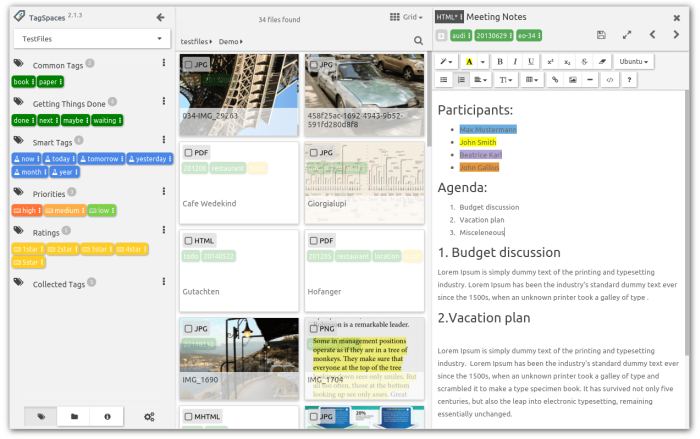
- Manage files and folders from desktop and web interfaces.
- Add colour-coded tags to files and folders using filenames or sidecar metadata.
- Create notes in plain text, Markdown and HTML formats.
- Edit plain text, Markdown, HTML and JSON files.
- Preview images, PDFs, audio, video, source code, archives and many other file formats.
- Search files by name and tags using fuzzy matching.
- Browse files using list, grid and gallery perspectives.
- Connect S3-compatible object storage including AWS S3, Wasabi, Cloudflare R2 and self-hosted MinIO.
- Self-host TagSpaces Lite Web using a conventional web server or Docker.
- Install the web edition as a Progressive Web App on mobile devices.
- Cross-platform support – runs on Linux, macOS and Windows.
Website: www.tagspaces.org
Support:
Developer: TagSpaces UG
License: GNU Affero General Public License v3.0
TagSpaces is written in JavaScript. Learn JavaScript with our recommended free books and free tutorials.
Related Software
| General Purpose GUI Note Taking Apps | |
|---|---|
| Joplin | Note taking and to-do application with synchronisation |
| Trilium Notes | Hierarchical note taking application |
| CherryTree | Hierarchical note taking application packed with features |
| TagSpaces | Personal data manager for organizing, editing and tagging information |
| VNote | Vim-inspired note-taking application |
| Simplenote | Fast, free, synchronized notes |
| Notesnook | Focused on user privacy and ease of use |
| Tusk | Evernote desktop software |
| QOwnNotes | Plain-text file notepad with markdown support and ownCloud integration |
| heynote | Dedicated scratchpad for developers |
| tomboy-ng | Reincarnation of tomboy |
| Beaver Notes | Notes stay on your device. No sign-ups, no tracking, no complexity |
| Iotas | Distraction-free note taking via its mobile-first design |
| Gnote | Port of Tomboy to C++ |
| KleverNotes | Note taking and management application |
| Treedome | Seeks inspiration from CherryTree |
| Print(Notes) | Markdown notes app made with Flutter |
| Folio | Markdown note-taking app for GNOME |
| FeatherNotes | Lightweight Qt5 hierarchical notes manager |
| nvPY | Inspired by Notational Velocity and ResophNotes |
| Lockbook | Encrypted notebook |
| FromScratch | Simple but smart note-taking app |
| NotNative | Modern note-taking app with Vim-like editing |
| HelixNotes | Local-first Markdown note-taking app |
| Darkwrite | Eye-candy note taking and to-do app |
| Bookup | Streamline notes with Markdown |
| BasKet Note Pads | Organizing, sharing, and taking notes |
| Swifty Notes | Native GTK markdown notes |
| mnemo | Local-first, cross-platform note-taking app leveraging the Typst ecosystem |
| MyNotex | Take and to manage textual notes and activity management |
| Hugvi | Code note-taking desktop app |
Read our verdict in the software roundup.
| Personal Information Managers | |
|---|---|
| Kontact | Unites mature and proven applications |
| Evolution | Integrated mail, addressbook and calendaring functionality |
| TagSpaces | Offline, open source, personal data manager |
| Org mode | Mode for the Emacs text editor |
| Makagiga | To-do manager, RSS reader, notepad, widgets, image viewer |
| TreeTag | Personal data manager |
| TreeLine | Stores almost any kind of information |
| BORG Calendar | Desktop calendar and task manager with scheduling and reminder features |
| Osmo | Includes calendar, task manager and address book modules |
| LXQt Organizer | Lightweight personal organizer for managing events, tasks, and contacts |
Read our verdict in the software roundup.
| Web-Based File Managers | |
|---|---|
| copyparty | Portable file server |
| Filestash | Dropbox-like file manager |
| AList | File list program that supports multiple storages |
| Tiny File Manager | Versatile web-based PHP file manager |
| FileBrowser Quantum | Browser-based storage access with fast search |
| Cloudreve | Self-hosted file management system with multi-cloud support |
| FileGator | Powerful multi-user file manager |
| Dufs | Fle server that supports static serving |
| kodbox | Self-hosted document management and collaboration platform |
| Cloud Commander | For the web with console and editor |
| Directory Lister | Browse and share folders |
| SFTPGo | WebAdmin UI lets you manage users, folders, and more |
| TagSpaces | Offline, open source, personal data manager |
| Nextcloud | Personal cloud storage, text editor, photo gallery, file share,... |
| Gossa | Fast and simple multimedia fileserver |
| Mikochi | Browse, upload and stream media from a NAS or home server |
| FileRise | Self-hosted storage with sharing, access controls and uploads |
| WFM | Standalone browser interface for browsing and editing server files |
| Surfer | Simple static file server |
| IFM | Improved File Manager |
| HardBore | Sub-2ms cold start, native OS integration, full keyboard navigation |
| Fint | Keyboard-driven file manager |
Read our verdict in the software roundup.
 LinuxLinks helps you discover the best free and open source software for Linux. Explore our extensive collection of recommended applications, including alternatives to popular proprietary software. We also publish software reviews, Linux tutorials, hardware reviews, free programming books and articles covering the wider open source community. Browse our Linux resources to discover more. Know a useful free and open source Linux application we haven't covered? Suggest a program for inclusion. Has your software been featured on LinuxLinks? Display one of our Featured on LinuxLinks badges on your website or GitHub README. |
Please read our Comment Policy before commenting.