
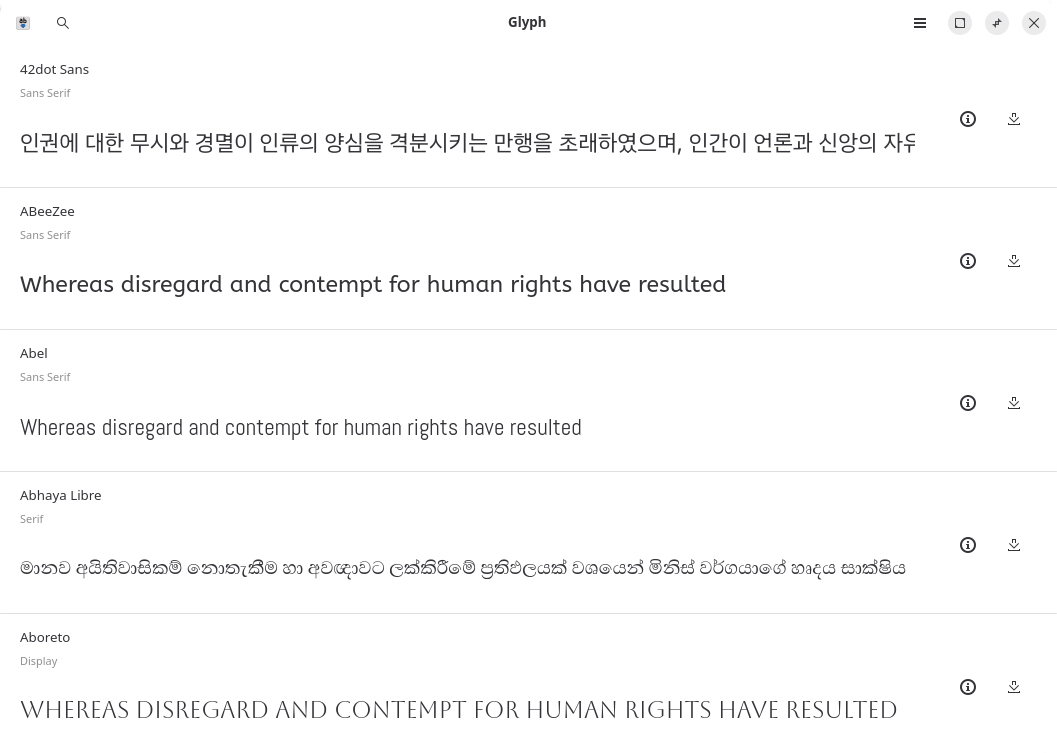
Glyph is an app for installing fonts from Google Fonts Github Repo written in Python, using GTK4 and Libadwaita.
It lets you search through thousands of available fonts and install them into your system in original quality.
This is free and open source software
Key Features
- Preview fonts without internet or installation.
- Search through thousands of fonts in various categories such as sans, mono etc.
- Install the latest font to your system.
- View the details of fonts such as the designer, license, files etc.
- Fonts fetched from Google Fonts Github repo with original quality.
Website: github.com/shonebinu/Glyph
Support:
Developer: Shone Binu
License: GNU General Public License v3.0
Glyph is written in Python. Learn Python with our recommended free books and free tutorials.
Related Software
| Font Viewers | |
|---|---|
| fontpreview | Search and preview fonts |
| KFontview | View and install different types of fonts |
| fntsample | PDF and PostScript font samples generator |
| GNOME Fonts | View fonts on your system |
| Opcion Font Viewer | Java based font viewer |
| fontvuer | Cross-platform font viewer |
| cfonts | Command line tool for sexy ANSI fonts |
| Font Viewer | View and install fonts |
Read our verdict in the software roundup.
 Explore our comprehensive directory of recommended free and open source software. Our carefully curated collection spans every major software category. Explore our comprehensive directory of recommended free and open source software. Our carefully curated collection spans every major software category.This directory is part of our ongoing series of informative articles for Linux enthusiasts. It features hundreds of detailed reviews, along with open source alternatives to proprietary solutions from major corporations such as Google, Microsoft, Apple, Adobe, IBM, Cisco, Oracle, and Autodesk. You’ll also find interesting projects to try, hardware coverage, free programming books and tutorials, and much more. Know a useful open source Linux program that we haven’t covered yet? Let us know by completing this form. |