

CalcPy is a terminal calculator and advanced math solver using Python, IPython and SymPy.
This is free and open source software.
Key Features
- Display both symbolic and numeric solutions.
- Integers displayed as decimal, hex and binary.
- Evaluation preview while typing.
Currency conversion 10USD (calcpy.base_currency=’EUR’ to change base currency) (by ECB). - ? suffix provides some basic analysis of expression (similar to WolframAlpha).
- ((1,2),(3,4))?, x**2+1?, 234?.
- Automatic symbolic variables, anything like x y_1 is a sympy symbol.
- Symbolic variables assumptions are uniform, symbols(x, real=True) would change all occurencase of x to be real.
- Implicit multiplication (2x, (x+1)(x-1) are valid).
- Nested tuples are matrices ((1,2),(3,4))**2.
- All variables and functions are restored between sessions (delete using del).
- Datetime calculations d”yesterday at 9 am” – d”1990-1-30 9:20″.
- Sizes KB, MB, GB, TB (e.g. 4MB-32KB).
- Unit prefixes G, M, k, m, u, n, p (4G/3.2n, enable by calcpy.units_prefixes=True).
- Implicit lambda f(a,b):=a**2+b**2.
- Latex input diff($\frac{1,x}$) (latex output with latex(1/x)).
- Copy to clipboard copy(_) would copy last result.
- Custom user startup (for imports, etc.) edit_user_startup().
- Persistent configuration, see options with calcpy?
- SymPy:
- All the elementary (and non-elementry) math functions and constants – ln, sin, e, pi etc.
- Calculus, algebra, plotting – diff, integrate, limit, Sum, solve, plot, plot_implicit etc.
- IPython:
- Get last result with _, get specific cell _12 (Out[12] works too)
- func_name? show docs for func_name
- who/who_ls see all defined variables
- Prompt history with up/down, search with ctrl+r
- Autocomplete with tab
- Edit code on editor with %edit func_name
- Python:
- All the basic arithmetic +,-,*,/,** or ^
- Binary and hex input 0b1101, 0xafe1
- Scientific notation 2.12e-6
- Programmer operations // integer division, % modulo, & bitwise AND, | bitwise OR, ^^ bitwise XOR (on calcpy ^ is exponentiation, disable with calcpy.caret_power), ~ bitwise not, >>/<< right/left shift.
Website: github.com/idanpa/calcpy
Support:
Developer: Idan Pazi
License: MIT License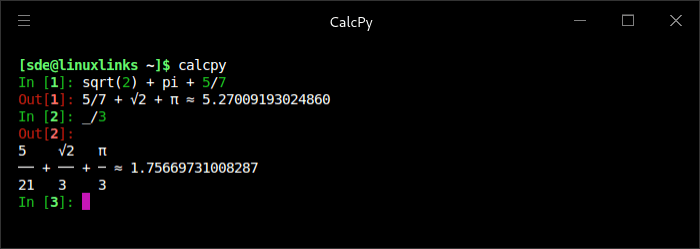
CalcPy is written in Python. Learn Python with our recommended free books and free tutorials.
Related Software
Terminal-Based Calculators Genius Desktop calculator, an educational tool in mathematics, and for research Numbat High precision scientific calculator supporting physical units kalker Calculator with math syntax qalc Symbolic maths, arbitrary precision and unit conversion calc C-style arbitrary precision calculator concalc Parser-algorithm of extcalc wcalc Uses intuitive expressions and implicit multiplication pcalc Terminal calculator made for programmers bcal Storage expression calculator numr Text calculator for natural language expressions kalc Complex numbers, 2d/3d graphing, arbitrary precision calculator clac Stack-based calculator with postfix notation CalcPy Calculator and advanced math solver using Python, IPython and SymPy fortbite Powerful mathematical calculator leveraging Fortran’s strengt abacus Simple interactive calculator CLI Daisy General-purpose TUI scientific calculator Quich Just an advanced terminal calculator orpie curses-based RPN calculator val Arbitrary-precision language with variables, functions and complex numbers Squiid Advanced calculator supporting both RPN and algebraic input mucalc Convenient calculator for the command line HIP35 HP-35 RPN calculator emulator csc Scientific maths using 64-bit floating-point arithmetic RCalc Reverse Polish Notation calculator ec RPN calculator with array operations and quotations coriolinus-calc CLI calculator app and library spigot Streaming exact real calculator Rink Provides unit conversions, arbitrary precision and dimensional analysis Read our verdict in the software roundup.
 Explore our comprehensive directory of recommended free and open source software. Our carefully curated collection spans every major software category.
This directory is part of our ongoing series of informative articles for Linux enthusiasts. It features hundreds of detailed reviews, along with open source alternatives to proprietary solutions from major corporations such as Google, Microsoft, Apple, Adobe, IBM, Cisco, Oracle, and Autodesk.
You’ll also find interesting projects to try, hardware coverage, free programming books and tutorials, and much more.
Discovered a useful open source Linux program that we haven’t covered yet? Let us know by completing this form.
Please read our Comment Policy before commenting.
This is great if you want to use python as a calculator
Python is awesome for math. Software like NumPy, SciPy, scikit-learn, SymPy is all Python based and in daily use for me