

We are always looking for utilities that improve our productivity. One way to improve your workflow is to enhance your typing experience.
Do you often type the same sentences over and over? If so, this article will be of interest.
A text expander can be extremely powerful as it detects when you type a keyword and replaces it while you are typing. People often use them to write quick text snippets. The amount of time saves on each expansion may not, in itself, be that great. But add up the savings over time and you may be amazed at the benefit.
Here’s our verdict captured in a legendary LinuxLinks-styled chart. We only include free and open source software when making our selection.
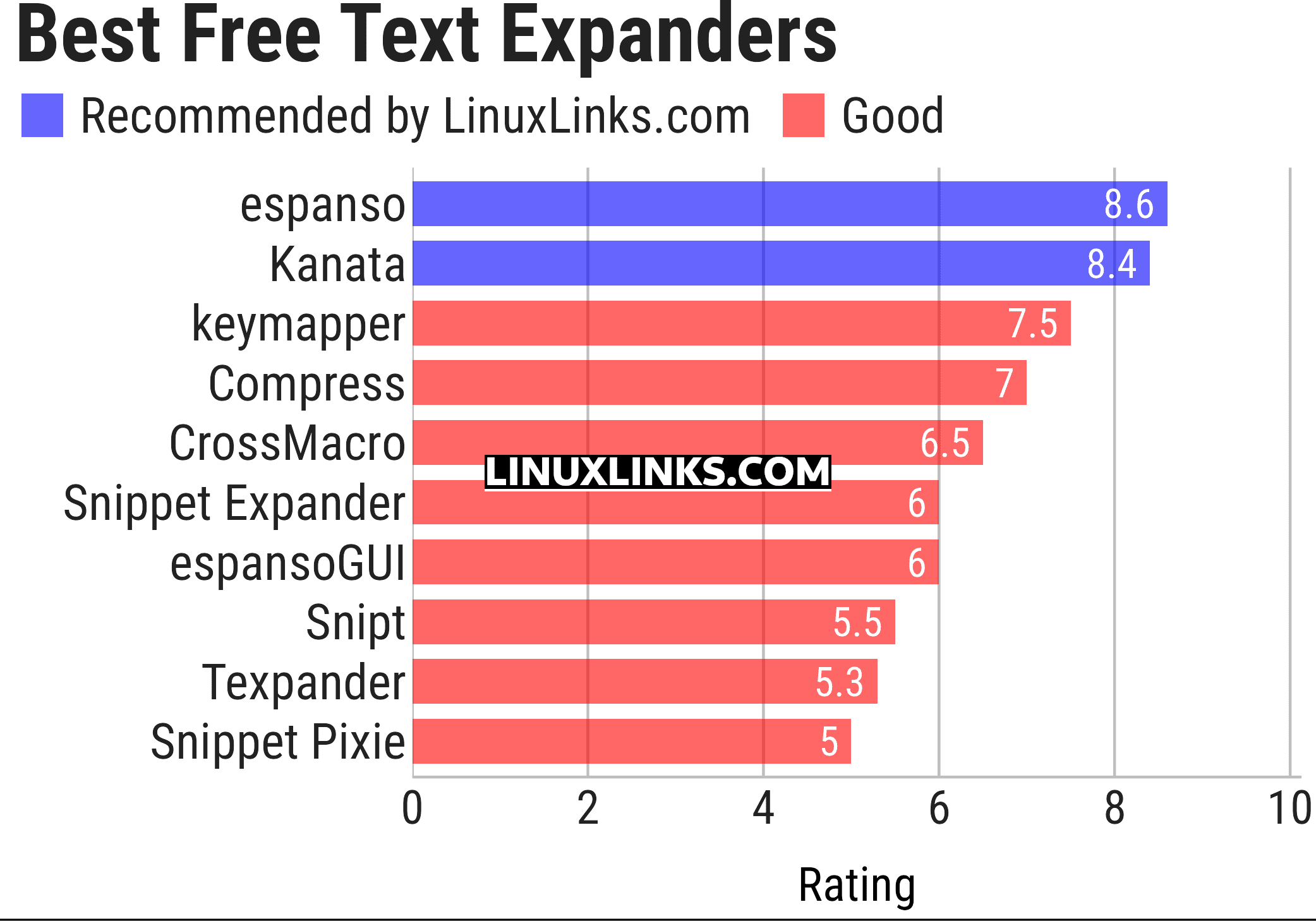
Let’s explore the 10 tools at hand. For each program we have compiled its own portal page, a full description with an in-depth analysis of its features, a screenshot, together with links to relevant resources.
| Text Expander Tools | |
|---|---|
| espanso | A smart and efficient cross-platform text expander written in Rust |
| Kanata | Cross-platform keyboard remapper |
| keymapper | Context-aware key remapper |
| Compress | Text compression for generating keyboard expansions |
| CrossMacro | Mouse and keyboard macro recorder and player |
| Snippet Expander | Save and expand frequently used text snippets |
| espansoGUI | GUI for espanso created with Rust and Iced |
| Snipt | Text snippet expansion tool |
| Texpander | Bash script that uses xclip, xdotool, and zenity to expand abbreviations |
| Snippet Pixie | Save often used text snippets and expand them. The tool is written in Vala |
This article has been updated to reflect the changes outlined in our recent announcement.
 Explore our carefully curated directory of recommended free and open source software, covering every major software category. Explore our carefully curated directory of recommended free and open source software, covering every major software category.The directory forms part of our extensive collection of articles for Linux enthusiasts. It includes hundreds of detailed reviews, together with free and open source alternatives to proprietary software from companies such as Google, Microsoft, Apple, Adobe, IBM, Cisco, Oracle, and Autodesk. LinuxLinks also covers interesting projects worth exploring, Linux-compatible hardware, free programming books and tutorials, and much more. Know a useful free and open source Linux application that we haven’t covered? Tell us about it using our submission form. |
Please read our Comment Policy before commenting.
I vibe coded one, nothing fancy but it works. hope someone can improve it
AI slop then.
This isn’t coding. Typing a few text prompts into ChatGPT is what you have done.
I hope no one wastes time looking at your ‘project’. Instead, start reading some good books on the language that interests you most.