
Frontend developers appreciate the importance of UI design as it’s a critical part of developing an app. With terminal-based tools, visual design might not be foremost in a developer’s mind. While the design is constrained, it’s still important to communicate terminal output in the best way possible.
Adding color and styling to terminal output helps make a command line interface more engaging, informative, and easy to understand.
This roundup showcases the best tools for terminal string styling.
Here’s our verdict captured in a legendary LinuxLinks-style ratings chart. Only free and open source software is eligible for inclusion.
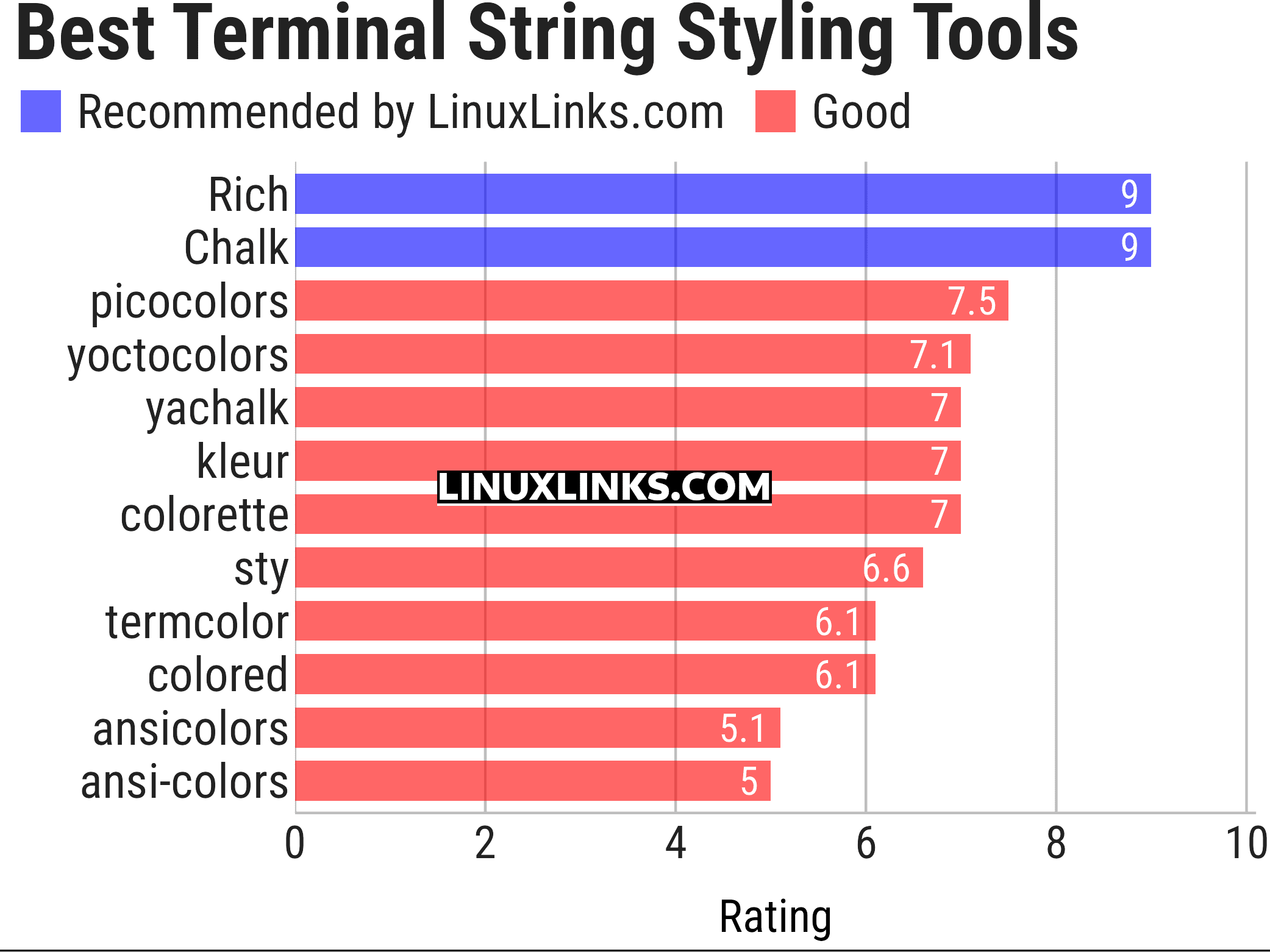
Let’s explore the 12 tools at hand. For each title we have compiled its own portal page, a full description with an in-depth analysis of its features, together with links to relevant resources.
| Terminal String Styling Tools | |
|---|---|
| Rich | Python library for rich text and beautiful formatting |
| Chalk | Bills itself as “Terminal string styling done right” |
| picocolors | Tiny and fast library for terminal output formatting |
| yoctocolors | Small and fast command-line coloring package |
| yachalk | Clone of Chalk written in Python |
| kleur | Node.js library for formatting terminal text with ANSI colors |
| colorette | Set your terminal text color and styles |
| sty | String styling for your terminal |
| termcolor | ANSI color formatting for output in the terminal |
| colored | Simple Python library for color and formatting in terminal |
| ansicolors | ANSI colors for Python |
| ansi-colors | Add ANSI colors to terminal text |
This article has been updated to reflect the changes outlined in our recent announcement.
 Explore our carefully curated directory of recommended free and open source software, covering every major software category. Explore our carefully curated directory of recommended free and open source software, covering every major software category.The directory forms part of our extensive collection of articles for Linux enthusiasts. It includes hundreds of detailed reviews, together with free and open source alternatives to proprietary software from companies such as Google, Microsoft, Apple, Adobe, IBM, Cisco, Oracle, and Autodesk. LinuxLinks also covers interesting projects worth exploring, Linux-compatible hardware, free programming books and tutorials, and much more. Know a useful free and open source Linux application that we haven’t covered? Tell us about it using our submission form. |
Please read our Comment Policy before commenting.