

A file archiver is computer software which brings together a group of files into a single archive file. An archive file is therefore a collection of files and directories that are stored in one file. There are many advantages of storing multiple files this way. For example, an archive is a great way to store backup data, transfer files to another directory, or to a different computer. Archive files are often compressed to save disk space and reduce transfer times.
This type of utility lets users compress, decompress, and archive files and directories. Most archivers also store additional metadata such as user and group permissions, timestamps, and directory structures. Other features often found in archive managers include support for multiple volumes, encryption, Unicode names, password protection, and integration into the shell.
The granddaddy of archive managers is the tar utility (together with the ar and cpio tools). Tar was created in the early days of Unix and remains an essential utility for any Linux system. The filename extension .tar is synonymous with file archives. Other types of archive formats include .iso (for optical storage mediums such as CDROM and DVD-ROMs), .shar, .cpio, and .ar.
We make the following recommendations captured in a legendary LinuxLinks-style ratings chart. All the software featured is free and open source goodness.
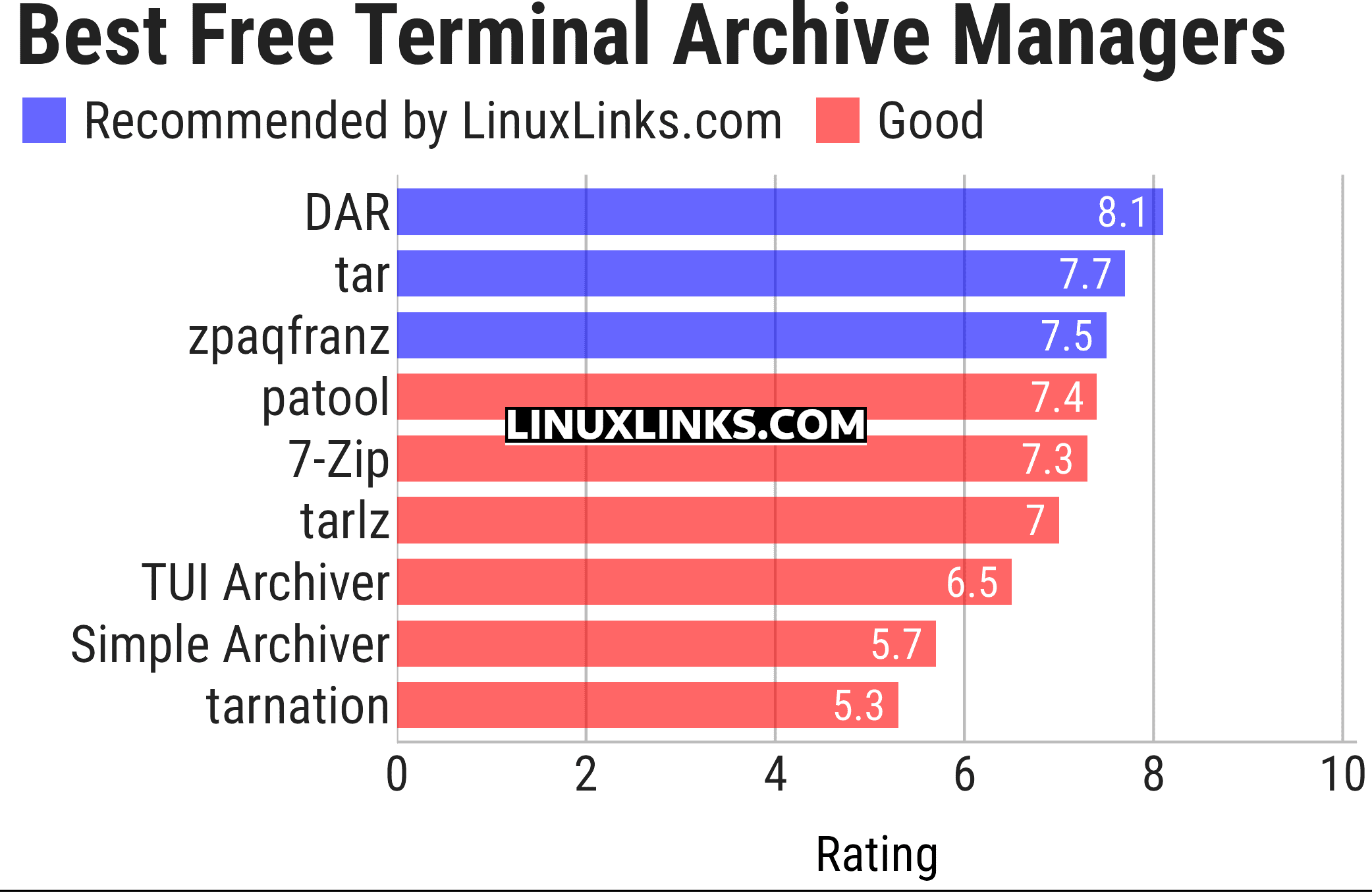
Click the links in the table below to learn more about each archive manager.
| Terminal-Based Archive Managers | |
|---|---|
| DAR | Disk ARchive: Backup directory tree and files |
| tar | A file archiver and archive format developed since the early days of Unix |
| zpaqfranz | Deduplicating archiver with encryption and paranoid-level tests |
| patool | Portable archive file manager |
| 7-Zip | File archiver with a high compression ratio |
| tarlz | Massively parallel combined implementation of tar and lzip |
| TUI Archiver | Terminal application to list / manage archives |
| Simple Archiver | Fairly wide range of features |
| tarnation | Simple, extensible tar backup/restore utility |
If you want graphical archive managers, they are covered in this roundup.
This article has been updated to reflect the changes outlined in our recent announcement.
 Explore our carefully curated directory of recommended free and open source software, covering every major software category. Explore our carefully curated directory of recommended free and open source software, covering every major software category.The directory forms part of our extensive collection of articles for Linux enthusiasts. It includes hundreds of detailed reviews, together with free and open source alternatives to proprietary software from companies such as Google, Microsoft, Apple, Adobe, IBM, Cisco, Oracle, and Autodesk. LinuxLinks also covers interesting projects worth exploring, Linux-compatible hardware, free programming books and tutorials, and much more. Know a useful free and open source Linux application that we haven’t covered? Tell us about it using our submission form. |
Please read our Comment Policy before commenting.