

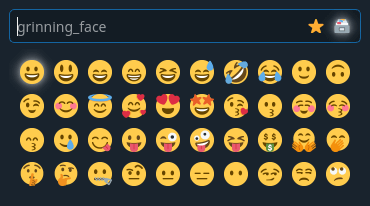
x11-emoji-picker is a dialog / emoji picker inspired by the Windows 10 emoji picker.
It is written for Linux systems that use XServer.
The emoji picker alwayss write to the window that was active before starting the application. You have to restart it if you want to write to a different window.
After the emoji picker opened you can just begin typing to search for an emoji. Emojis that start with the text you entered will be shown below the text input. You can navigate these by using the arrow keys.
When you’ve selected your emoji you can press the return key to write it.
This is free and open source software.
Website: github.com/GaZaTu/x11-emoji-picker
Support:
Developer: GaZaTu
License: MIT License
x11-emoji-picker is written in C++. Learn C++ with our recommended free books and free tutorials.
Related Software
| GUI Emoji Pickers | |
|---|---|
| Feeling Finder | Simple but very effective emoji picker written in Dart and C++ |
| Smile | Emoji picker with custom tags support |
| Emote | Written in GTK3, the program is lightweight and stays out of your way |
| Emoji Mart | Modern emoji picker |
| Xmoji | Plain X11 emoji keyboard |
| jome | Provides most of the interesting emojis of Emoji 13.1 |
| Emoji Picker | Part of ibus-typing-booster, completion input method for faster typing |
| Emoji Selector | GNOME extension provides a searchable popup menu with most emojis |
| Flemozi | Simple, fast and lightweight emoji picker |
| wofi-emoji | Simple emoji selector for Wayland using wofi |
| bemoji | Emoji picker that remembers your favorites |
| x11-emoji-picker | Dialog / emoji picker inspired by the Windows 10 emoji picker |
| Mingle | Play with Google’s Emoji Kitchen |
| Emojify | Lightweight, native emoji picker |
| HyprEmoji | Modern emoji picker for Hyprland |
| Carmenta | Emoji picker for Linux desktops built with Rust, GTK4 and libadwaita |
Read our verdict in the software roundup.
 Explore our comprehensive directory of recommended free and open source software. Our carefully curated collection spans every major software category. Explore our comprehensive directory of recommended free and open source software. Our carefully curated collection spans every major software category.This directory is part of our ongoing series of informative articles for Linux enthusiasts. It features hundreds of detailed reviews, along with open source alternatives to proprietary solutions from major corporations such as Google, Microsoft, Apple, Adobe, IBM, Cisco, Oracle, and Autodesk. You’ll also find interesting projects to try, hardware coverage, free programming books and tutorials, and much more. Discovered a useful open source Linux program that we haven’t covered yet? Let us know by completing this form. |
Please read our Comment Policy before commenting.