

A startling fact is that there are in excess of a billion people who have some type of significant disability. That represents approximately 16% of the world’s population with a physical, sensory or mental limitation that interferes with their ability to move, see, hear or learn. 350 million people in the world are partially sighted or blind. The faster computer technology evolves, the more excluded these individuals would become without development in computer software that seeks to address their needs.
Accessibility is the degree to which products, devices, services, or environments are available to as many people as possible whatever their circumstances. Accessibility can be viewed as the ability to access and benefit from a system or entity. Accessibility is paramount. Social inclusion is not an act of charity but a fundamental human right.
We have witnessed Linux software and distributions that have made strides to help make everyone socially inclusive. For example, the GNOME Accessibility Project develops open source accessibility solutions for graphical user interfaces. Ubuntu has an Accessibility Team that aims to make Ubuntu usable by a broad a spectrum of people as possible.
There are also lots of individual software applications that offer different accessibility features. This article seeks to identify some of the finest open source software that is available that helps to enable individuals make full use of computer-based technology whatever their physical or sensory abilities.
Here’s our verdict captured in a legendary LinuxLinks-style ratings chart. Only free and open source software are eligible for inclusion.
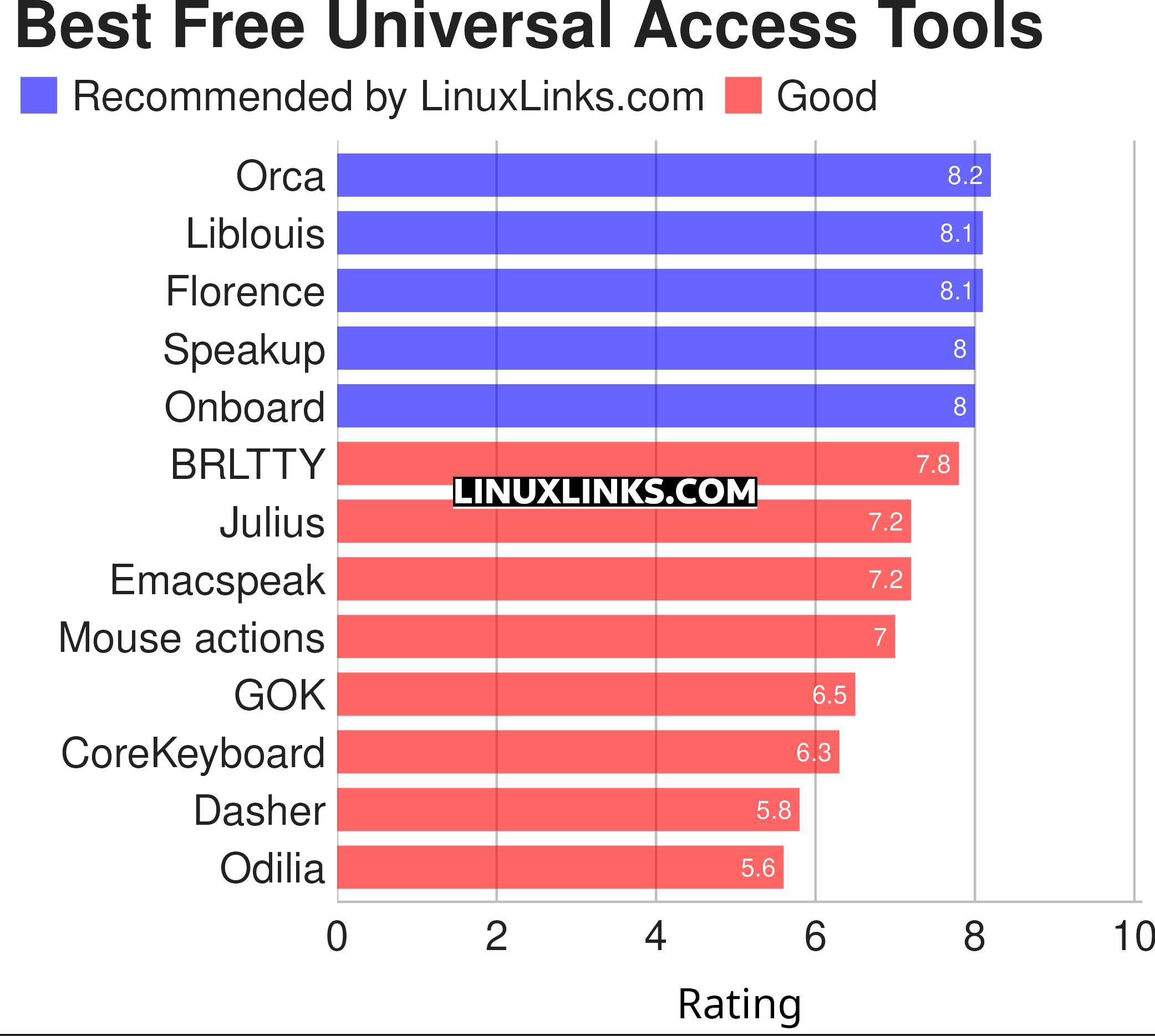
Let’s explore the 13 universal access tools at hand. For each application we have compiled its own portal page, a full description with an in-depth analysis of its features, a screenshot, together with links to relevant resources.
| Universal Access Tools | |
|---|---|
| Orca Screen Reader | Scriptable screen reader |
| Liblouis | Braille translator, back-translator and formatter |
| Florence Virtual Keyboard | Extensible scalable virtual keyboard |
| Speakup | Kernel-based speech synthesizer driver suite |
| Onboard | Useful for tablet PC users and for mobility impaired users |
| BRLTTY | Gives a braille user access to the text consoles |
| Julius | Two-pass large vocabulary continuous speech recognition engine |
| Emacspeak | Emacs extension that provides spoken output |
| Mouse actions | Execute commands from mouse events |
| GOK | GNOME On Screen Keyboard |
| CoreKeyboard | Simple virtual keyboard with word suggestions |
| Dasher | Graphical predictive text input system |
| Odilia | Rust-based screen reader |
This article has been revamped in line with our recent announcement.
 Explore our comprehensive directory of recommended free and open source software. Our carefully curated collection spans every major software category. Explore our comprehensive directory of recommended free and open source software. Our carefully curated collection spans every major software category.This directory is part of our ongoing series of informative articles for Linux enthusiasts. It features hundreds of detailed reviews, along with open source alternatives to proprietary solutions from major corporations such as Google, Microsoft, Apple, Adobe, IBM, Cisco, Oracle, and Autodesk. You’ll also find interesting projects to try, hardware coverage, free programming books and tutorials, and much more. Know a useful open source Linux program that we haven’t covered yet? Let us know by completing this form. |