

In Operation
Here’s what we see when first running the program.
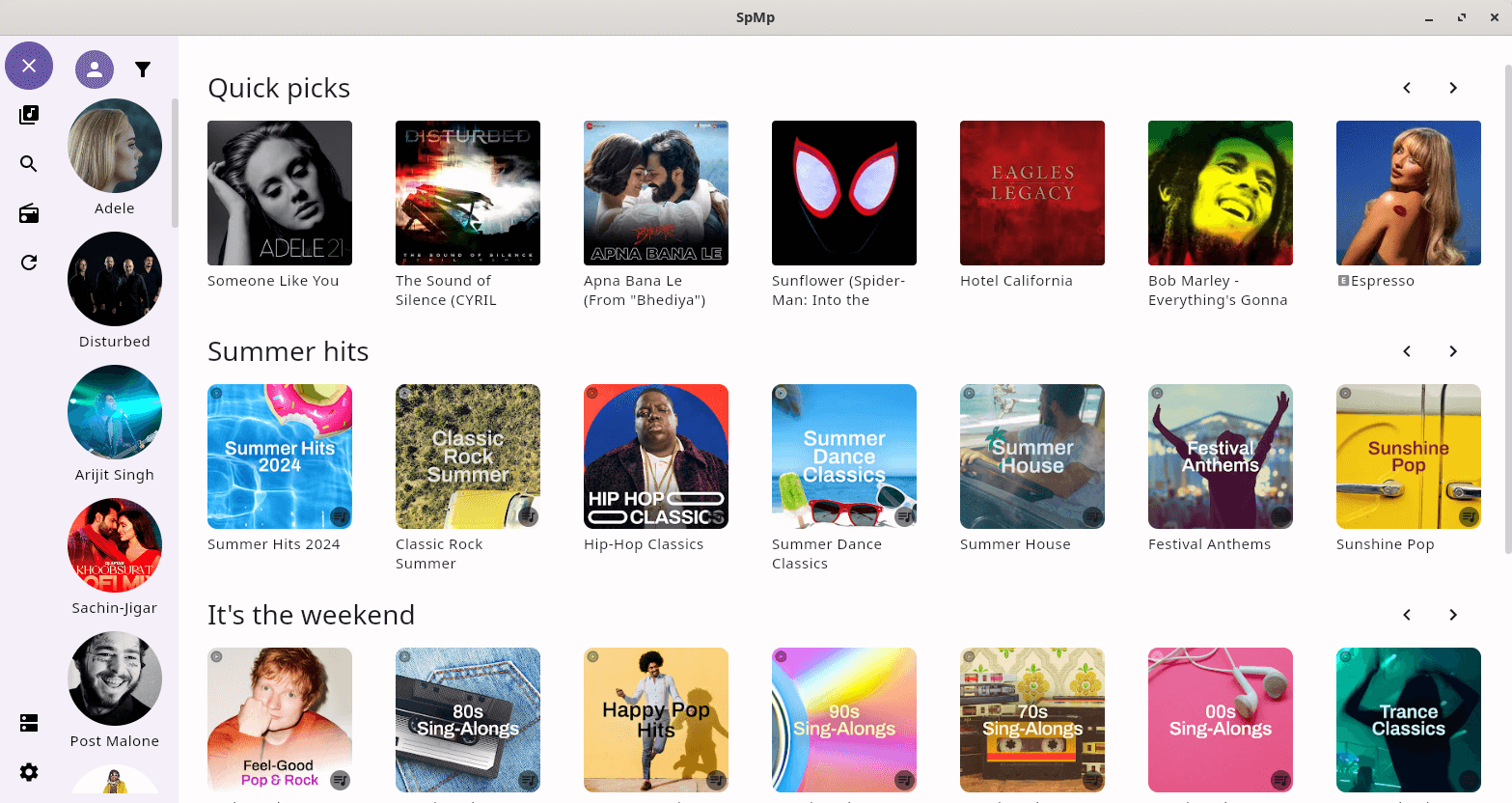
The interface is divided into various sections. On the far left is a column of icons which give access to playlists, search functionality, select artists, refresh, a download section and settings. The settings section offers a impressive array of customization options. The bulk of the interface is a collection of album art divided into a few sections.
Click a thumbnail and you’ll see something like this. The UI is well designed although the position of the album art detracts a little from the aesthetic appeal.
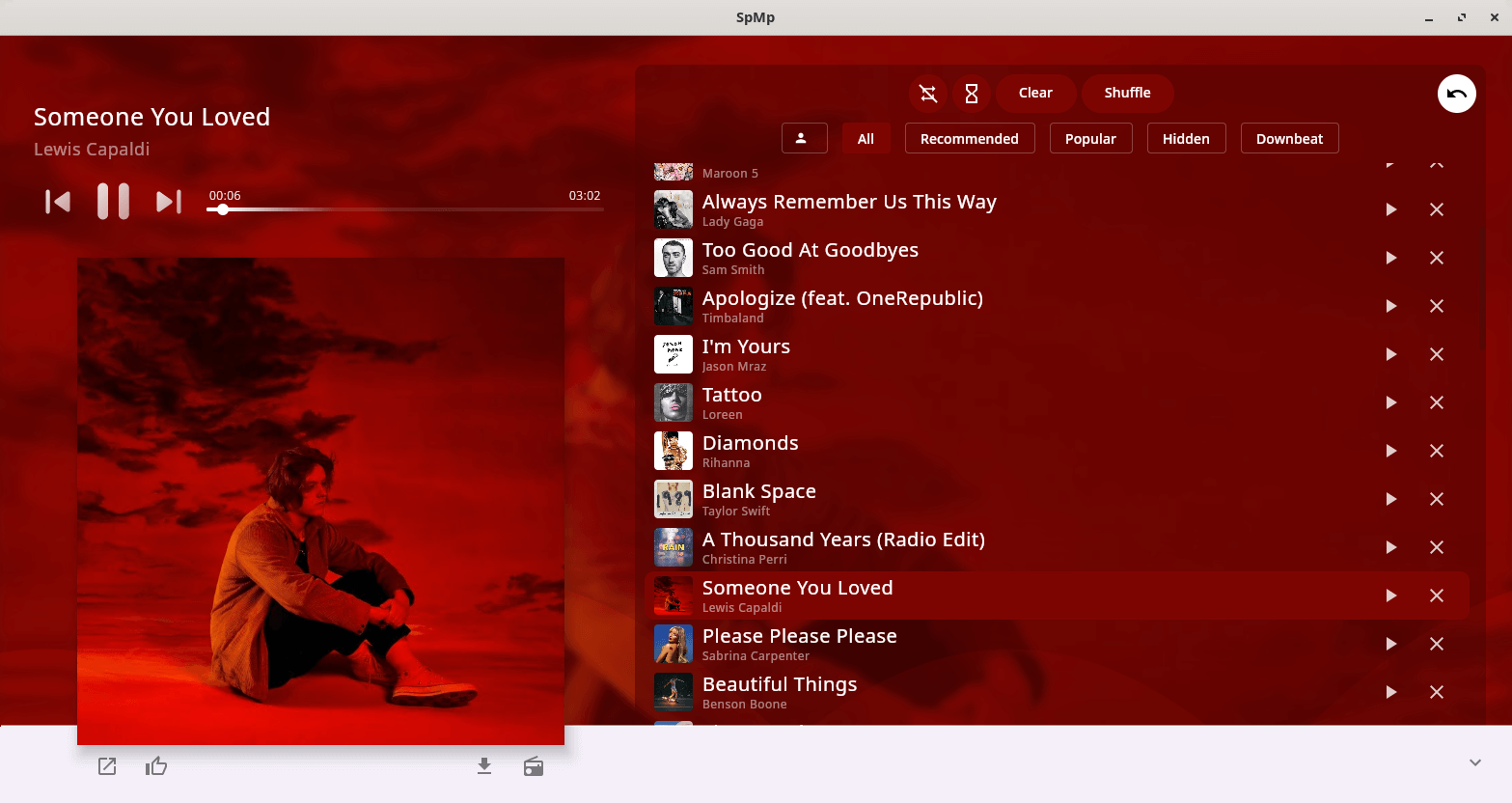
By default the app using the colour from the current song’s thumbnail. The visual design is very impressive, but if that’s not to your taste, you can set a custom colour set per song or globally. There are three modes for theming the player menu, as well as three accent colour sources.
Playlist support is good. They can be created locally and then converted to a YouTube playlist. There’s support to rename, add and remove songs, and reordering.
There is also support for lyrics, but they didn’t synchronise well from our testing when displayed in place of the album art. Timed lyrics support is a work in progress.
Other features include the ability to download tracks, metadata editing, radio filters, multi-select, and YouTube functionality.
Summary
We really like SpMp. It’s a great way to listen to YouTube music. The desktop app is easy to use, quick to navigate, and offers an impressive array of customization options. A lot of thought has gone into the program’s user interface.
The program is a little rough around the edges. We did experience a few crashes and plenty of bugs are evident. Hopefully with time these will be ironed out.
The fly in the ointment? The ps_mem utility reports that memory usage is around 1.3GB (that’s right, 1.3GB)! Crazy for what the program does. And the lack of gapless playback detracts from the album listening experience.
Website: github.com/sayaka-sh/spmp
Support:
Developer: Talo Halton
License: GNU General Public License v3.0
SpMp is written in Kotlin. Learn Kotlin with our recommended free books and free tutorials.
Pages in this article:
Page 1 – Introduction and Installation
Page 2 – In Operation and Summary
Related Software
| YouTube Tools | |
|---|---|
| FreeTube | Privacy-based YouTube app |
| Media Downloader | Frontend for youtube-dl, gallery-dl, Lux, you-get, ... |
| OmniGet | Download media and files from a broad range of online sources |
| pipe-viewer | Lightweight YouTube client without requiring an API key |
| Piped | Uses NewPipe Extractor, a library for extracting |
| Open Video Downloader | Easy-to-use graphical frontend for downloading online videos |
| Tartube | Video downloader and browser built around yt-dlp |
| AudioTube | Qt-based music streamer |
| Videomass | Download, convert and processing media |
| ClipGrab | Downloader for YouTube and other sites |
| Minitube | Application for watching YouTube without using Flash |
| Materialious | Fontend for YouTube and Invidious |
| youtube-local | Browser-based YouTube client |
| SMTube | Search, play and download YouTube videos |
| Pipeline | Watch YouTube and PeerTube videos |
| MellowPlayer | Multi-platform cloud music integration |
| ytdl-gui | Graphical interface for yt-dlp |
| Youwee | Built with Tauri and React |
| PlasmaTube | Designed to be integrated with KDE Plasma |
| PsTube | Flutter-based video client |
| Video Downloader | Download videos from YouTube and other websites |
| VacuumTube | Unofficial wrapper of YouTube Leanback |
| NeoDLP | Feature-rich video/audio downloader based on yt-dlp |
| Mixtapes | Modern, Linux-first YouTube Music player |
| GDownloader | GUI for downloading videos, audio and galleries |
| Sunder | Built with Tauri v2 and Rust |
| SpMp | YouTube music client with a focus on customization |
| Pulsar | yt-dlp GUI |
| NouTube | YouTube and YouTube Music in a single app |
Read our verdict in the software roundup.
 LinuxLinks helps you discover the best free and open source software for Linux. Explore our extensive collection of recommended applications, including alternatives to popular proprietary software. LinuxLinks helps you discover the best free and open source software for Linux. Explore our extensive collection of recommended applications, including alternatives to popular proprietary software.We also publish software reviews, Linux tutorials, hardware reviews, free programming books and articles covering the wider open source community. Browse our Linux resources to discover more. Know a useful free and open source Linux application we haven't covered? Suggest a program for inclusion. Has your software been featured on LinuxLinks? Display one of our Featured on LinuxLinks badges on your website or GitHub README. |
Please read our Comment Policy before commenting.