

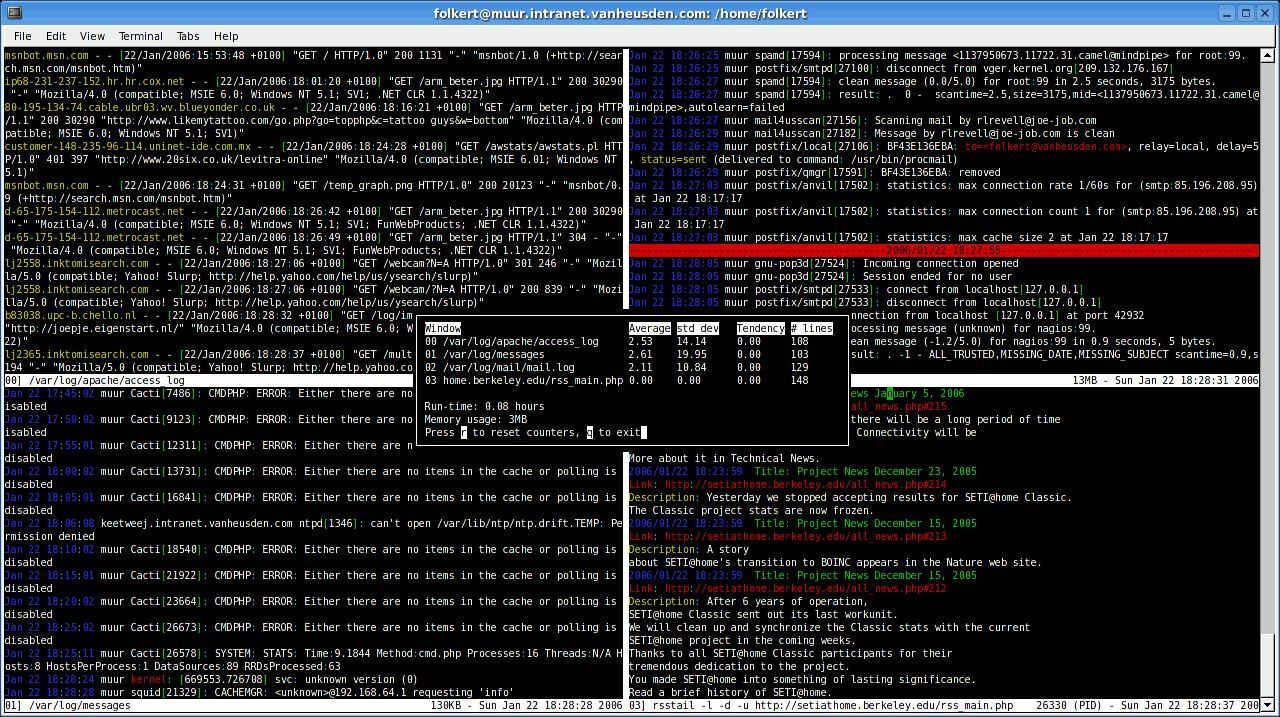
MultiTail is a terminal application that allows several log files or command outputs to be monitored simultaneously. It extends the functionality of the traditional tail utility by presenting separate streams in configurable windows within a single terminal session.
The application is particularly useful when investigating problems involving several processes or services. Instead of repeatedly switching between terminal windows, administrators can examine their output together and identify related events as they occur.
MultiTail uses ncurses to provide its interface and is designed to work efficiently over remote terminal connections, including relatively slow links.
This is free and open source software.
Key Features
- Multiple windows – displays several log files or command outputs in separate terminal windows.
- Log merging – combines two or more sources into a single view.
- Colour highlighting – uses configurable colour schemes to distinguish messages and important events.
- Regular expression filtering – displays selected messages or suppresses irrelevant lines.
- Field-based selection – matches information using field numbers or string offsets.
- Wildcard monitoring – automatically switches to matching files with more recent modification times.
- Interactive configuration – provides menus for changing expressions and adding windows.
- Extensible colour schemes – includes predefined configurations for many common services and applications.
- External command monitoring – displays continually updated output from other programs.
- Remote log access – can monitor files on other computers through SSH commands.
- Carriage-return handling – supports collapsing progress-bar updates that use carriage returns.
- Terminal efficiency – designed to remain useful over low-bandwidth connections.
Website: github.com/thobbs/multitail-curses
Support:
Developer: Folkert van Heusden
License: MIT License
MultiTail is written in C. Learn C with our recommended free books and free tutorials.
Related Software
| Terminal Log Viewers | |
|---|---|
| lnav | Powerful navigation, filtering and analysis of system and application logs |
| Nerdlog | Remote-first monitoring with powerful querying and filtering capabilities |
| lazyjournal | Browse systemd journal entries with intuitive keyboard controls |
| toolong | Tail, merge and search multiple files in real time |
| logrifle | Quickly browse and search records with a keyboard-driven interface |
| nless | Interactive pager with structured data navigation |
| MultiTail | Monitor multiple files simultaneously with colour-coded output |
| Logria | Aggregate multiple data streams with live filtering and highlighting |
| logana | Fast, interactive exploration with filtering and search |
| JSON Log Viewer | Explore structured JSON records with interactive filtering and navigation |
Read our verdict in the software roundup.
| Console Log File Analyzers | |
|---|---|
| journalctl | Query and display messages from the journal |
| lnav | Curses-based tool for viewing and analyzing log files |
| Gonzo | Go based TUI for log analysis |
| angle-grinder | Slice and dice logs |
| MultiTail | Monitor logfiles and command output in multiple windows |
| Chipmunk | Fast logfile viewer that can deal with huge logfiles (>10 GB) |
| TWSLA | Work with large log sets without deploying a heavier log management stack |
| Swatch | Simple Log Watcher is a useful tool to monitor just about any type of log |
| reqlog | Search, track and stream logs |
 LinuxLinks helps you discover the best free and open source software for Linux. Explore our extensive collection of recommended applications, including alternatives to popular proprietary software. LinuxLinks helps you discover the best free and open source software for Linux. Explore our extensive collection of recommended applications, including alternatives to popular proprietary software.We also publish software reviews, Linux tutorials, hardware reviews, free programming books and articles covering the wider open source community. Browse our Linux resources to discover more. Know a useful free and open source Linux application we haven't covered? Suggest a program for inclusion. Has your software been featured on LinuxLinks? Display one of our Featured on LinuxLinks badges on your website or GitHub README. |
Please read our Comment Policy before commenting.