

ls++ is an alternative to the ls command found in coreutils.
ls++ bills itself as colorized ls on steroids.
This is free and open source software.
Website: github.com/trapd00r/ls–
Support:
Developer: Magnus Woldrich
License: Perl/artistic License
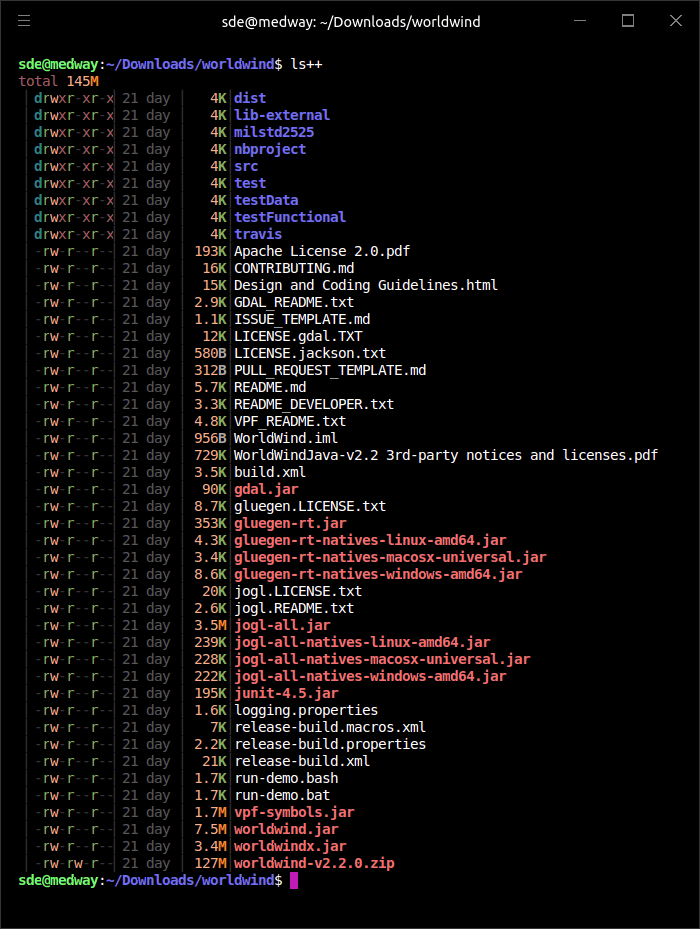
Usage:
    ls++ [VIEW..] [OPTIONS..] [FILE]

Options:
   Views:
      --pf    permissions, file
      --psf   permissions, size, file
      --ptsf  permissions, time, size, file
      --potsf permissions, owner, time, size, file

   Documentation:
      --help  show the help and exit
      --man   show the manpage and exit

    Not known parameters will be passed through to ls, so to show hidden
    files, "-a" or "-A" might be added. See ls(1) for more information.
ls++ is written in Perl. Learn Perl with our recommended free books and free tutorials.
Related Software
| ls alternatives | Programming Language | License |
|---|---|---|
| eza | Rust | MIT License |
| exa | Rust | MIT License |
| lsd | Rust | Apache License 2.0 |
| colorls | Ruby | MIT License |
| ls++ | Perl | Perl/artistic license |
| ls-go | Go | MIT License |
| k | Shell | MIT License |
| Natls | Rust | MIT License |
| g | Go | MIT License |
| logo-ls | Go | MIT License |
| lsv | Vlang | MIT License |
| facad | C | MIT License |
| lsr | Zig | MIT License |
| lv | C++ | GNU General Public License v3.0 |
| lsx | Rust | GNU General Public License v3.0 |
| lla | Rust | MIT License |
| pls | Rust | GNU General Public License v3.0 |
| zlist | Zig | MIT License |
| ls-f | Rust | MIT License |
| lsnote | Rust | MIT License |
 Explore our carefully curated directory of recommended free and open source software, covering every major software category. Explore our carefully curated directory of recommended free and open source software, covering every major software category.The directory forms part of our extensive collection of articles for Linux enthusiasts. It includes hundreds of detailed reviews, together with free and open source alternatives to proprietary software from companies such as Google, Microsoft, Apple, Adobe, IBM, Cisco, Oracle, and Autodesk. LinuxLinks also covers interesting projects worth exploring, Linux-compatible hardware, free programming books and tutorials, and much more. Know a useful free and open source Linux application that we haven’t covered? Tell us about it using our submission form. |
Please read our Comment Policy before commenting.