

Images are part of every day internet usage, and are particularly important for social media engagement. A good image viewer is an essential part of any operating system.
There are so many image viewers available for Linux. Some would argue too many. But many of them offer something different. For example, I personally mostly use Geeqie, not because it’s got the best UI or feature set. It stands out for me courtesy of a really useful function where changes to an image are automatically displayed by the program without any human intervention. That’s really useful when I generate charts generated with R.
Lightning Image Viewer (LIV) is billed as a desktop image (previewer) with some notable UX features. This is free and open source software written in Rust.
Installation
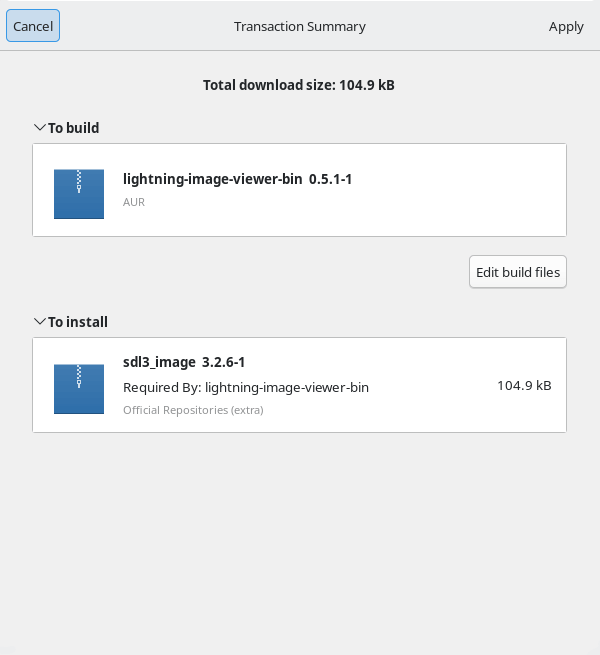
I evaluated LIV using Manjaro, an Arch-based Linux distribution. Arch is famous for the Arch User Repository (AUR), a community-driven repository. It contains package descriptions (PKGBUILDs) that allow users to compile a package from source with makepkg and then install it via the in-house pacman, a lightweight, simple and fast package manager that allows for continuously upgrading the entire system with one command.
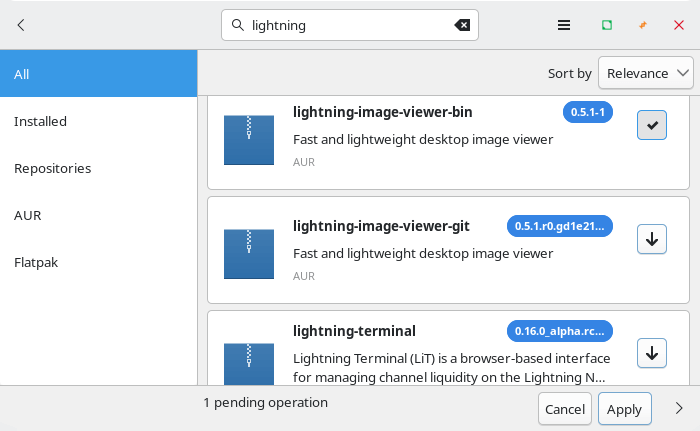
There’s a couple of packages in the AUR. I installed the binary package with Pamac (Manjaro’s GUI package manager).
The project provides a .deb package for Debian/Ubuntu, and there’s also a Windows binary if you’re still dabbling in the occult.
In Operation
LIV is very different to your typical image viewer. The program doesn’t have a menu interface at all. Open an image from a file manager, and you’ll see the image displayed without any menu, and the only window decoration is a small semi-transparent grey border. .

While there’s no menu interface, you can use the mouse or keyboard to zoom in and out, as well as pan around the image. You can make the image full screen by pressing the F key or F11, or with a mouse wheel click. And you can play animations with the space bar.
It’s also possible to navigate between images in the same directory using using Page Up and Page Down. Keyboard shortcuts also let you rotate and mirror images.
It’s also possible to open files from the command-line but the developer intends images to be opened from a file manager.
Summary
LIV is pretty light on features but it may be all that you need. It’s a decent previewer for images and supports a wide range of formats.
LIV has a strange bug where images don’t display in KDE Plasma depending on the wallpaper chosen for the desktop I tested the software on multiple machines and each exhibited the same problem.
Website: github.com/shatsky/lightning-image-viewer
Support:
Developer: Eugene Shatsky
License: GNU General Public License v3.0
Lightning Image Viewer is written in Rust. Learn Rust with our recommended free books and free tutorials.
| Popular series | |
|---|---|
 | The largest compilation of the best free and open source software in the universe. Each article is supplied with a legendary ratings chart helping you to make informed decisions. |
 | Hundreds of in-depth reviews offering our unbiased and expert opinion on software. We offer helpful and impartial information. |
 | The Big List of Active Linux Distros is a large compilation of actively developed Linux distributions. |
 | Replace proprietary software with open source alternatives: Google, Microsoft, Apple, Adobe, IBM, Autodesk, Oracle, Atlassian, Corel, Cisco, Intuit, SAS, Progress, Salesforce, and Citrix |
 | Awesome Free Linux Games Tools showcases a series of tools that making gaming on Linux a more pleasurable experience. This is a new series. |
 | Machine Learning explores practical applications of machine learning and deep learning from a Linux perspective. We've written reviews of more than 40 self-hosted apps. All are free and open source. |
 | New to Linux? Read our Linux for Starters series. We start right at the basics and teach you everything you need to know to get started with Linux. |
 | Alternatives to popular CLI tools showcases essential tools that are modern replacements for core Linux utilities. |
 | Essential Linux system tools focuses on small, indispensable utilities, useful for system administrators as well as regular users. |
 | Linux utilities to maximise your productivity. Small, indispensable tools, useful for anyone running a Linux machine. |
 | Surveys popular streaming services from a Linux perspective: Amazon Music Unlimited, Myuzi, Spotify, Deezer, Tidal. |
 | Saving Money with Linux looks at how you can reduce your energy bills running Linux. |
 | Home computers became commonplace in the 1980s. Emulate home computers including the Commodore 64, Amiga, Atari ST, ZX81, Amstrad CPC, and ZX Spectrum. |
 | Now and Then examines how promising open source software fared over the years. It can be a bumpy ride. |
 | Linux at Home looks at a range of home activities where Linux can play its part, making the most of our time at home, keeping active and engaged. |
 | Linux Candy reveals the lighter side of Linux. Have some fun and escape from the daily drudgery. |
 | Getting Started with Docker helps you master Docker, a set of platform as a service products that delivers software in packages called containers. |
 | Best Free Android Apps. We showcase free Android apps that are definitely worth downloading. There's a strict eligibility criteria for inclusion in this series. |
 | These best free books accelerate your learning of every programming language. Learn a new language today! |
 | These free tutorials offer the perfect tonic to our free programming books series. |
 | Linux Around The World showcases usergroups that are relevant to Linux enthusiasts. Great ways to meet up with fellow enthusiasts. |
 | Stars and Stripes is an occasional series looking at the impact of Linux in the USA. |