

Fluxbox is a lightweight window manager that was based on the Blackbox 0.61.1 code. It is very light on resources and easy to handle but yet full of features to make an easy, and extremely fast, desktop experience.
The software has been extended with features such as pwm-style window tabs, configurable key bindings, toolbar, and an iconbar. It also includes some cosmetic fixes over Blackbox.
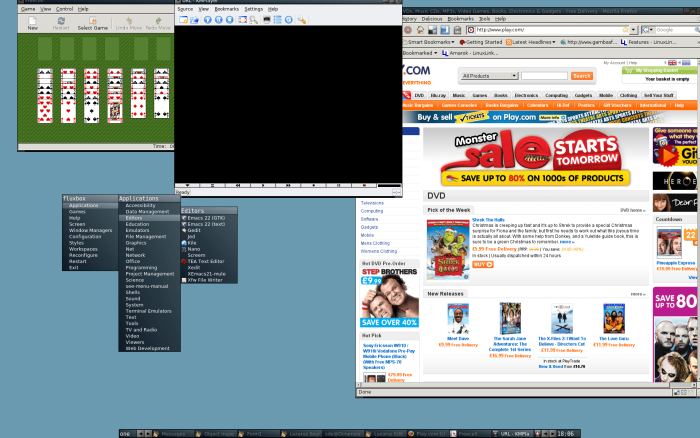
Fluxbox provides configurable window decorations, a root menu to launch applications and a toolbar that shows the current workspace name, a set of application names and the current time. There is also a workspace menu to add or remove workspaces. The `slit’ can be used to dock small applications; e.g. most of the bbtools can use the slit.
Fluxbox can iconify windows to the toolbar, in addition to adding the window to the Icons submenu of the workspace menu. One click and they reappear. A double-click on the titlebar of the window will shade it; i.e. the window will disappear, and only the titlebar will remain visible.
Fluxbox uses its own graphics class to render its images on the fly. By using style files, users can configure exactly how the desktop looks. fluxbox styles are compatible with those of Blackbox 0.65 or earlier versions, so users migrating can still use their current favourite themes.
Fluxbox supports the majority of the Extended Window Manager Hints (EWMH) specification, as well as numerous other Window Hinting standards. This allows all compliant window managers to provide a common interface to standard features used by applications and desktop utilities.
This package contains support for GNOME and KDE.
Key Features
- Tabs – Group windows together, similar to Firefox Tabbed browsing, which makes working with a lot of windows at the same time easier.
- Virtual desktops.
- Autogrouping.
- Slit – a dock for any application that is ‘dockable’.
- Fully customizable root menu.
- Toolbar:
- Workspace Name.
- Iconbar.
- System Tray.
- Clock.
- Workspace Arrows.
- Window Arrows.
- Hot-key support.
- System tray, similar to the KDE or Windows system tray.
- Keys-file.
- Pixmap themes.
- Wallpaper chooser.
Website: fluxbox.org
Support:
Developer: Henrik Kinnunen, Simon Bowden, Mathias Gumz, Mark Tiefenbruck, Tomas Janousek
License: MIT License
Fluxbox is written in C++. Learn C++ with our recommended free books and free tutorials.
Related Software
| Stacking Window Managers | |
|---|---|
| Openbox | Standards compliant, fast, light-weight, extensible window manager |
| KWin | Window manager for the KDE Plasma Desktop |
| Mutter | Wayland display server and X11 window manager and compositor library |
| FVWM | Powerful ICCCM-compliant multiple virtual desktop window manager |
| berry | Healthy, bite-sized window manager |
| xfwm | Part of the Xfce desktop environment |
| Window Maker | NeXTSTEP-like window manager |
| JWM | Joe’s Window Manager |
| Gala | Designed by elementary for use with Pantheon |
| Fluxbox | Highly configurable and low resource |
| evilwm | Maximises screen real estate and provides good keyboard control |
| Worm | Tiny, dynamic, tag-based window manager |
| Blackbox | Similar to the NeXT interface and Window Maker |
| Enlightenment | Focuses on pushing the limits of existing technologies |
| PekWM | Originally based on the aewm++ window manager |
| Marco | MATE default window manager |
| 2bwm | Offers 2 borders, and written over the XCB library |
| cwm | OpenBSD fork of calmwn, a clean and lightweight window manager |
| IceWM | Win95-OS/2-Motif-like window manager |
| Sawfish | Extensible window manager using an Emacs Lisp-like scripting language |
| Moksha | Modern iteration of the Enlightenment window manager |
| Magpie | X11 window manager and compositor library |
| sowm | Itsy bitsy floating window manager |
| Compiz | OpenGL window and compositing manager |
Read our verdict in the software roundup.
 Explore our comprehensive directory of recommended free and open source software. Our carefully curated collection spans every major software category. Explore our comprehensive directory of recommended free and open source software. Our carefully curated collection spans every major software category.This directory is part of our ongoing series of informative articles for Linux enthusiasts. It features hundreds of detailed reviews, along with open source alternatives to proprietary solutions from major corporations such as Google, Microsoft, Apple, Adobe, IBM, Cisco, Oracle, and Autodesk. You’ll also find interesting projects to try, hardware coverage, free programming books and tutorials, and much more. Discovered a useful open source Linux program that we haven’t covered yet? Let us know by completing this form. |