

Many people who regularly use computers suffer from eye strain and fatigue. Looking at a monitor for a long time can strain your eyes or can make any other problems you are having with your eyes seem more apparent. There is also research to show that late-night exposure to bright lights can affect sleep quality. This can be mitigated by reducing blue-light exposure.
There are lots of simple steps you can take to reduce eye strain and fatigue. These include adjusting the brightness, contrast settings, and text size displayed, as well as minimizing glare, and ensuring your room has proper lighting. Taking regular breaks is also very important.
Some monitors go further offering various eye care technologies including flicker-free technology, and an ultra-low blue light filter with different filter settings. But even if your display offers eye care technology and it’s well designed e.g. offering hotkeys that let you easily adjust filter settings. there’s still a good case to use a software solution as well. This is because the software typically offers more flexibility, such as the ability to automatically adjust the backlight and screen temperature based on the ambient brightness in your surroundings, or on a time schedule.
If you need color accuracy occasionally, using a hardware solution can be tedious. Good eye care software lets users disable the filter for a specific period of time. That’s extremely handy if you need to only periodically work on tasks where color accuracy is important such as a lighttable and darkroom for photographers.
Here’s our verdict captured in a legendary LinuxLinks-style ratings chart. Only free and open source software is eligible for inclusion.
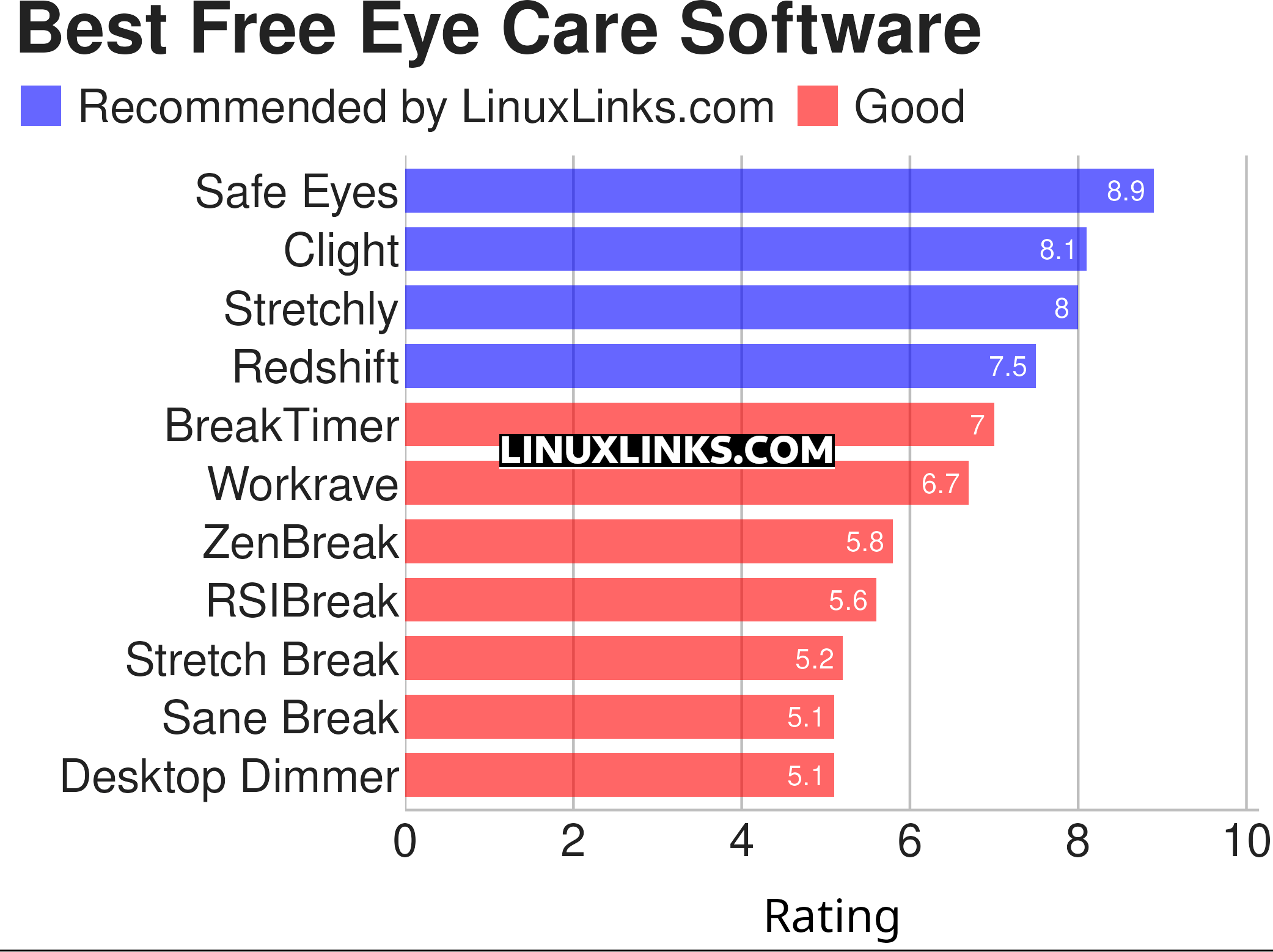
| Eye Care Software | |
|---|---|
| Safe Eyes | Simple and extensible break reminder |
| Clight | Lightweight C daemon that turns your webcam into a light sensor |
| Stretchly | Reminder to take breaks |
| Redshift | Adjusts the color temperature of your display |
| BreakTimer | Set up customizable breaks and will remind you to take them |
| Workrave | Assists in the recovery and prevention of Repetitive Strain Injury |
| ZenBreak | Menu bar app that reminds you to take breaks |
| RSIBreak | Take care of your health and take regular breaks |
| Stretch Break | Digital wellbeing tool that helps you take regular breaks |
| Sane Break | Gentle break reminder |
| Desktop Dimmer | Darker-than-dark dimming for internal and external screens |
This article has been revamped in line with our recent announcement.
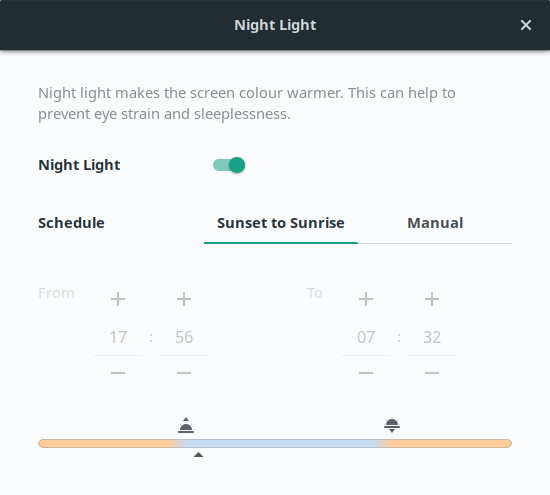
Your desktop environment may also offer some basic functionality to reduce the amount of blue light emitted. The popular desktop environment GNOME includes a night light feature that makes the screen color warmer. Functionality is quite basic, but it may be sufficient depending on your requirements.
 Explore our comprehensive directory of recommended free and open source software. Our carefully curated collection spans every major software category. Explore our comprehensive directory of recommended free and open source software. Our carefully curated collection spans every major software category.This directory is part of our ongoing series of informative articles for Linux enthusiasts. It features hundreds of detailed reviews, along with open source alternatives to proprietary solutions from major corporations such as Google, Microsoft, Apple, Adobe, IBM, Cisco, Oracle, and Autodesk. You’ll also find interesting projects to try, hardware coverage, free programming books and tutorials, and much more. Know a useful open source Linux program that we haven’t covered yet? Let us know by completing this form. |
You should absolutely check Gammy! I was using Redshift and I was pretty happy with it, until I tried Gammy about a week ago. Gammy automatically adapts your screen brightness depending on the content it shows (bright pages/images will darken the screen and dark pages/images will make the screen brighter)… You can set it to adapt smoothly in a couple of seconds or you can make it adapt the brightness almost immediately!…
Thanks, we will take a look at Gammy.