

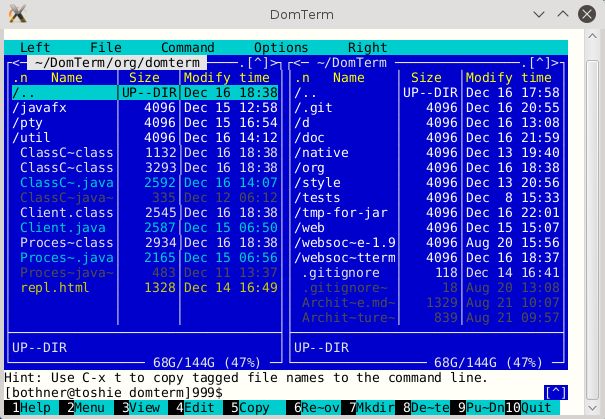
DomTerm is an open source terminal emulator, screen multiplexer and REPL console using web technologies (JavaScript and DOM).
Users can type commands which gets sent to an application, which evaluates the command, and displays the results, typically in some kind of type-script format.
We’d love to packages available for more Linux distributions than only Fedora.
Supports:
- qtdomterm, which uses the Qt toolkit and QtWebEngine.
- Electron framework which offers a nicer DomTerm front-end than a regular web browser.
- atom-domterm runs DomTerm as a package in the Atom text editor (which is also based on Electron) and integrates with the Atom pane system.
- A wrapper for JavaFX’s WebEngine, which is useful for code written in Java.
Key Features
- Full-featured terminal emulator using the embedded JavaFX WebEngine browser.
- xterm compatibility. It handles mouse events, 24-bit color, Unicode, double-width (CJK) characters, and input methods.
- Uses a browser engine as a “GUI toolkit”, offering embeddable graphics and links, HTML rich text, and foldable (show/hide) commands.
- Support for session management and sub-windows (tmux and GNU screen), basic input editing (readline), and paging (less).
- Tabs and tiling.
- Detach and reattach to sessions.
- domterm command offers multiple options for controlling or starting a server that manages one or more sessions.
- Mouse support using xterm protocols.
- Save the console file as an offline-readable (x)html-file.
- Pretty-printing (Common Lisp style) is supported. This offers automatic re-flow when resizing a window. It uses special commands to group logical blocks, and attempts to keep the text of a block on a single line with automatic re-flow on window re-size.
- Back-end that displays images, graphics, and rich text.
- Optional input editing. In character mode, each character is sent to the application, like a traditional terminal. In line mode, the browser does the editing, and sends the input line to the back-end when Enter is typed. A history of previous lines is available, accessible with the Up/Down arrow keys. Automatic mode switches between character mode and line mode depending on whether the back-end is in “canonical mode”.
- Built-in pager.
- Smart line-wrapping.
- Supported on Windows Subsystem for Linux (WSL).
Website: domterm.org
Support: GitHub code repository
Developer: Per Bothner
License: 3-clause BSD license
DomTerm is written in JavaScript and C. Learn JavaScript with our recommended free books and free tutorials. Learn C with our recommended free books and free tutorials.
Related Software
| Terminal Emulators | |
|---|---|
| Tabby | (Terminus) Highly configurable terminal emulator, SSH and serial client |
| Alacritty | Hardware-accelerated terminal emulator |
| Wave Terminal | AI-native terminal built for seamless workflows |
| urxvt | RXVT-like terminal emulator with Unicode support |
| Kitty | Like Alacritty, Kitty offers hardware acceleration |
| Ghostty | Feature-rich and cross-platform terminal emulator |
| Termora | Cross-platform terminal emulator and SSH client written using Kotlin/JVM |
| Guake | Drop-down terminal for GNOME |
| Terminator | Multiple GNOME terminals in one window |
| WezTerm | GPU-accelerated cross-platform terminal emulator and multiplexer |
| rio | Hardware-accelerated GPU terminal emulator |
| electerm | Terminal emulator and much more |
| st | Simple terminal implementation for X which sucks less |
| contour | Aimed at power users with a modern feature mindset |
| Zutty | High-end terminal emulator for low-end systems |
| xterm | Provides DEC VT102 and Tektronix 4014 compatible terminals |
| Extraterm | Swiss army chainsaw of terminal emulators |
| Terax | Terminal-first AI-native development workspace |
| Tilda | Gtk based drop down terminal |
| Ptyxis | Terminal for a container-oriented desktop |
| MATE Terminal | Terminal emulator the MATE desktop environment |
| GNOME Terminal | Terminal emulator for the GNOME desktop environment |
| foot | Fast, lightweight and minimalistic Wayland terminal emulator |
| Xfce Terminal | Lightweight and easy to use terminal emulator application |
| Tilix | Advanced GTK3 tiling emulator |
| Terminology | Fast, lean and visually enhanced open source terminal emulator |
| Konsole | The KDE 5 terminal emulator |
| Black Box | GTK 4 terminal |
| Yakuake | Drop-down terminal emulator based on KDE Konsole technology |
| Station | Convergent terminal emulator |
| Sakura | Vte-based terminal emulator |
| QTerminal | Lightweight Qt-based terminal emulator |
| Zashterminal | Modern, intuitive, and innovative terminal built with GTK4 and Adwaita |
| LazyCat Terminal | Built with Vala and GTK4. |
| Kerminal | Modern terminal emulator and SSH manager |
| Hyper | Terminal emulator built with web technologies |
| Termy | Minimal terminal emulator |
| DomTerm | Terminal emulator, REPL console, and screen multiplexer |
| CRT | Visually expressive terminal emulator written in Rust |
| kermit | VTE-based, simple and froggy terminal emulator |
| ROXTerm | VTE terminal emulator with tabs |
| LXTerminal | Lightweight terminal emulator based on GTK+ for the LXDE desktop |
| Bobcat | Built using the U++ framework and TerminalCtrl widget |
| fortty | GPU-accelerated terminal emulator written in Fortran |
| Tess | Hackable, simple, rapid and beautiful terminal |
| mlterm | Multilingual terminal emulator on X11 |
| Termite | Keyboard-centric VTE-based terminal |
| Packet | Terminal multiplexer and broadcast system |
| fingerterm | Terminal emulator with a custom virtual keyboard |
Read our verdict in the software roundup.
| Terminal Emulators Built on Web Technologies | |
|---|---|
| Tabby | (Terminus) Highly configurable terminal emulator, SSH and serial client |
| Wave Terminal | AI-native terminal built for seamless workflows |
| electerm | Terminal emulator and much more |
| Terax | Terminal-first AI-native development workspace |
| Hyper | Beautiful and extensible experience for command-line interface users |
| Kerminal | Modern terminal emulator and SSH manager |
| DomTerm | Terminal emulator, REPL console, and screen multiplexer |
| Tess | Hackable, simple, rapid and beautiful terminal |
| Packet | Terminal multiplexer and broadcast system |
Read our verdict in the software roundup.
 Explore our carefully curated directory of recommended free and open source software, covering every major software category. Explore our carefully curated directory of recommended free and open source software, covering every major software category.The directory forms part of our extensive collection of articles for Linux enthusiasts. It includes hundreds of detailed reviews, together with free and open source alternatives to proprietary software from companies such as Google, Microsoft, Apple, Adobe, IBM, Cisco, Oracle, and Autodesk. LinuxLinks also covers interesting projects worth exploring, Linux-compatible hardware, free programming books and tutorials, and much more. Know a useful free and open source Linux application that we haven’t covered? Tell us about it using our submission form. |
Please read our Comment Policy before commenting.