

Last Updated on March 9, 2026
This is a new series looking at the Chuwi CoreBook Air Plus running Linux. In this series I’ll examine every aspect of this laptop from a Linux perspective.
The Chuwi CoreBook Air Plus has a price of $629 (that’s not an affiliate link). There’s a $50 early bird discount available which brings the price down to $579. And Chuwi is offering LinuxLinks readers a 13% discount on the purchase price. Use the discount code LinuxAirPlus at the checkout. With both discounts applied, the price is $547.23. For UK readers, this means the laptop costs around £400. There’s also a 14-inch model available (the Chuwi Corebook Air) at a lower price.
In this article, I put the Air Plus through a variety of benchmarks. Most of the tests use the Phoronix Test Suite. Together with the Air Plus, I’ve run the same benchmarks on a few other machines to put the results into context including an 11th generation Intel laptop. Note the N100 machine is much cheaper than the other machines. It’s included simply to put in perspective the performance improvement offered by the higher specification machines.
Each machine is tested with the same software and configured to ensure consistency between results. All power management functionality is disabled when running the benchmarks. Where available, I enabled Performance Mode in the Power Limit mode section in the BIOS. Every performance enhancing technique is used e.g. the performance governor is used for all tests, each machine was running with as few processes running as possible (e.g. no X11/Wayland is running except for the graphic benchmarks).
Let’s begin with a variety of processor benchmarks.
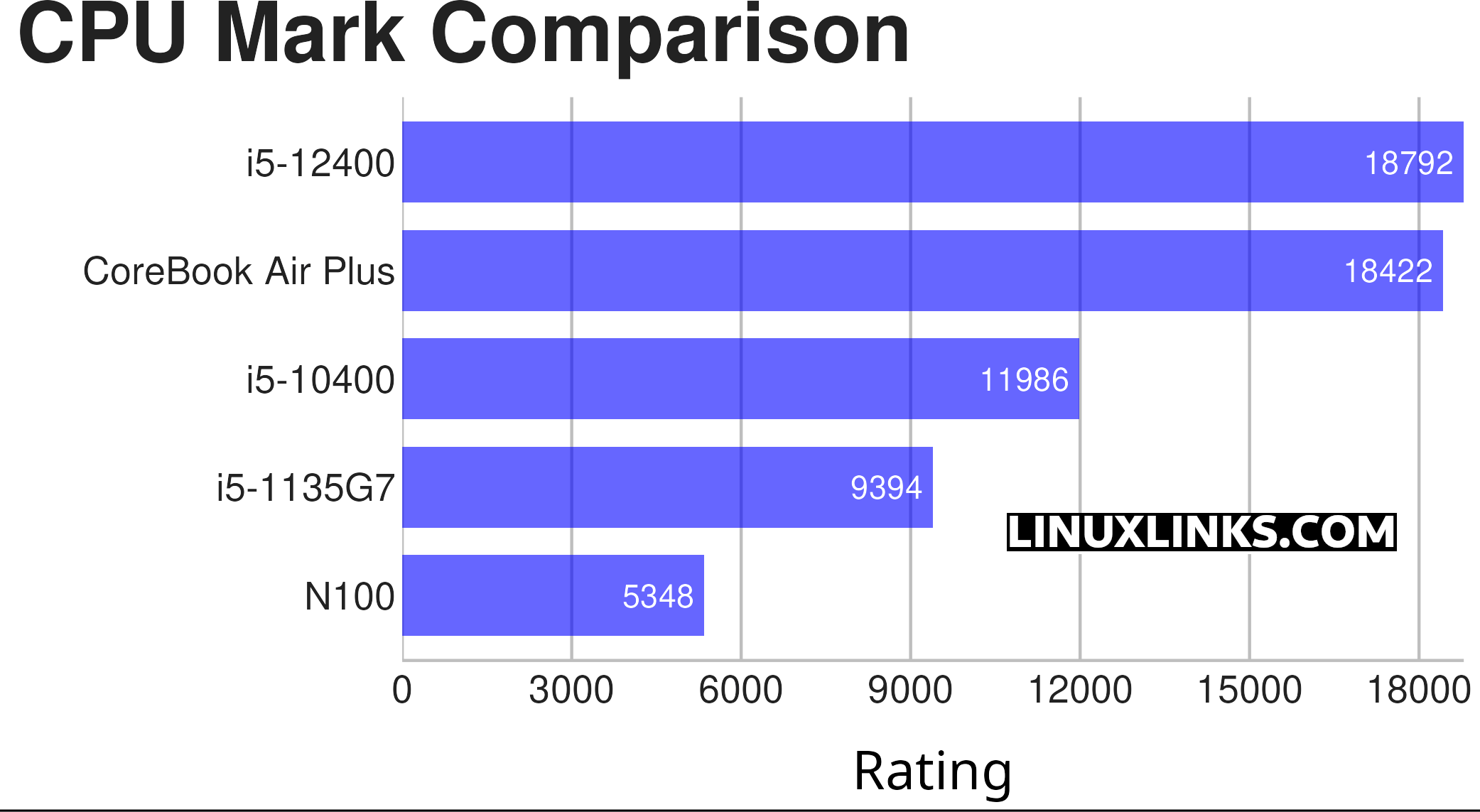
The results from CPU Mark show that the Chuwi laptop should perform pretty close to a 12th generation Intel desktop processor (the i5-12400).
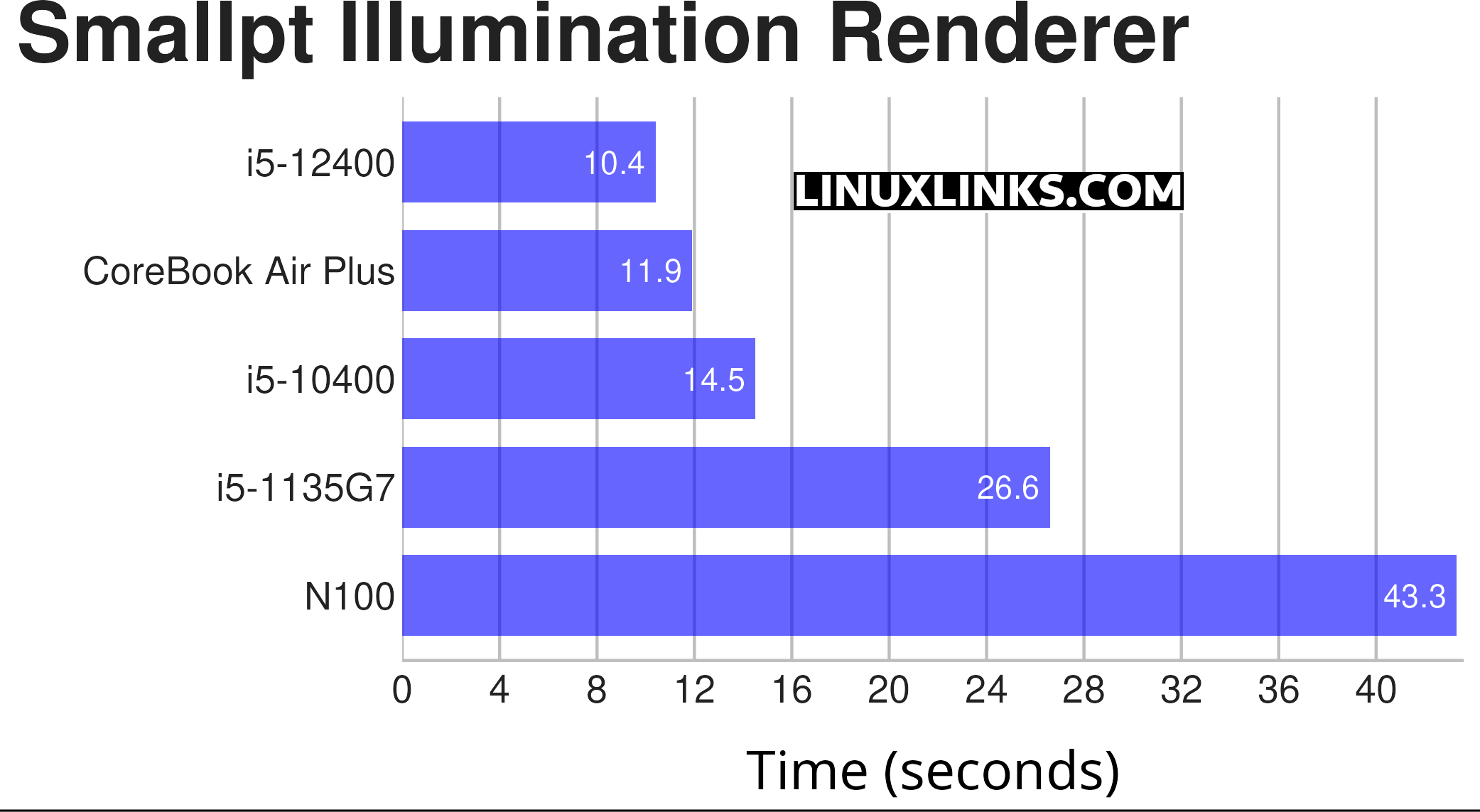
$ phoronix-test-suite benchmark smallpt
Smallpt is a C++ global illumination renderer written in less than 100 lines of code. Global illumination is done via unbiased Monte Carlo path tracing and there is multi-threading support via the OpenMP library. A lower time indicates better performance. As this benchmark uses all cores, a CPU with many cores complete the test considerably quicker.
The Air Book performs approximately how I anticipated given that the test uses all the cores and both the 10th generation and 12th generation desktop processors have the same number of cores and threads as the Air Plus (that’s 6 cores, 12 threads).
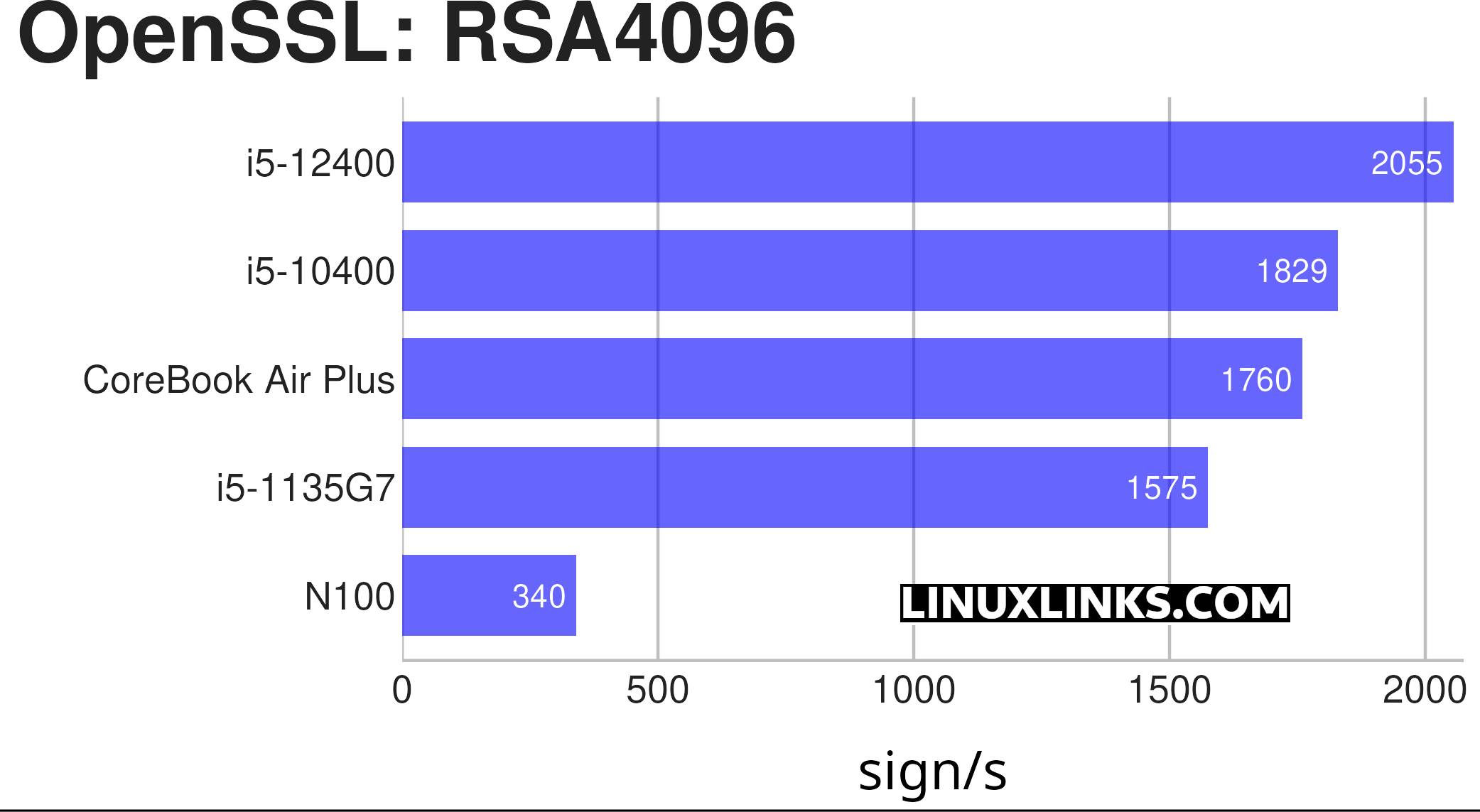
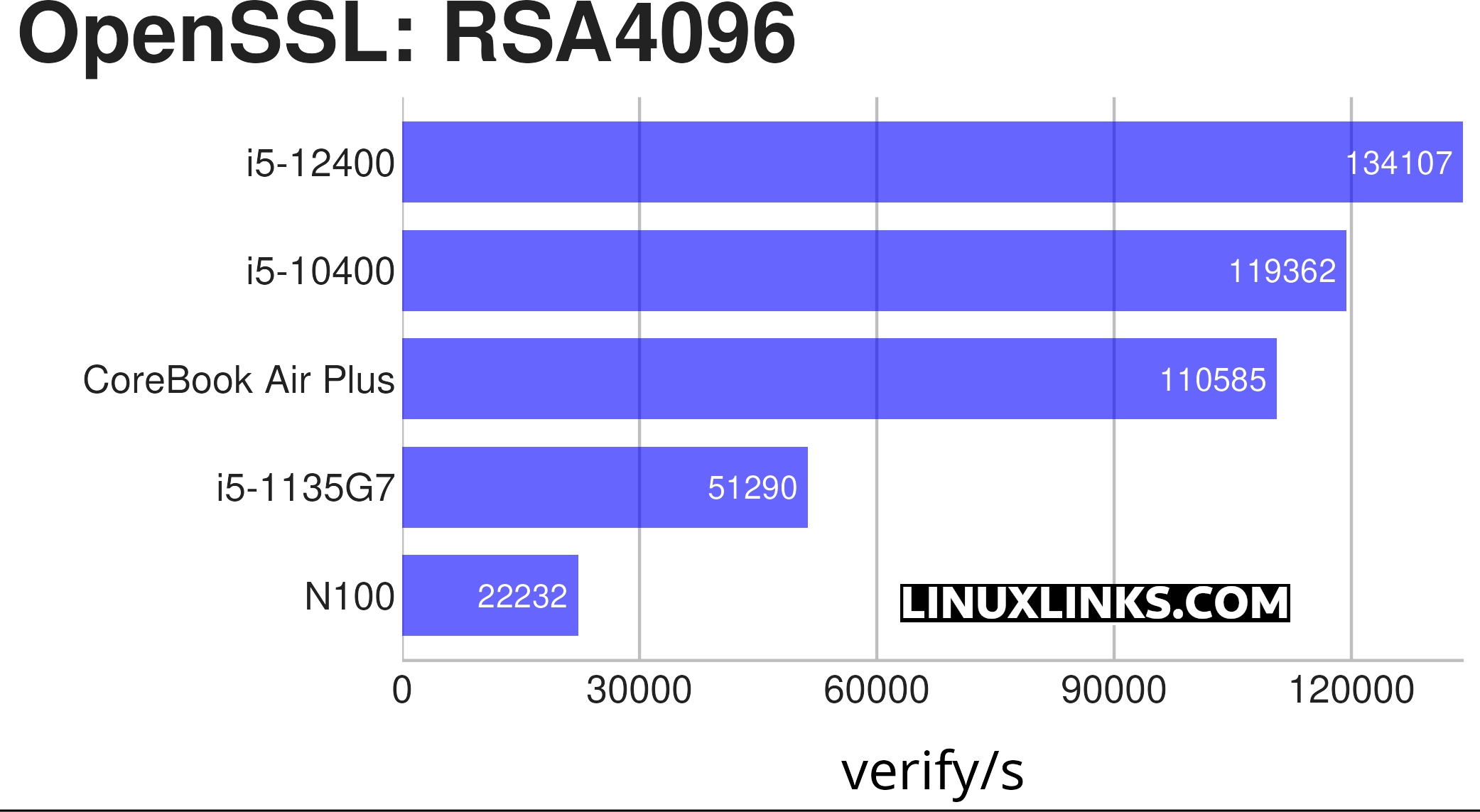
$ phoronix-test-suite benchmark openssl
OpenSSL is an open-source toolkit that implements SSL (Secure Sockets Layer) and TLS (Transport Layer Security) protocols. This test profile makes use of the built-in “openssl speed” benchmarking capabilities.
There are many different algorithms available for this benchmark. I’ve tested with the RSA4096 algorithm, as it’s representative for the others. There are two charts for this benchmark, one for the sign/s and one for the verify/s.
Nothing too stellar here from the Air Plus, being pipped by the 10th generation Intel processor machine.
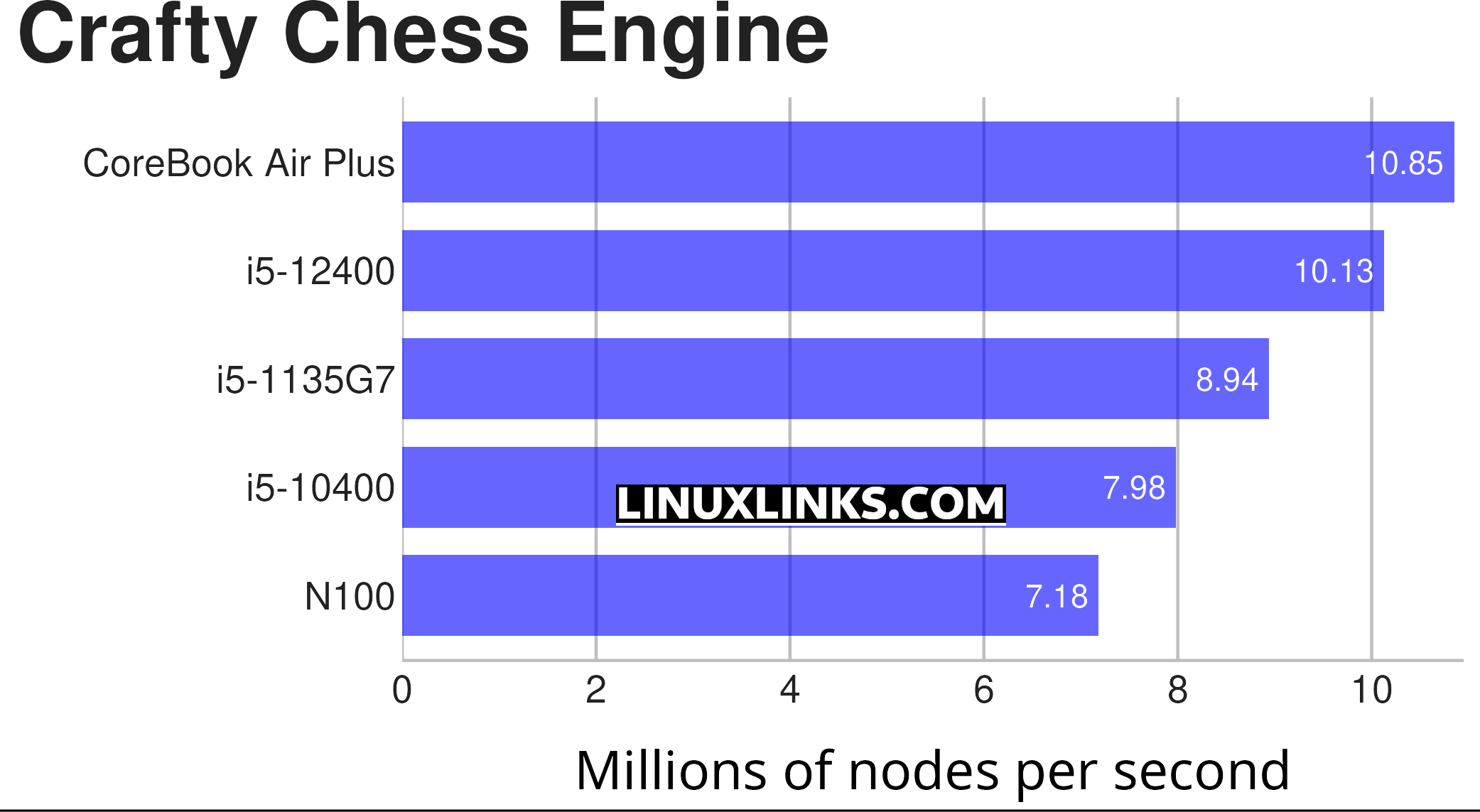
$ phoronix-test-suite benchmark crafty
Crafty is a chess program directly derived from Cray Blitz, winner of the 1983 and 1986 World Computer Chess Championships.
This is a benchmark looking at the CPU’s performance through a chess benchmark. This benchmark only uses a single core.
When using desktop apps, one should never underestimate the importance of single thread performance. Many desktop tasks don’t use lots of cores, so having lots of cores may not actually improve performance.
The Air Plus laptop scores a higher number of nodes per second than the 12th generation desktop processor. It’s a great result.
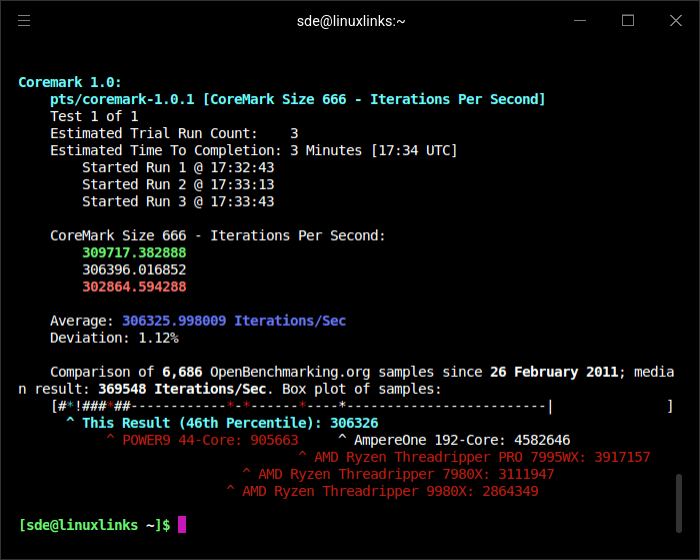
I also ran the Coremark benchmark. Here are the results for the Air Book.
Pages in this article:
Page 1 – Introduction / Processor
Page 2 – Graphics
Page 3 – Memory
Page 4 – Disk and WiFi
Complete list of articles in this series:
| Chuwi CoreBook Air Plus | |
|---|---|
| Hardware Review | A concise look at the hardware |
| Specifications | Using the inxi tool to delve into the laptop's specifications |
| Benchmarks | I put the laptop through a series of benchmarks |
| BIOS | Basic Input/Output System |
| Power Consumption | Testing the laptop's power consumption |
| Battery | Battery life while updating the LinuxLinks website |
| Ubuntu | Configuring Ubuntu 25.10 |