

Bookmark allows you to save your favourite URLs without leaving the terminal and then quickly open them in the browser.
This is free and open source software.
Key Features
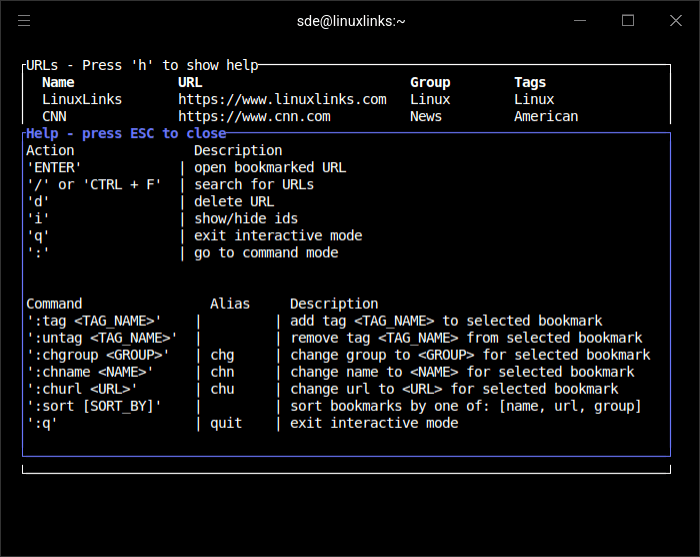
- Available commands:
- group – manage URL groups.
- add – add a bookmark URL.
- list – list bookmarks.
- delete – delete a bookmark.
- tag – add a tag to a bookmark.
- untag – remove a tag from a bookmark.
- chgroup – change the group of the bookmark.
- chn – change name of the bookmark.
- chu – change the URL of the bookmark.
- import – imports bookmarks from previous versions.
- URLs can be added to groups and labeled with tag. Some groups and tags principles include:
- Every URL can be in a single group.
- Every URL can have multiple tags.
- URL names in scope of one group have to be unique.
Website: github.com/Szymongib/bookmark
Support:
Developer: Szymon Gibała
License: MIT License
Bookmark is written in Rust. Learn Rust with our recommended free books and free tutorials.
Related Software
| Text-Based Bookmark Managers | |
|---|---|
| nb | CLI and local web note‑taking, bookmarking, archiving, and knowledge base |
| Shiori | Simple bookmarks manager written in Go |
| buku | Bookmark management utility written in Python |
| Tbmk | Commands bookmark for shells |
| IntelliShell | Like IntelliSense, but for shells |
| GoSuki | Local-first bookmark manager that tracks multiple browsers in real time |
| bmm | Fast local bookmark manager with CLI and TUI interfaces |
| Bookmark | Save your favourite URLs without leaving the terminal |
| Tempesta | Billed as the fastest and lightest command-line bookmark manager |
| star | Unix command line bookmark manager |
| Marcador | Minimal bookmark manager |
| bkmr | Manage bookmarks, snippets, notes, commands and other knowledge |
| crumbs | Store commands under a meaningful name in a hierarchy |
| bookmarkmenu | Bookmark storage using the menu back end |
| book | Simple bookmark manager |
| bmk | Go bookmark tool |
Read our verdict in the software roundup.
 Explore our comprehensive directory of recommended free and open source software. Our carefully curated collection spans every major software category. Explore our comprehensive directory of recommended free and open source software. Our carefully curated collection spans every major software category.This directory is part of our ongoing series of informative articles for Linux enthusiasts. It features hundreds of detailed reviews, along with open source alternatives to proprietary solutions from major corporations such as Google, Microsoft, Apple, Adobe, IBM, Cisco, Oracle, and Autodesk. You’ll also find interesting projects to try, hardware coverage, free programming books and tutorials, and much more. Discovered a useful open source Linux program that we haven’t covered yet? Let us know by completing this form. |
Please read our Comment Policy before commenting.