

Last Updated on May 23, 2022
Long Range Zip (Lrzip)
Lrzip uses an extended version of rzip, which does a first pass long distance redundancy reduction. It uniquely offers a good range of compression methods:
- LZMA (the default algorithm) – this is the Lempel–Ziv–Markov chain algorithm.
- ZPAQ – designed for user-level backups.
- LZO – Lempel–Ziv–Oberhume.
- gzip – based on the DEFLATE algorithm, which is a combination of LZ77 and Huffman coding.
- bzip2 – compression program that uses the Burrows–Wheeler algorithm.
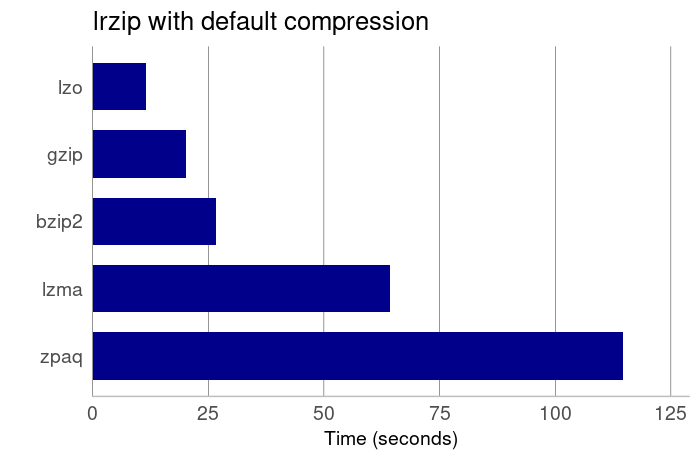
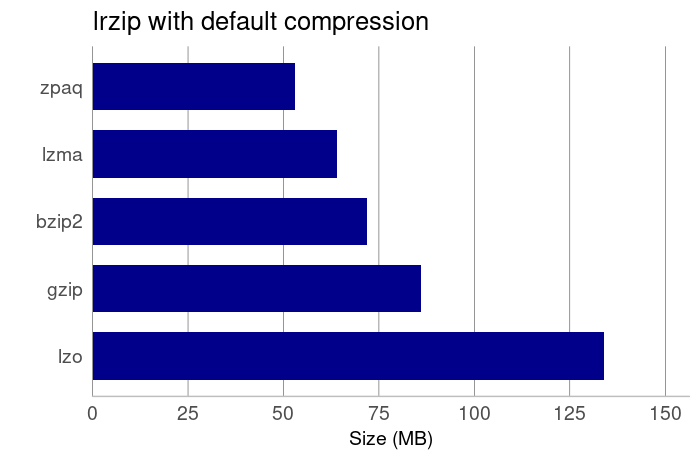
When it comes to the size of the compressed tarball, zpaq offers the best compression.
Pages in this article:
Page 1 – Introduction
Page 2 – Charts with Default Compression
Page 3 – Charts with Fastest Compression
Page 4 – Charts with Best Compression
Page 5 – lrzip with Different Compression Methods
Methodology used for the tests
We took a 537MB tarball of a popular source package. The tarball was copied to RAM (/dev/shm), and the tests ran in RAM on a quad-core CPU without hyper-threading (Core i5-2500K), with no X server running, and under negligible load.
Each test was run three times with the latest version (at the time of writing) of each multi-core compression tool. The average results are recorded in the charts above. The tests show the relative difference between the multi-core compression tools. They are for indicative purposes only.
Learn more about the features offered by the multi-core compression tool. We’ve compiled a dedicated page for each tool explaining, in detail, the features they offer.
| Multi-Core Compression Tools | |
|---|---|
| Zstandard | Fast compression algorithm, providing high compression ratios |
| pigz | Parallel implementation of gzip. It's a fully functional replacement for gzip |
| pixz | Parallel indexing XZ compression, fully compatible with XZ. LZMA and LZMA2 |
| PBZIP2 | Parallel implementation of the bzip2 block-sorting file compressor |
| lrzip | Compression utility that excels at compressing large files |
| lbzip2 | Parallel bzip2 compression utility, suited for serial and parallel processing |
| plzip | Massively parallel (multi-threaded) lossless data compressor based on lzlib |
| crabz | Like pigz but written in Rust |
| PXZ | Runs LZMA compression on multiple cores and processors |
 Explore our comprehensive directory of recommended free and open source software. Our carefully curated collection spans every major software category. Explore our comprehensive directory of recommended free and open source software. Our carefully curated collection spans every major software category.This directory is part of our ongoing series of informative articles for Linux enthusiasts. It features hundreds of detailed reviews, along with open source alternatives to proprietary solutions from major corporations such as Google, Microsoft, Apple, Adobe, IBM, Cisco, Oracle, and Autodesk. You’ll also find interesting projects to try, hardware coverage, free programming books and tutorials, and much more. Know a useful open source Linux program that we haven’t covered yet? Let us know by completing this form. |
Thank you so much! I’m going to try out some of these.
Some comparison between them would be very usefull
I did a similar study a few years ago and ended up using pbzip2 as my go-to compression utility.
The main reason is that it can do multi-core de-compression as well, unlike pigz.
The compression algorithm is fairly slow, so it works best when you have 30+ cores to throw at it.
Keep in mind that to use pbzip2 to de-compress with multiple cores, you need to compress with pbzip2 first. It adds some hints to the file to let the decompression know how to split up the work properly.
Seems you brought me a solution, thanks !
Do you know if initramfs is using a single threaded kernel bzip2 routine or my /bin/pbzip2 for decompression at runtime ?
Cordialement.
Multicore compression : great ! But … all decompressions are done on a SINGLE core ! Why ?
I tried option to select the number of threads but in vain.
Any idea to do multicore decompression ?
Cordialement.
Do you know zpaqfranz?
Thanks.