
Optical Character Recognition (OCR) is the conversion of scanned images of handwritten, typewritten or printed text into searchable, editable documents. OCR software is able to recognise the difference between characters and images, and between characters themselves.
The use of paper has been displaced from some activities. For example, the vast majority of journeys on the London Underground are made using the Oyster card without a paper ticket being issued. We have witnessed talk of a paperless office for more than 40 years. However, the office environment has shown a resistance to remove the mountain of paper generated. Things have changed in the past few years, with a marked shift in the paperless office concept. Paper documents contain a wealth of important management data and information that would be better stored electronically. There is computer software that makes this conversion possible. The benefit of scanning documents is not purely for archival reasons. OCR technology is vital for gaining access to paper-based information, as well as integrating that information in digital workflows.
OCR software is not mainstream so open source alternatives to proprietary heavyweight software are fairly thin on the ground. Matters are also complicated by the fact that OCR computer software needs very sophisticated algorithms to translate the image of text into accurate actual text. The software also has to cope with images that contain a lot more than text, such as layouts, images, graphics, tables, in single or multi pages.
Here’s our rating for each OCR system. Only free and open source software is eligible for inclusion.
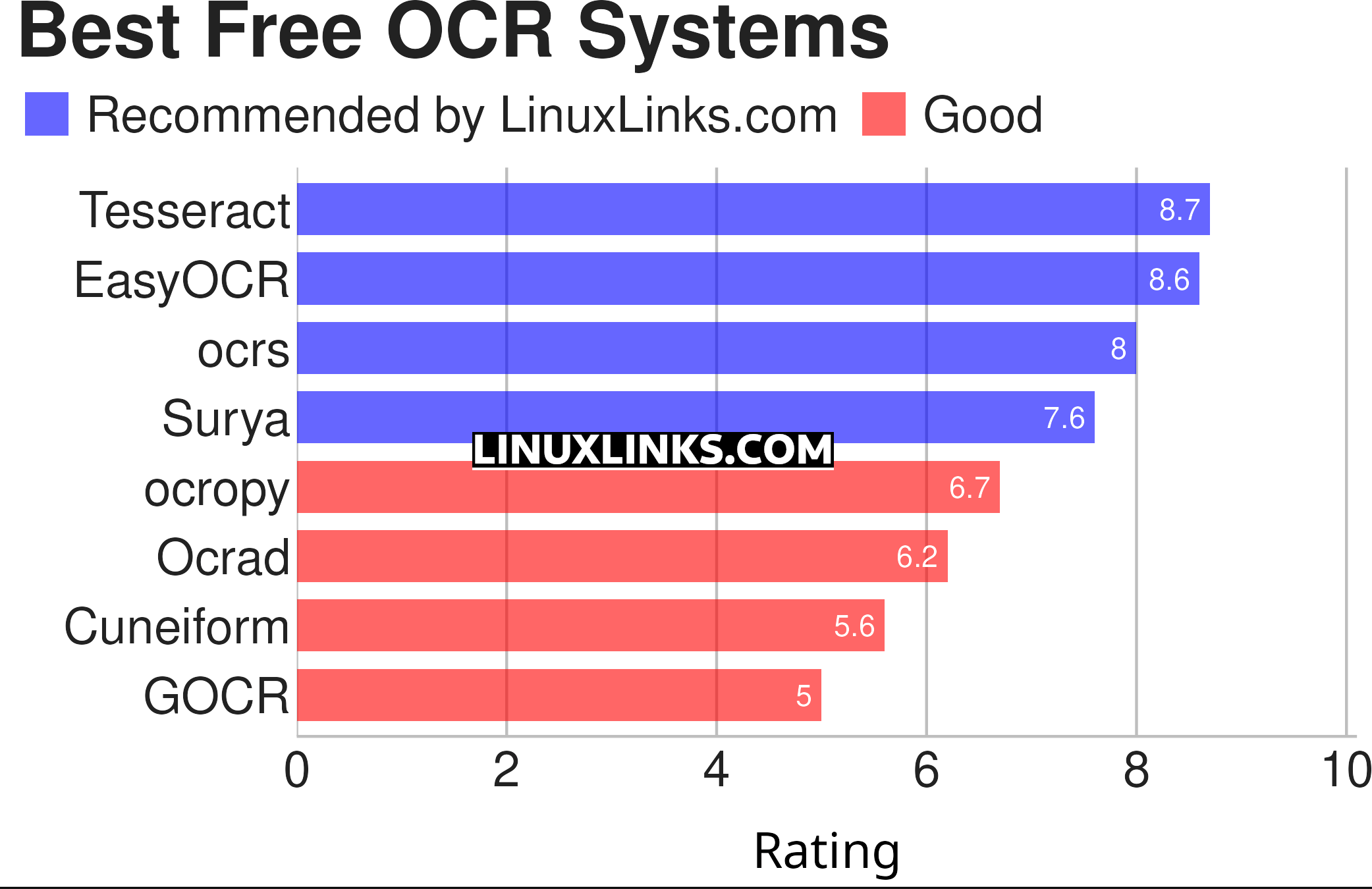
Click the links in the table below to learn more about each OCR system.
| OCR Systems | |
|---|---|
| Tesseract | High quality neural net (LSTM) based OCR engine focused on line recognition |
| EasyOCR | OCR that reads natural scene text and dense text in documents |
| ocrs | Modern OCR engine |
| Surya | Multilingual document OCR toolkit with text recognition |
| ocropy | Open source document analysis and OCR system |
| Ocrad | OCR engine based on a feature extraction method |
| Cuneiform | OCR Engine to convert OCR documents into editable form |
| GOCR | Reads images in many formats |
This article has been revamped in line with our recent announcement.
 Explore our comprehensive directory of recommended free and open source software. Our carefully curated collection spans every major software category. Explore our comprehensive directory of recommended free and open source software. Our carefully curated collection spans every major software category.This directory is part of our ongoing series of informative articles for Linux enthusiasts. It features hundreds of detailed reviews, along with open source alternatives to proprietary solutions from major corporations such as Google, Microsoft, Apple, Adobe, IBM, Cisco, Oracle, and Autodesk. You’ll also find interesting projects to try, hardware coverage, free programming books and tutorials, and much more. Know a useful open source Linux program that we haven’t covered yet? Let us know by completing this form. |
gimagereader is also great tool
It may be a great tool but it’s not an OCR system. Instead it’s merely a front-end.
No, it’s not even good.