

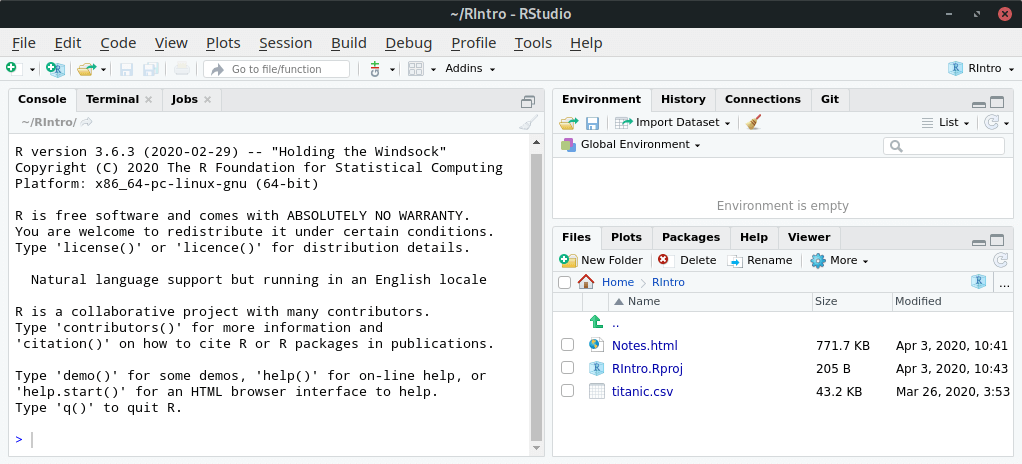
RStudio is an integrated development environment (IDE) for R. RStudio combines an intuitive user interface with powerful coding tools to help you get the most out of R. It
includes a console, syntax-highlighting editor that supports direct code execution, as well as tools for plotting, history, and workspace management.
RStudio includes a wide range of productivity enhancing features and runs on all major platforms. RStudio can optionally also be run as server which enables you to provide a browser based interface to a version of R running on a remote system.
Read our interactive tutorial for data science using R and RStudio. No programming knowledge required.
Key Features
- Customizable workbench with all of the tools required to work with R in one place (console, source, plots, workspace, help, history, etc).
- Syntax highlighting editor with code completion.
- Execute code directly from the source editor (line, selection, or file).
- Full support for authoring Sweave and TeX documents.
- Searchable history.
- Retrieve previous commands.
- Keyboard shortcuts.
- Easy installation of new packages
- Runs on all major platforms and can also be run as a server, enabling multiple users to access the RStudio IDE using a web browser
- Integrated help functionality.
- RStudio works with the manipulate package to add interactive capabilities to standard R plots.
R Notebook features:
- R Markdown document with chunks that can be executed independently and interactively, with output visible immediately beneath the input. R Notebooks are a method of literate programming that allows for direct interaction with R while producing a reproducible document with publication-quality output.
- Inline output (notebook mode) on all R Markdown documents.
- Plain-text files and therefore work well with version control.
- Keyboard shortcuts.
- rmarkdown package provides several functions that can be used to read and write R Notebooks outside of RStudio.
Website: posit.co
Support:
Developer: RStudio, Inc.
License: GNU Affero GPL v3
RStudio is written in Java, C++ and JavaScript. Learn Java with our recommended free books and free tutorials. Learn C++ with our recommended free books and free tutorials. Learn JavaScript with our recommended free books and free tutorials.
Related Software
| Graphical User Interfaces for R | |
|---|---|
| RStudio | Professional software for R with a code editor, debugging & visualization tools |
| StatET for R | Eclipse based IDE (integrated development environment) for R |
| Rattle | R Analytic Tool To Learn Easily: Data Mining using R |
| jamovi | Provides R syntax for each analysis that is run |
| RKWard | Easy to use and easily extensible IDE/GUI |
| R Commander | A Basic-Statistics GUI for R |
| JGR | Universal and unified graphical user interface for R |
| Deducer | Intuitive, cross-platform graphical data analysis system |
Read our verdict in the software roundup.
| Notebook software | |
|---|---|
| JupyterLab | The next generation user interface for Project Jupyter |
| RStudio | Integrated development environment (IDE) for R |
| Jupyter Notebook | Web-based notebook environment for interactive computing |
| Positron | Next-generation data science IDE |
| marimo | Reactive Python notebook |
| Apache Zeppelin | Multi-purpose notebook |
| IPython | Rich architecture for interactive computing |
| euporie | Terminal interface for Jupyter notebooks and kernels |
| Polynote | Experimental polyglot notebook environment |
| Livebook | Interactive and collaborative code notebooks |
| nteract | Notebooks on your Desktop |
| Pluto | Simple reactive notebooks for Juli |
| Cantor | Frontend for mathematical and scientific software |
| Pretzel | Billed as a modern replacement for Jupyter Notebooks |
| Spark Notebook | Interactive and reactive data science using Scala and Spark |
| BeakerX | Kernels and extensions to the Jupyter interactive computing environment |
Read our verdict in the software roundup.
| Integrated Development Environments | |
|---|---|
| RStudio | Enterprise-ready professional software for R |
| PyCharm | Integrated Development Environment for Python |
| Neovim | Continuation and extension of Vim |
| Lapce | Fast and powerful code editor written in Rust |
| NetBeans IDE | Java based IDE from Apache |
| VSCodium | Binary distribution of VS Code |
| Eclipse | Java based environment combining a number of different Eclipse projects |
| Qt Creator | Cross-platform, complete Integrated Development Environment |
| Spyder | The Scientific Python Development Environment |
| KDevelop | An easy to use IDE for KDE |
| Helix | Post-modern modal text editor |
| Theia | Cloud & desktop IDE framework |
| eric | Full featured Python editor and IDE |
| Thonny | Python Integrated Development Environment for Beginners |
| Lazarus | Delphi compatible cross-platform IDE |
| PyDev | Python Integrated Development Environment for Eclipse |
| Gambas | Development environment and a full powerful development platform |
| Che | Kubernetes based Cloud Development Environments for Enterprise Teams |
| Leo | Python based IDE, Outliner and PIM |
| IntelliJ IDEA | IDE for Java, Groovy, and other languages |
| LiteIDE | Edit and build Go projects |
| Arduino IDE | Electronics prototyping platform |
| ZeroBrane Studio | Lightweight Lua-based IDE for Lua |
| CodeLite | Powerful and lightweight C/C++ IDE |
| Pyzo | Cross-Platform Python IDE focused on interactivity and introspection |
| DrRacket | IDE for the Racket programming languages |
| Builder | IDE for GNOME |
| Geany | Small and lightweight IDE based on Scintilla |
| Code::Blocks | Very extensible and fully configurable |
| Ecere SDK | Software development kit |
| Zasper | IDE for Data Science |
| U++ | Rapid application development framework |
| roobuilder | Vala and JavaScript IDE |
Read our verdict in the software roundup.
 Explore our carefully curated directory of recommended free and open source software, covering every major software category. Explore our carefully curated directory of recommended free and open source software, covering every major software category.The directory forms part of our extensive collection of articles for Linux enthusiasts. It includes hundreds of detailed reviews, together with free and open source alternatives to proprietary software from companies such as Google, Microsoft, Apple, Adobe, IBM, Cisco, Oracle, and Autodesk. LinuxLinks also covers interesting projects worth exploring, Linux-compatible hardware, free programming books and tutorials, and much more. Know a useful free and open source Linux application that we haven’t covered? Tell us about it using our submission form. |
Please read our Comment Policy before commenting.
RStudio is extremely heavy a piece of software. It just takes over your computer just to crash at the end and, for you to restart it, you’ll wait a whole bunch of time!
RStudio is first-class software. We’ve never had a single crash with the software.
RStudio does consume RAM, but it’s superb software, rock solid. Maybe there’s something wrong with your computer, Pedro? Compiling all the R packages on a Linux box does take a long time; Windows actually is better in that respect as no compiling is needed.
I’ve had issues with crashing as well, typically if I start something else that’s resource intensive while running Rstudio (or maybe the other way around, but it was Rstudio that crashed.) I still use Rstudio extensively. My biggest issue is that it doesn’t use screen space efficiently.
I use RStudio every day. The user interface definitely isn’t perfect but it’s still fantastic software.
I never like having to compile all the libraries I use as I sometimes distro hop.