

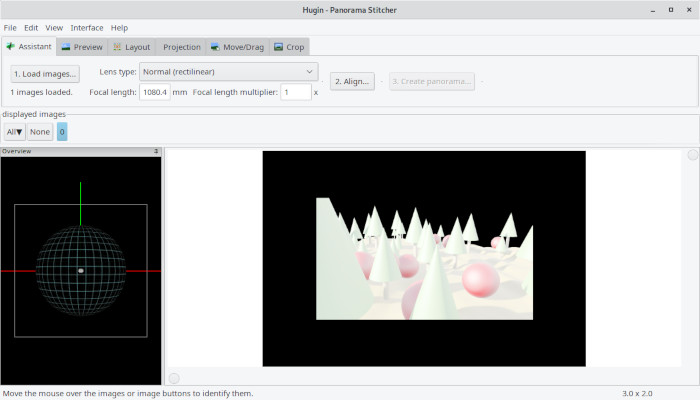
Hugin is a panorama photo stitching program. The resulting image can span 360 degrees. Another common use of Hugin is the creation of very high resolution pictures by combining multiple images.
Essentially, Hugin is a graphical user interface frontend for Panorama Tools. Stitching is accomplished by using several overlapping photos taken from the same location, and using control points to align and transform the photos so that they can be blended together to form a larger image.
Hugin allows for the easy creation of control points between two images, optimization of the image transforms, and much more.
The following tools are part of the Hugin suite:
- Hugin – the graphical user interface front end.
- nona – a simple stitcher that does geometrical and photometric distortions to photos and writes the output to image files. It is a replacement for PTStitcher.
- nona_gui, nona with a graphical progress bar.
- fulla correction of barrel distortion, chromatic aberration and vignetting.
- nona_gui a version of nona with simple GUI progress dialogs, similar to the windows version of PTStitcher.
- autooptimiser – optimise a panorama pairwise, starting from an anchor image. cmd line version of the pairwise mode in hugin.
- align_image_stack a tool to automate the process to align a stack of photos.
- tca_correct a tool to automatically generate chromatic aberration correction parameters for use with fulla.
- matchpoint feature identification.
- pto2mk generation of Makefiles for command-line stitching.
- cpclean command line tool to remove control points with improbable error distances.
- calibrate_lens automatic lens calibration using straight-line detection.
- vig_optimize command line tool to estimate photometric parameters.
- hugin_hdrmerge merges multiple exposures to HDR using Khan anti-ghosting algorithm.
- hugin_stitch_project a GUI tool to stitch a single hugin .pto project.
- celeste_standalone removes cloud-like control points from project files.
- PTBatcherGUI a GUI queue manager for stitching multiple hugin projects.
- PTBatcher command-line access to the hugin Batch Processor stitching queue.
- panoglview OpenGL panorama viewer stored in sourceforge SVN alongside hugin which must be built separately.
- autopano-sift-C version of autopano-sift written in C, also needs to be built separately.
Features include:
- Stitch large mosaics of images and photos, e.g. of long walls or large microscopy samples.
- Combine overlapping images for panoramic photography.
- Vertical feature detection tool.
- Fast Preview window can now show composition guides such as Rule of Thirds and Golden ratio to support an easier composition of the final panorama.
- Correct complete panorama images that are e.g. “wavy” due to a badly levelled panoramic camera
- Perform advanced photometric corrections and HDR stitching.
- Find control points and optimize parameters with the help of software assistants/wizards
- Output several projection types, such as equirectangular (used by many full spherical viewers), mercator, cylindrical, stereographic, and sinusoidal.
- Internationalization: Brazilian Portuguese, Bulgarian, Catalan, Chinese Simplified, Chinese Traditional, Czech, Dutch, English, French, German, Hungarian, Italian, Japanese, Korean, Polish, Russian, Slovakian, Slovenian, Spanish, Swedish, and Ukranian translations.
Website: hugin.sourceforge.io
Support: wiki.panotools.org/Hugin
Developer: Pablo d’Angelo
License: GNU GPL v2
Hugin is written in C++. Learn C++ with our recommended free books and free tutorials.
Related Software
| HDR Imaging Software | |
|---|---|
| RawTherapee | The Experimental Raw Photo Editor |
| OpenEXR | HDR image file format and HDR utilities |
| Hugin | Panorama photo stitching program |
| pfstools | Command line HDR manipulation programs |
| tev | High dynamic range image comparison tool |
| HyperHDR | Ambient lighting implementation for television and music sets |
| HDRView | Depth-map and high-dynamic range image viewer |
| Luminance HDR | Provides a workflow for HDR imaging |
| Radiance | Lighting simulation and rendering system |
| HDRMerge | Combine two or more raw images into a single raw |
| CinePaint | Works with 16-bit and floating point pixels for HDR imaging |
Read our verdict in the software roundup.
 Explore our comprehensive directory of recommended free and open source software. Our carefully curated collection spans every major software category. Explore our comprehensive directory of recommended free and open source software. Our carefully curated collection spans every major software category.This directory is part of our ongoing series of informative articles for Linux enthusiasts. It features hundreds of detailed reviews, along with open source alternatives to proprietary solutions from major corporations such as Google, Microsoft, Apple, Adobe, IBM, Cisco, Oracle, and Autodesk. You’ll also find interesting projects to try, hardware coverage, free programming books and tutorials, and much more. Know a useful open source Linux program that we haven’t covered yet? Let us know by completing this form. |