
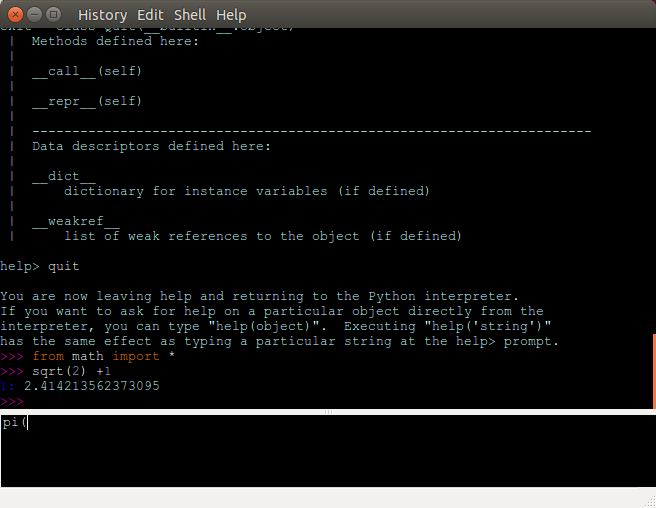
DreamPie is a graphical interactive Python shell designed to make experimenting with Python code more convenient. It uses a distinctive interface that separates code entry from command history, allowing users to develop and execute statements without mixing their input with previous results.
The main window contains a history area displaying executed commands and their output, together with a separate code editor. Users can write and revise several lines of Python before executing them, making the application useful for testing functions and developing small pieces of code interactively.
DreamPie provides contextual assistance when working with Python objects, including completion suggestions, function documentation and argument information. Its history management facilities also make it easier to revisit earlier commands and preserve useful work.
The application was developed using GTK and has facilities for working with alternative Python interpreters. Its older graphical dependencies can make installation on contemporary Linux distributions more challenging.
This is free and open source software.
Key Features
- Separate command history and code editing areas.
- Multiline code editing with indentation and block selection tools.
- Automatic completion of object attributes, module names and filenames.
- Display function signatures, argument information and documentation.
- Completion of dictionary keys and function keyword arguments.
- Automatically insert parentheses and optionally quotation marks when entering function calls.
- Result history retains references to recently evaluated expressions.
- Automatically collapse lengthy output to keep the history manageable.
- Save interactive sessions as HTML files and reload previous history.
- Copy selected commands without their output for reuse in Python scripts.
- Open additional code tabs while retaining unfinished work.
- Find commands and expressions in the editing and history areas.
- Choose between vertical and horizontal window layouts.
- Integration with matplotlib for interactive plotting.
- Support for alternative Python interpreters, including PyPy, Jython and IronPython.
Website: github.com/noamraph/dreampie
Support:
Developer: Noam Yorav-Raphael
License: GNU General Public License v3.0
DreamPie is written in Python. Learn Python with our recommended free books and free tutorials.
Related Software
| Open Source Python Shells | |
|---|---|
| IPython | Enhanced interactive Python shell |
| ptpython | Advanced Python Read-Eval-Print Loop |
| bpython | Fancy interface to the Python interpreter for Linux, BSD, OS X and Windows |
| IDLE | Integrated development environment for Python |
| DreamPie | Python shell which is designed to be reliable and fun |
Read our verdict in the software roundup.
 LinuxLinks helps you discover the best free and open source software for Linux. Explore our extensive collection of recommended applications, including alternatives to popular proprietary software. LinuxLinks helps you discover the best free and open source software for Linux. Explore our extensive collection of recommended applications, including alternatives to popular proprietary software.We also publish software reviews, Linux tutorials, hardware reviews, free programming books and articles covering the wider open source community. Browse our Linux resources to discover more. Know a useful free and open source Linux application we haven't covered? Suggest a program for inclusion. Has your software been featured on LinuxLinks? Display one of our Featured on LinuxLinks badges on your website or GitHub README. |
Please read our Comment Policy before commenting.