

Data recovery is the process of retrieving data from corrupted or damaged storage media when it cannot be accessed. The storage media in question will often be a hard disk, but it can also be removable media such as CDs, DVDs, Blu-rays, and USB keys. There are many different reasons why a system administrator may need to use data recovery tools.
At boot up, mainstream Linux distributions perform routine scans to identify and fix any inconsistencies in the file system. A damaged file system might be caused by the computer not shutting down in an orderly fashion, which can occur say in the event of a power cut. However, such routine scans will not detect hardware failure which might exist for a long period without being noticeable to users. Accesses to bad sectors on the media can make the situation worse, and with further usage as well as the passage of time, the media can eventually become unreadable.
As data is a priceless asset for many organizations, you might think it will be necessary to use a professional recovery service. However, these are incredibly expensive. A better strategy is to have a good set of open source software with a plan ready to be implemented if you need to recover the system, and not simply to have made regular backups of data, and saved the partitioning information on the hard disk.
Here’s our ratings chart with our verdict. Only free and open source software is eligible for inclusion. These tools may well be a life-saver in the event that you need to retrieve data from corrupted media. We would strongly recommend that you become familiar with how they work just in case you are ever put in the position of needing to recover data.
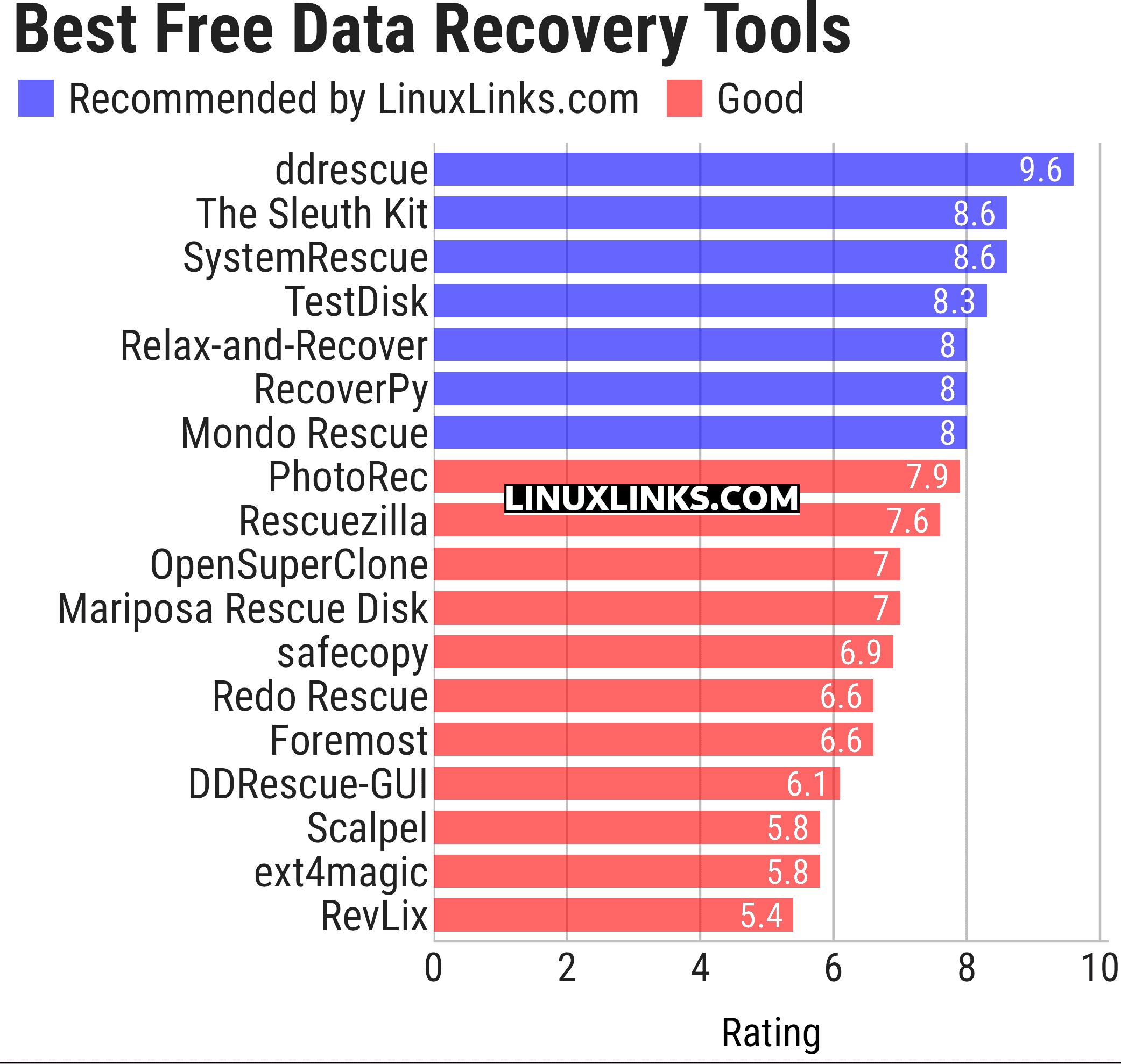
Click the links in the table below to learn more about each tool.
| Data Recovery Tools | |
|---|---|
| ddrescue | GNU data recovery tool |
| The Sleuth Kit | Analyze disk images and recover files |
| SystemRescue | System rescue disk |
| TestDisk | Partition scanner and disk recovery tool |
| Relax-and-Recover | Linux Disaster Recovery |
| RecoverPy | Terminal-based data recovery tool |
| Mondo Rescue | Tool for configuring and maintaining network machines |
| PhotoRec | Digital Picture and File Recovery |
| Rescuezilla | Complete disaster recovery solution |
| OpenSuperClone | Powerful data recovery utility |
| Mariposa Rescue Disk | Comes with a lot of applications that serve to rescue your system |
| safecopy | Copy utility ignoring errors |
| Redo Rescue | Backup and recovery solution |
| Foremost | Recover files based on their headers, footers, and data structures |
| DDRescue-GUI | Frontend for ddrescue |
| Scalpel | Data carving tool |
| ext4magic | Recover deleted or overwritten files |
| RevLix | Developed to recover deleted files on Linux systems |
We’ve largely removed distributions from this roundup. Check our Erik’s Active List of Linux Distributions.
This article has been updated to reflect the changes outlined in our recent announcement.
 Explore our comprehensive directory of recommended free and open source software. Our carefully curated collection spans every major software category. Explore our comprehensive directory of recommended free and open source software. Our carefully curated collection spans every major software category.This directory is part of our ongoing series of informative articles for Linux enthusiasts. It features hundreds of detailed reviews, along with open source alternatives to proprietary solutions from major corporations such as Google, Microsoft, Apple, Adobe, IBM, Cisco, Oracle, and Autodesk. You’ll also find interesting projects to try, hardware coverage, free programming books and tutorials, and much more. Know a useful open source Linux program that we haven’t covered yet? Let us know by completing this form. |
Please read our Comment Policy before commenting.
Some of these tools have not been updated in years.
Do you plan to test more recent live CDs such as Kaisen Linux, 4MLinux or Ikki Boot ?
This group test is not really about distros like Ikki Boot. Sure Ikki Boot, 4MLinux include data recovery tools, but so do lots of other distros. We therefore limit the number of distros included in this roundup, and focus more on the data recovery tools themselves. Maybe we’ll split out the live distros already in the roundup, and then reconsider other distros.
If a few of the tools have not been updated in a few years, they won’t be any newer in live CDs. The point should be what, if any, tools do these live CDs include that are better data recovery tools.
ddrescue is an amazing tool. Managed to save lots of data with it, highly recommended.
100% agree with you Susu!
Why is relax-and-recover not mentioned?
Comprehensive
Easy to use
Maintained
It should be at the top of the list
Thanks for your suggestion.
And please read the Comment FAQ.
Add RevLix by Cektor in this list. It’s a GUI for PhotoRec, TestDisk, ddrescue and foremost.
I’ll take a look at it.