

RustLock is a command-line tool written in Rust that allows users to quickly lock their Linux session from the terminal. It provides a simple and lightweight way to trigger the system screen lock, making it useful for scripts, shortcuts, and automated workflows.
This is free and open source software.
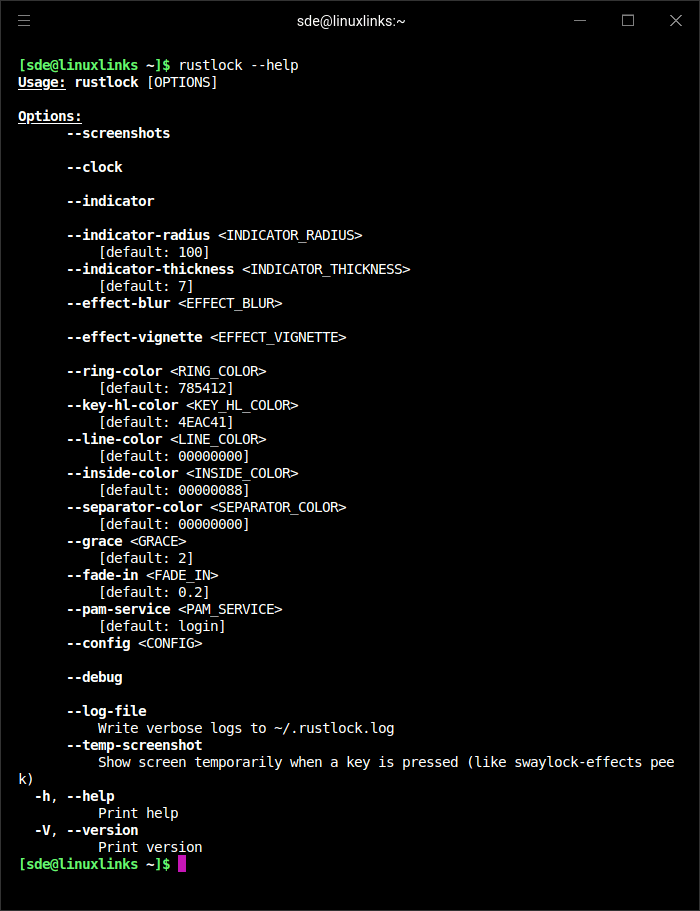
Key Features
- Visual Effects:
- Gaussian blur (configurable radius and passes).
- Vignette effect (configurable base and factor).
- Smooth fade-in animation.
- Password Indicator:
- Circular ring with configurable radius and thickness.
- Dynamic key highlight segments that rotate with each keystroke.
- Customizable colors (ring, inside, separator, highlight).
- Information Display:
- Centered clock (HH:MM format).
- Full date.
- System uptime.
- Screenshot Support:
- Captures desktop background before locking.
- Applies visual effects to background.
- Authentication:
- PAM-based authentication.
- Configurable grace period (any key press within N seconds unlocks without password).
- Logging: Verbose debug logs written to ~/.rustlock.log.
Website: github.com/JorySeverijnse/rustlock
Support:
Developer: Jory Severijnse
License: MIT License
RustLock is written in Rust. Learn Rust with our recommended free books and free tutorials.
 Explore our comprehensive directory of recommended free and open source software. Our carefully curated collection spans every major software category. Explore our comprehensive directory of recommended free and open source software. Our carefully curated collection spans every major software category.This directory is part of our ongoing series of informative articles for Linux enthusiasts. It features hundreds of detailed reviews, along with open source alternatives to proprietary solutions from major corporations such as Google, Microsoft, Apple, Adobe, IBM, Cisco, Oracle, and Autodesk. You’ll also find interesting projects to try, hardware coverage, free programming books and tutorials, and much more. Know a useful open source Linux program that we haven’t covered yet? Let us know by completing this form. |