

This is a new series where I hand-pick an open source Linux application each week that has not previously been covered on LinuxLinks. Each application must meet a very high standard.
Ratarmount (Random Access To Archived Resources) is a Linux utility that lets you mount archives as virtual filesystems instead of extracting them first. That simple idea is important when working with large tarballs, backups, datasets, or other compressed archives. Browse files inside an archive as if they were in a normal directory. Far more efficient than unpacking everything simply to review a few files.
This is free and open source software.
Installation
I evaluated Ratarmount using Manjaro, a popular Arch-based Linux distribution. There’s a package in the Arch User Repostiory which I installed with Pamac (Manjaro’s GUI package manager).
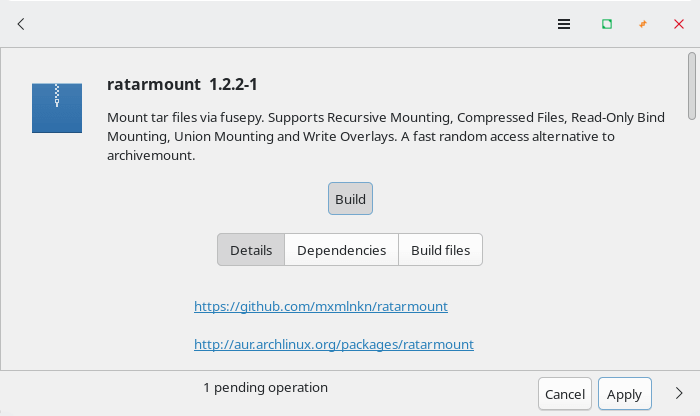
Installation proceeds with no issues.
If you’re not using an Arch-based distribution, the easiest way to install Ratarmount is with AppImage, as the project provides builds for x86_64 and other architectures.
The project’s GitHub page describes installation with pip, but many Linux distributions now discourage or prevent this unless you use a virtual environment.
In Operation
Ratarmount (Random Access To Archived Resources) is a Linux utility that lets you mount archives as virtual filesystems instead of extracting them first. That simple idea is important when working with large tarballs, backups, datasets, or other compressed archives. Browse files inside an archive as if they were in a normal directory. Far more efficient than unpacking everything simply to review a few files.
Its biggest strength is random access. Traditional archive tools force you to extract large amounts of data before reaching the file you want. Ratarmount avoids that by indexing the archive, allowing direct access to individual files. This saves time, reduces disk usage, and makes large archives much easier to handle.
Ratarmount is particularly useful to developers, system administrators, researchers, and other advanced Linux users. It excels at inspecting backups, exploring source archives, examining container layers, and working with big compressed datasets. Once mounted, the archive can be accessed with familiar Linux tools, file managers, editors, and shell commands, which makes the workflow feel natural.
Another major strength is versatility. Ratarmount is not limited to simple tar usage. It supports a broad range of archive-related scenarios and offers features that go well beyond basic extraction. That makes it more than just a convenience tool. It feels like a serious utility designed for demanding real-world use.
Key Features
- Random Access: Care was taken to achieve fast random access inside compressed streams for bzip2, gzip, xz, and zstd, and inside TAR files by building indices containing seek points.
- Highly Parallelized: By default, all cores are used for parallelized algorithms such as the gzip, bzip2, and xz decoders. This can yield huge speedups on most modern processors but requires more main memory. It can be controlled or completely turned off using the
-P <cores>option. - Recursive Mounting: Ratarmount will also mount TARs inside TARs inside TARs recursively into folders of the same name, which is useful for the 1.31TB ImageNet data set.
- Mount Compressed Files: You may also mount files with one of the supported compression schemes. Even if these files do not contain a TAR, you can leverage ratarmount’s true seeking capabilities when opening the mounted uncompressed view of such a file.
- Read-Only Bind Mounting: Folders may be mounted read-only to other folders for use cases such as merging a backup TAR with newer versions of those files residing in a normal folder.
- Union Mounting: Multiple TARs, compressed files, and bind mounted folders can be mounted under the same mountpoint.
- Write Overlay: A folder can be specified as a write overlay. All changes below the mountpoint will be redirected to this folder, and deletions are tracked so that all changes can be applied back to the archive.
- Remote Files and Folders: A remote archive or whole folder structure can be mounted similarly to tools like sshfs thanks to the filesystem_spec project. These can be specified with URIs as explained in the section “Remote Files”. Supported remote protocols include FTP, HTTP, HTTPS, SFTP, SSH, Git, GitHub, S3, Samba v2 and v3, and Dropbox. Many of these are very experimental and may be slow.
Example Usage
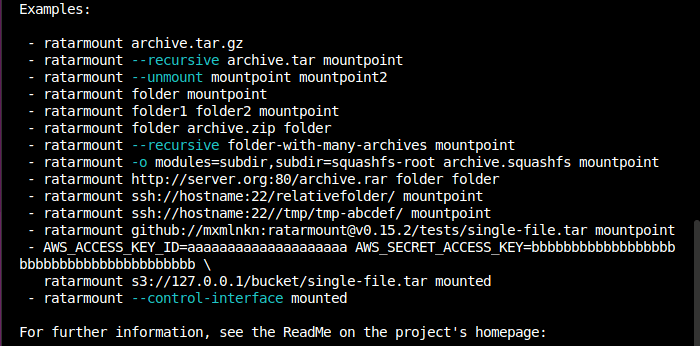
Summary
Ratarmount is a powerful and highly practical archive utility for Linux. It solves a real problem in an elegant way and can dramatically improve the experience of working with large compressed archives. For casual users it may be more than necessary, but for power users it’s a very useful tool.
Ratarmount is not a beginner-friendly desktop application. Users who only occasionally unpack small archive files will find standard archive managers simpler. Its FUSE-based design and advanced features make it better suited to technically confident users who prefer the command line.
Website: github.com/mxmlnkn/ratarmount
Support:
Developer: Maximilian Knespel
License: MIT License
Ratarmount is written in Python. Learn Python with our recommended free books and free tutorials.
 Explore our comprehensive directory of recommended free and open source software. Our carefully curated collection spans every major software category. Explore our comprehensive directory of recommended free and open source software. Our carefully curated collection spans every major software category.This directory is part of our ongoing series of informative articles for Linux enthusiasts. It features hundreds of detailed reviews, along with open source alternatives to proprietary solutions from major corporations such as Google, Microsoft, Apple, Adobe, IBM, Cisco, Oracle, and Autodesk. You’ll also find interesting projects to try, hardware coverage, free programming books and tutorials, and much more. Discovered a useful open source Linux program that we haven’t covered yet? Let us know by completing this form. |