
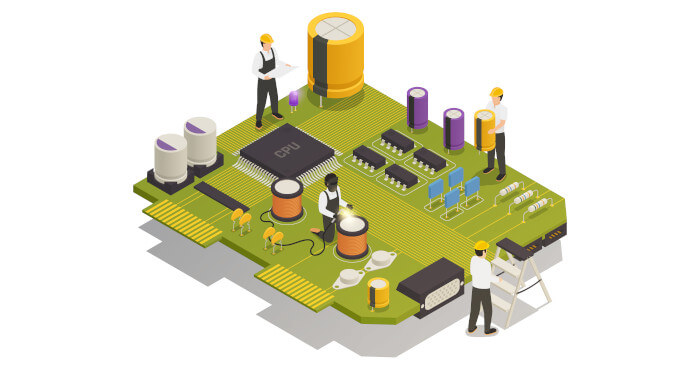
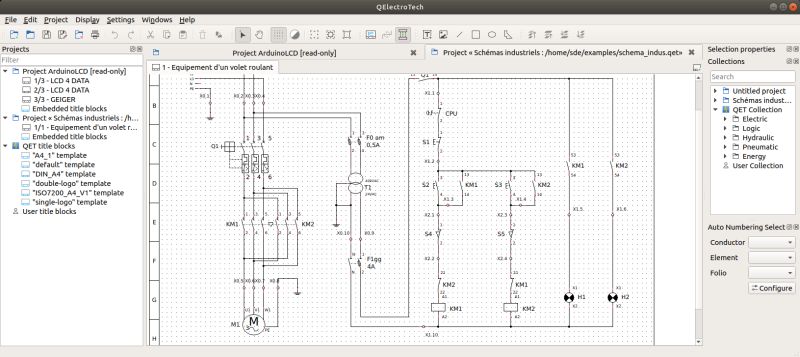
QElectroTech is an open source application to create electrical, electronics, automation, and control circuits. The software can also be used to create mechanical objects to illustrate processes, instrumentation drawings among various creative possibilities. QElectroTech is a good professional quality drafting application for various drawings that form a project.
QElectroTech has a large collection of standard and custom symbols, referred to as elements, that describe most of the commonly used components in electrical, hydraulic, pneumatic, computer systems. These elements can be selected drag dropped with mouse on to a diagram editor and connected with lines to represent or describe a system. A large number of such diagrams can be drafted under a project.
QElectroTech also consists of an inbuilt element editor that permits creation of newer elements that do not exist in the collection. Elements in the QET collection are not editable i.e read only. But, once the element is drag dropped into a diagram, it is automatically added to “imported” collection in a duplicate copy. This copy of the element will be available for editing to effect suitable changes to create customized symbols.
QElectroTech is a Qt5 application.
Key Features
- Two tools: an element editor for creating schematic symbols and a diagram editor for creating your drawings.
- Libraries of common symbols are included, along with the IEC 60617 standardized symbols.
- Elements are saved in an xml format.
- Export diagrams to formats including dxf, pdf, jpg, png, bmp, svg and more.
- Full screen mode.
- Highly configurable.
- Cross-platform support – runs under under Linux, Mac OS X, and Windows operating systems.
- Internationalization support – translations for Arabic, Brazilian, Catalan, Czech, Croatian, Danish, Flemish, German, Italian, Polish, Portuguese, Romanian, Russian, and Spanish.
Website: qelectrotech.org
Support: Manual, Wiki, Forum
Developer: Laurent Trinques, Joshua Claveau, Davi Fochi
License: GNU General Public License v2.0
QElectroTech is written in C++. Learn C++ with our recommended free books and free tutorials.
Related Software
| Electronic Design Automation | |
|---|---|
| gEDA | Full suite and toolkit of Electronic Design Automation tools |
| LibrePCB | Software to develop printed circuit boards |
| Fritzing | Suited to the needs of designers and artists |
| Magic | VLSI layout editor, extraction, and DRC tool |
| KiCad | Software suite for the creation of electronic schematics |
| QElectroTech | Design electric diagrams |
| PyOPUS | Library for simulation-based optimization of arbitrary systems |
| KTechLab | IDE for electronic and PIC microcontroller circuit design and simulation |
| KLayout | GDS and OASIS file viewer and editor |
| DIYLC | Circuit layout and schematic drawing tool |
| Horizon EDA | Supports an integrated end-to-end workflow for printed circuit board design |
| xschem | Schematic editor for VLSI/Asic/Analog custom designs |
| Ringdove | EDA suite of multiple software components |
| Electric | The Electric VLSI Design System |
| FidoCadJ | Offers a large library of electronics and electronic engineering symbols |
| Lepton | Suite of software tools for designing electronics |
Read our verdict in the software roundup.
 Explore our comprehensive directory of recommended free and open source software. Our carefully curated collection spans every major software category. Explore our comprehensive directory of recommended free and open source software. Our carefully curated collection spans every major software category.This directory is part of our ongoing series of informative articles for Linux enthusiasts. It features hundreds of detailed reviews, along with open source alternatives to proprietary solutions from major corporations such as Google, Microsoft, Apple, Adobe, IBM, Cisco, Oracle, and Autodesk. You’ll also find interesting projects to try, hardware coverage, free programming books and tutorials, and much more. Discovered a useful open source Linux program that we haven’t covered yet? Let us know by completing this form. |
Please read our Comment Policy before commenting.