
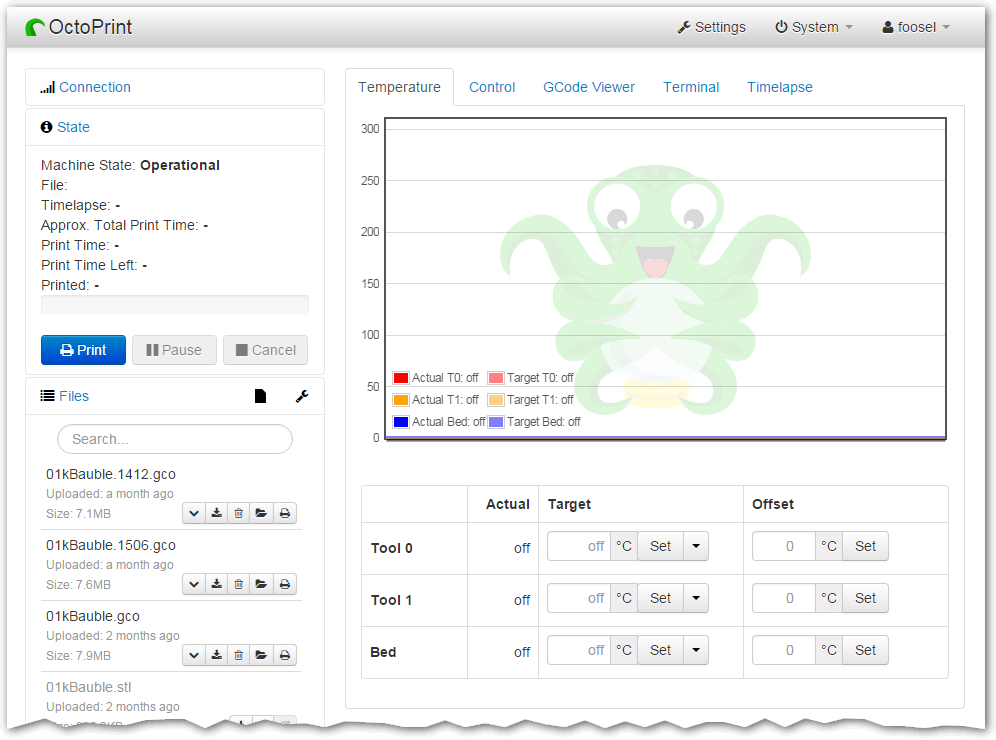
OctoPrint provides a snappy web interface for controlling consumer 3D printers.
Control and monitor every aspect of your 3D printer and your printing jobs right from within your browser.
This is free and open source software.
Key Features
- Full remote control & monitoring:
- Access the embedded webcam feed and watch remotely how your printer is creating your newest thing.
- Get constant feedback regarding the current progress of your print job.
- Take a look at the integrated GCODE visualizer to see a rendition of the GCODE you are currently printing.
- Keep an eye on the temperatures of your hotends and print bed and adapt them on the fly.
- Move the print head along all axes, extrude, retract or just define your own custom controls.
- Start, stop or just pause your current print job, you are in full control at any time.
- Compatible with most of the available consumer 3D printers. And its powerful plugin system allows extending its functionality in various ways. To name a few:
- Visualize your bed leveling via Bed Level Visualizer.
- Create stunning timelapses that seem to just grow out of the print bed using Octolapse.
- Completely control the theming of OctoPrint’s UI with Themeify.
- Easily update your printer’s firmware right from within OctoPrint via Firmware Updater.
- Add support for specific printers like older Flashforge printers or older Makerbots or current Flashforge, Dremel or PowerSpec machines.
Website: github.com/OctoPrint/OctoPrint
Support:
Developer: OctoPrint developers
License: GNU Affero General Public License v3.0
OctoPrint is written in Python and JavaScript. Learn Python with our recommended free books and free tutorials. Learn JavaScript with our recommended free books and free tutorials.
Related Software
| 3D Printer Tools | |
|---|---|
| Orca Slicer | Forked from BambuStudio, itself a fork of PrusaSlicer, itself a fork of Slic3r |
| PrusaSlicer | Takes 3D models (STL, OBJ, AMF) and converts them into G-code instruction |
| Cura | State-of-the-art slicer app to prepare your 3D models for your 3D printer |
| SuperSlicer | G-code generator for 3D printers |
| Slic3r | Toolpath generator for 3D printers |
| BambuStudio | Bbills itself as a cutting-edge, feature-rich slicing program |
| Printrun | Suite of hosts for 3D printers and other CNC machines |
| MatterControl | Track, preview, and print your 3D parts |
| mslicer | Currently only ELEGOO .goo files can be generated |
| OctoPrint | Based on BambuStudio |
| Creality Print | 3D slicer for Creality printers |
| ElegooSlicer | Slicer compatible with most FDM printers |
| preFlight | Building on the Slic3r legacy as a spiritual successor to PrusaSlicer |
| QIDIStudio | Snappy web interface for controlling consumer 3D printers |
Read more in the software roundup.
 Explore our comprehensive directory of recommended free and open source software. Our carefully curated collection spans every major software category. Explore our comprehensive directory of recommended free and open source software. Our carefully curated collection spans every major software category.This directory is part of our ongoing series of informative articles for Linux enthusiasts. It features hundreds of detailed reviews, along with open source alternatives to proprietary solutions from major corporations such as Google, Microsoft, Apple, Adobe, IBM, Cisco, Oracle, and Autodesk. You’ll also find interesting projects to try, hardware coverage, free programming books and tutorials, and much more. Discovered a useful open source Linux program that we haven’t covered yet? Let us know by completing this form. |