
What is seen on your display and what the image should look like can be two quite different things.
If you value image quality and accuracy, calibration of your monitor will be important. Anyone involved in digital photography, graphic design or artwork will recognize the importance that their monitor is producing the best results, showing true colors and black levels.
The objective when calibrating a monitor is to ensure the monitor has color references known by everyone (humans and software). This will mean the colors are represented accurately on your monitor.
Generally speaking, using a color measurement instrument to calibrate your display will result in a better calibration compared to a visual calibration. The following open source tools are invaluable for anyone looking for accurate color reproduction.
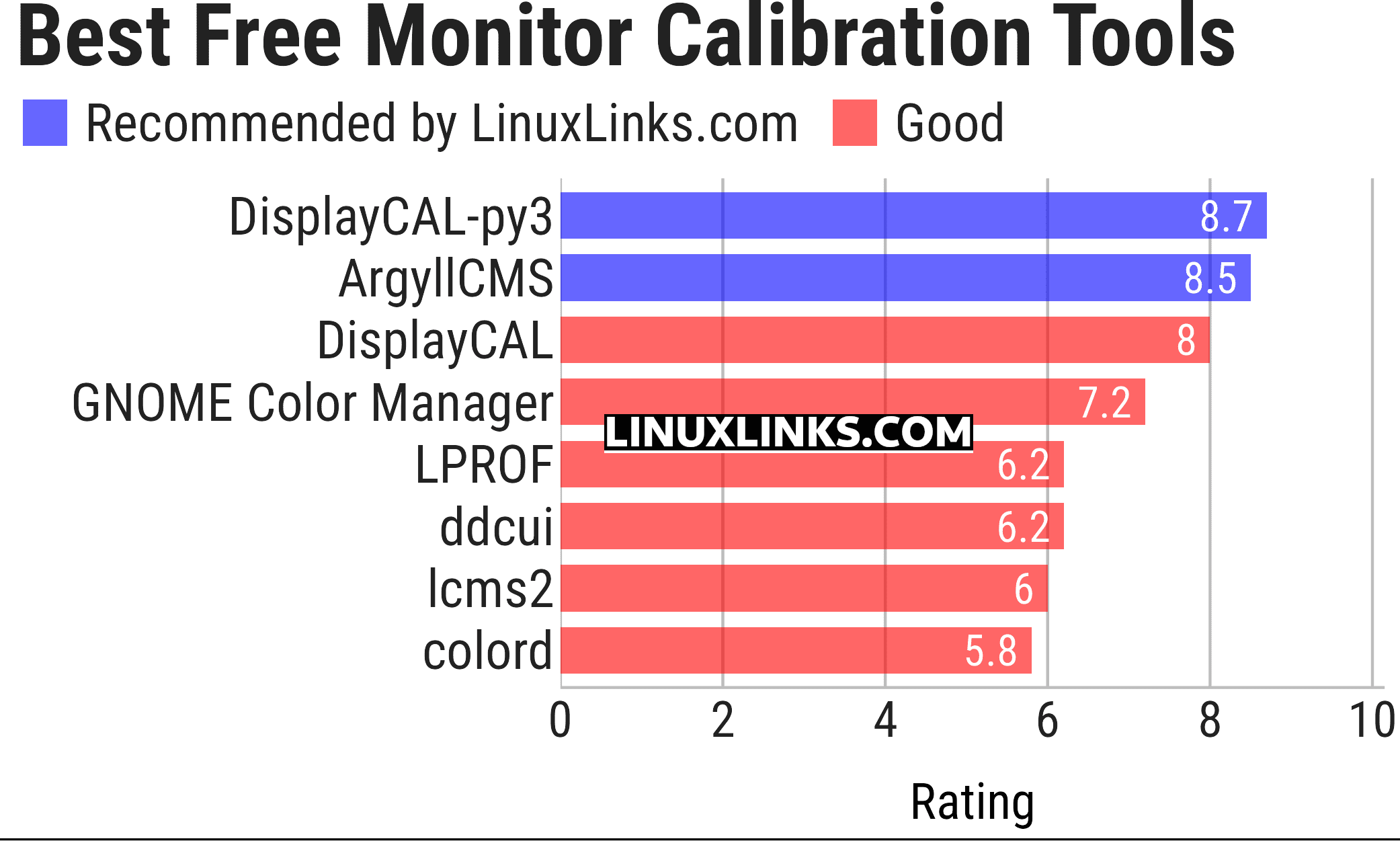
We make the following recommendations captured in a legendary LinuxLinks-style ratings chart.
Let’s explore the monitor calibration tools at hand. For each title we have compiled its own portal page, a full description with an in-depth analysis of its features, together with links to relevant resources.
| Calibrate your Monitor with these Open Source Tools | |
|---|---|
| DisplayCAL-py3 | A fork of DisplayCAL with Python 3 support |
| ArgyllCMS | ICC compatible color management system |
| DisplayCAL | Display calibration and profiling |
| Gnome Color Manager | Utilities for color management to be used in the GNOME desktop |
| LPROF | Color profiler that creates ICC compliant profiles |
| ddcui | Graphical user interface for ddcutil |
| lcms2 | Small-footprint color management engine |
| colord | Manage, install and generate colour profiles |
This article has been updated to reflect the changes outlined in our recent announcement.
 Explore our comprehensive directory of recommended free and open source software. Our carefully curated collection spans every major software category. Explore our comprehensive directory of recommended free and open source software. Our carefully curated collection spans every major software category.This directory is part of our ongoing series of informative articles for Linux enthusiasts. It features hundreds of detailed reviews, along with open source alternatives to proprietary solutions from major corporations such as Google, Microsoft, Apple, Adobe, IBM, Cisco, Oracle, and Autodesk. You’ll also find interesting projects to try, hardware coverage, free programming books and tutorials, and much more. Know a useful open source Linux program that we haven’t covered yet? Let us know by completing this form. |
Please read our Comment Policy before commenting.