

Almost everything that happens on a Linux system is logged in some way. These log files traditionally were stored plain ASCII text in a standard log file format, although they can be in binary format. Most logs are stored in the traditional system log subdirectory /var/log. Logs keep track of events, such as system errors, user activities, and transaction histories. These log files are everywhere.
For many years system and kernel logs were handled by a utility called syslogd. Most Linux-based operating systems have since moved to systemd, which has a journal. It’s a giant log file for the whole system. Various software and services write their log entries into systemd’s journalctl.
Applications capture an enormous amount of information to log files, especially as a server may generate multiple logs. It is important to review log files to obtain feedback about the activity and performance of the server, and to identify hints to solve any problems that may arise. Logs are essential for system auditing, debugging and maintenance.
We can use the tail utility to monitor a plain text log file. But it’s often not that effective. An administrator of a system can suffer from information overload. Reviewing the log files in an efficient way can be a very time consuming task. There’s a need for an alternative.
Linux has a good range of logging tools, although many are designed for large-scale deployments. They need to be installed and configured for servers. Instead of a belt and braces approach, there’s still a need for a good log file analyzer for the terminal.
The software featured in this article are all released under an open source license, and offer a lot more functionality than tail. Here’s our verdict captured in a legendary LinuxLinks-style rating chart.
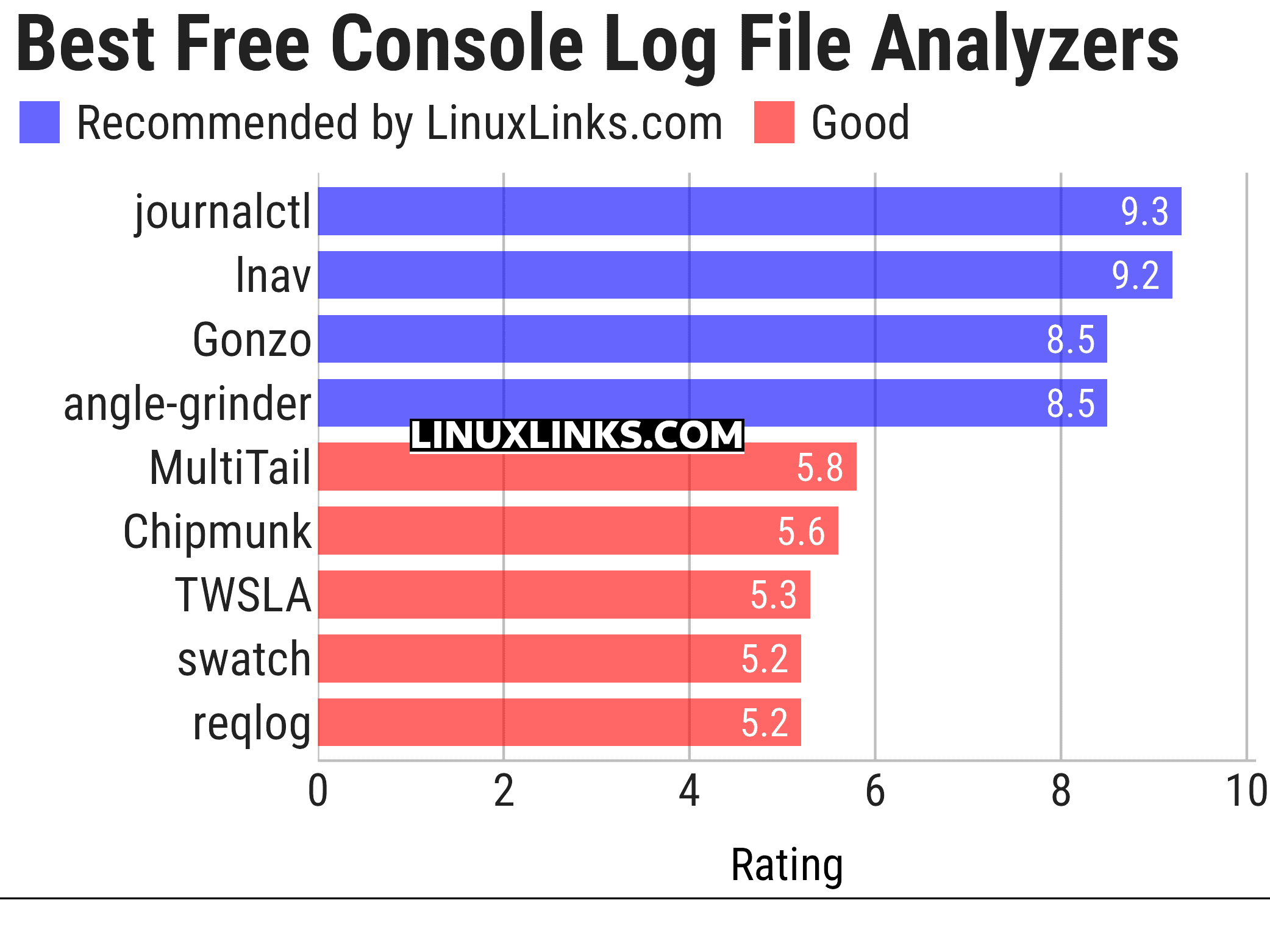
Click the links in the table below to learn more about each tool.
| Console Log File Analyzers | |
|---|---|
| journalctl | Query and display messages from the journal |
| lnav | Curses-based tool for viewing and analyzing log files |
| Gonzo | Go based TUI for log analysis |
| angle-grinder | Slice and dice logs |
| MultiTail | Monitor logfiles and command output in multiple windows |
| Chipmunk | Fast logfile viewer that can deal with huge logfiles (>10 GB) |
| TWSLA | Work with large log sets without deploying a heavier log management stack |
| Swatch | Simple Log Watcher is a useful tool to monitor just about any type of log |
| reqlog | Search, track and stream logs |
This article has been updated to reflect the changes outlined in our recent announcement.
 Explore our comprehensive directory of recommended free and open source software. Our carefully curated collection spans every major software category. Explore our comprehensive directory of recommended free and open source software. Our carefully curated collection spans every major software category.This directory is part of our ongoing series of informative articles for Linux enthusiasts. It features hundreds of detailed reviews, along with open source alternatives to proprietary solutions from major corporations such as Google, Microsoft, Apple, Adobe, IBM, Cisco, Oracle, and Autodesk. You’ll also find interesting projects to try, hardware coverage, free programming books and tutorials, and much more. Know a useful open source Linux program that we haven’t covered yet? Let us know by completing this form. |
Please read our Comment Policy before commenting.