

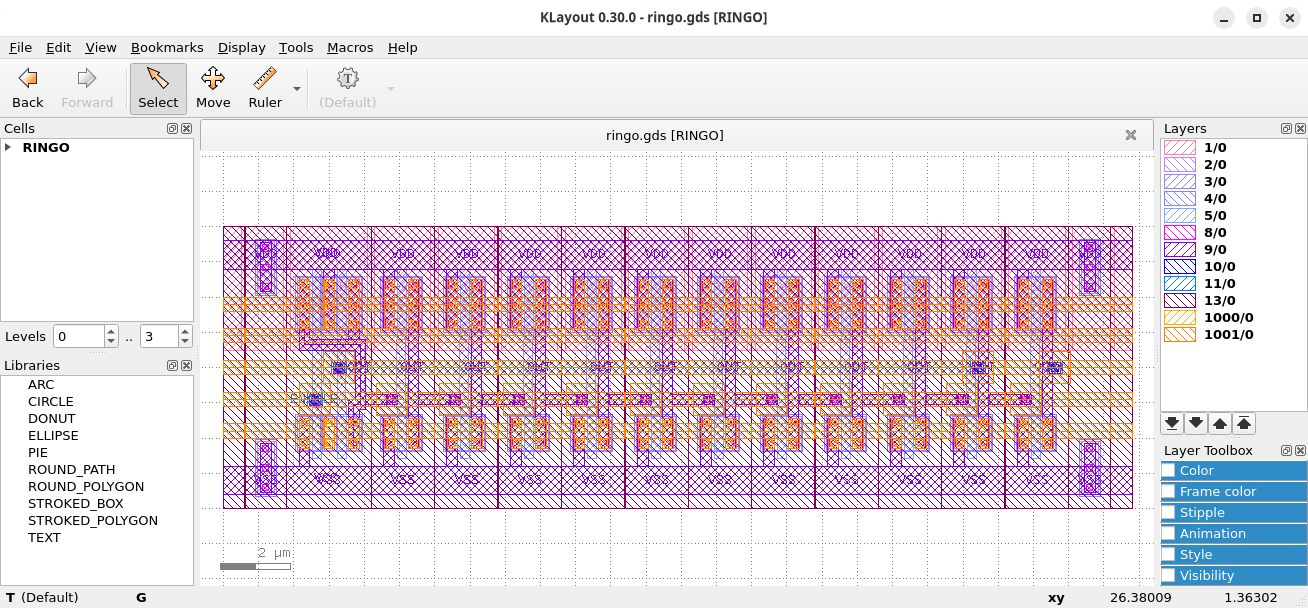
KLayout is a GDS and OASIS file viewer and editor. This is a mask layout viewer and editor for the chip design engineer.
This is free and open source software.
Key Features
- General:
- Fast and accurate: fast loading and drawing.
- Support of GDS and OASIS file formats with automatic uncompression of zlib compatible formats.
- Full support of properties.
- Full 64 bit support on Linux.
- Extensible and configurable to a large degree by custom Ruby or Python scripts.
- Integrated development environment for Ruby and Python scripts.
- Viewer:
- Overlay capabilities: multiple layouts can be loaded into one window.
- Very flexible layer configuration: many display options including choice of fill pattern and different frame and fill colors. Animation, transparency, dimming/highlighting …
- Layer grouping: the display properties of a group of layers can be changed at once.
- Advanced layer display attributes: layers can be named, they can carry additional transformations, select certain hierarchy levels or select shapes by their properties.
- Copy and paste of layers attributes to other panels.
- Drawing order: select the layer that is show on top.
- Descend into hierarchy: show a cell embedded into it’s context.
- Flexible rulers: unlimited count, flexible display styles. Multiple templates can be configured, rules can be edited (move, delete, copy & paste).
- Shape and instance browsers.
- Bookmarks, various zoom modes, mouse wheel support, screenshot function …
- Undo/redo on layer properties, for rulers …
- Save: save layout or parts (cells, layers) of it to a different format, with scaling or different database unit.
- Image overlay capabilities: image files (i.e. jpg, png, gif) can be loaded and placed at an arbitrary position in the layout.
- Marker browser: certain error report files can be loaded and a browser tool is provided.
- Global transformation to flip/rotate image.
- Editor:
- Smart drawing functions with many options: angle constraints, grid …
- True, in-place editing in subcells, variant building function.
- Unlimited undo/redo.
- Smart partial editing function to stretch shapes, move edges or vertices.
- Copy and paste of shapes and whole cells, even to other layouts.
- Many advanced editing functions: hierarchical operations, booleans, clip, corner rounding, sizing, alignment, layer operations …
- Support for external libraries dynamically bound to a layout.
- Parametrizable cells (PCells).
- A variety of useful utility functions: a XOR tool, a layout diff tool, a fill tool …
- A DRC feature with a basic set of verification and layer manipulation functions.
- A LVS feature.
- A powerful search and replace feature with a special query language.
- A technology package manager.
- An add-on package manager (“Salt”).
Website: www.klayout.de
Support:
Developer: Matthias Köfferlein
License: GNU General Public License v2.0
KLayout is written in C++. Learn C++ with our recommended free books and free tutorials.
Related Software
| Electronic Design Automation | |
|---|---|
| gEDA | Full suite and toolkit of Electronic Design Automation tools |
| Qucs-S | Graphical interface for SPICE circuit simulation engines |
| Digital | Digital logic designer and circuit simulator |
| LibrePCB | Software to develop printed circuit boards |
| Fritzing | Suited to the needs of designers and artists |
| Magic | VLSI layout editor, extraction, and DRC tool |
| KiCad | Software suite for the creation of electronic schematics |
| QElectroTech | Design electric diagrams |
| PyOPUS | Library for simulation-based optimization of arbitrary systems |
| KTechLab | IDE for electronic and PIC microcontroller circuit design and simulation |
| KLayout | GDS and OASIS file viewer and editor |
| DIYLC | Circuit layout and schematic drawing tool |
| Horizon EDA | Supports an integrated end-to-end workflow for printed circuit board design |
| xschem | Schematic editor for VLSI/Asic/Analog custom designs |
| Ringdove | EDA suite of multiple software components |
| Electric | The Electric VLSI Design System |
| FidoCadJ | Offers a large library of electronics and electronic engineering symbols |
| Lepton | Suite of software tools for designing electronics |
| Kactus2 | IP-XACT based SoC design and IP integration tool |
Read our verdict in the software roundup.
 Explore our comprehensive directory of recommended free and open source software. Our carefully curated collection spans every major software category. Explore our comprehensive directory of recommended free and open source software. Our carefully curated collection spans every major software category.This directory is part of our ongoing series of informative articles for Linux enthusiasts. It features hundreds of detailed reviews, along with open source alternatives to proprietary solutions from major corporations such as Google, Microsoft, Apple, Adobe, IBM, Cisco, Oracle, and Autodesk. You’ll also find interesting projects to try, hardware coverage, free programming books and tutorials, and much more. Discovered a useful open source Linux program that we haven’t covered yet? Let us know by completing this form. |
Please read our Comment Policy before commenting.