
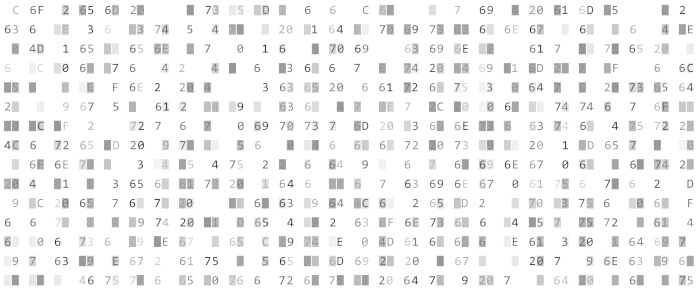
GHex allows the user to load data from any file, view and edit it in either hexadecimal or ASCII format.
This program is useful for debugging problems with object code or encodings.
GHex is free and open source software.
Key Features
- Find and replace functions.
- Conversion between binary, octal, decimal and hexadecimal values.
- Uses an alternative, user-configurable MDI concept that lets users edit multiple documents with multiple views of each.
- Interface offers the following elements:
- Menubar – contains all the commands that you need to work with files in GHex.
- Cursor offsets column – distance between the beginning of the file and the first byte in each line. By default, GHex displays the cursor offsets column to the left of the hexadecimal view.
- Display pane on left side – displays a hexadecimal view of the file.
- Display pane on right side – displays an ASCII view of the file.
- Type conversion dialog – displays the value of the selected character in several different numeric types
Website: gitlab.gnome.org/GNOME/ghex
Support:
Developer: The GHex authors
License: GNU General Public License, either version 2 of the License, (or at your option) any later version
GHex is written in C. Learn C with our recommended free books and free tutorials.
Related Software
| GUI Hex Editors | |
|---|---|
| ImHex | Hex editor with many advanced features |
| Hexerator | Hex editor focused on binary file exploration and aiding pattern recognition |
| rehex | Hex editor for reverse engineering |
| Okteta | Simple KDE editor for the raw data of files with good range of features |
| GHex | Hex editor for GNOME |
| wxHexEditor | Hex and disk editor which uses the wxWidgets GUI libraries |
| Fhex | Aims to be a lightweight yet full-featured hex editor. |
| wxMEdit | Improved version of the discontinued MadEdit |
| HexWalk | Hex editor, viewer, and analyzer |
| BinEd | Editor for binary data (hex viewer/editor) written in Jav |
| Q22 | Coss-platform binary file editor |
| Bless | Gtk# hex editor |
| Chirurgien | Helps understand and manipulate file formats |
Read our verdict in the software roundup.
 Explore our carefully curated directory of recommended free and open source software, covering every major software category. Explore our carefully curated directory of recommended free and open source software, covering every major software category.The directory forms part of our extensive collection of articles for Linux enthusiasts. It includes hundreds of detailed reviews, together with free and open source alternatives to proprietary software from companies such as Google, Microsoft, Apple, Adobe, IBM, Cisco, Oracle, and Autodesk. LinuxLinks also covers interesting projects worth exploring, Linux-compatible hardware, free programming books and tutorials, and much more. Know a useful free and open source Linux application that we haven’t covered? Tell us about it using our submission form. |
Please read our Comment Policy before commenting.