

In Operation
Here’s an image of Gespeaker in action.
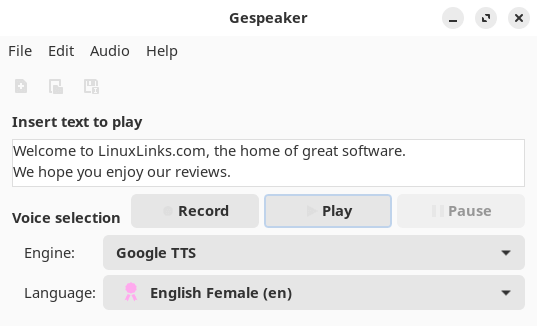
It sports a very simple interface. We can enter text or load a text file. Then choose the engine, and the voice. In the image above, we’re not using the eSpeak engine, but Google TTS instead.
There isn’t recording functionality, so we captured the output with Audacity, a popular audio editing and recording app.
Here’s the output with Google TTS engine. It sounds pretty good although somewhat laboured.
Here’s the output with the eSpeak engine. It sounds very robotic in comparison.
The next two samples are from Google TTS, and eSpeak engine respectively. The third sample is from Tortoise, software which uses deep learning.
Google TTS engine
eSpeak engine
Tortoise engine with high quality preset
The quality from Tortoise is head and shoulders better, even though pronunciation of the names of Linux distros is not handled well compared to Google TTS or eSpeak.
Summary
Gespeaker is a very simple frontend. It supports a few engines, but the quality of the generated speech is significantly worse than samples generated with equivalent software that uses deep-learning such as Tortoise or TTS. But that’s not really a criticism of Gespeaker.
We’d love the project to add support for Tortoise or TTS.
Recording functionality is not yet implemented.
eSpeakNG (Next Generation) is a continuation of the original developer’s project with more feedback from native speakers. Unfortunately, Gespeaker doesn’t support eSpeakNG.
Website: www.muflone.com/gespeaker
Support: GitHub Code Repository
Developer: Fabio Castelli
License: GNU General Public License v3.0
Gespeaker is written in Python. Learn Python with our recommended free books and free tutorials.
Pages in this article:
Page 1 – Introduction and Installation
Page 2 – In Operation and Summary
Related Software
| Speech Tools | |
|---|---|
| Piper | Fast, local neural text to speech system |
| Tortoise | Multi-voice text-to-speech system trained with an emphasis on quality |
| Coqui TTS | Offers pretrained models in more than 1,100 different languages |
| Bark | Transformer-based text-to-audio model. |
| Dia | 1.6B parameter text to speech model |
| Festival | General multi-lingual speech synthesis system |
| PraatSpeechAnalyser | Software for speech analysis and synthesis |
| Speech Note | Speech to Text, Text to Speech and Machine Translation |
| Mimic 3 | Lightweight Text to Speech engine |
| OrcaScreenReader | Scriptable screen reader |
| MeloTTS | High-quality multi-lingual text-to-speech library |
| Parler-TTS | Lightweight text-to-speech (TTS) model |
| Flite | Small, fast run time text to speech synthesis engine |
| RHVoice | Gives the visually impaired a synthesis voice with their screen reader |
| eSpeak NG | Continuation of the eSpeak project |
| eSpeak | Speech synthesizer using a formant synthesis method |
| Orpheus-TTS-FastAPI | High-performance self-hosted text-to-speech server |
| Gespeaker | GTK-based frontend for eSpeak |
| VoiceGen | Simple text-to-speech application |
| Glate | Google Translator and Text To Speech Service |
Read our verdict in the software roundup.
 Explore our comprehensive directory of recommended free and open source software. Our carefully curated collection spans every major software category. Explore our comprehensive directory of recommended free and open source software. Our carefully curated collection spans every major software category.This directory is part of our ongoing series of informative articles for Linux enthusiasts. It features hundreds of detailed reviews, along with open source alternatives to proprietary solutions from major corporations such as Google, Microsoft, Apple, Adobe, IBM, Cisco, Oracle, and Autodesk. You’ll also find interesting projects to try, hardware coverage, free programming books and tutorials, and much more. Discovered a useful open source Linux program that we haven’t covered yet? Let us know by completing this form. |
Please read our Comment Policy before commenting.