

Last Updated on March 8, 2026
Fortress is a command-line file explorer written in modern Fortran with fzf integration and git binds for fast staging and committing.
Shell integration is automatically set up for bash and fish.
This is free and open source software.
Key Features
- File Explorer:
- Dual-pane display inspired by Ranger/MC (parent dir 30% | current dir 70%).
- Real filesystem navigation with directory reading.
- Smart selection memory – remembers position when navigating.
- Visual hierarchy – dimmed parent pane, active current pane.
- Color-coded files:
- Directories: Blue + bold.
- Executable files: Green.
- Dotfiles: Grey.
- Regular files: White.
- Smooth scrolling – viewport follows cursor automatically.
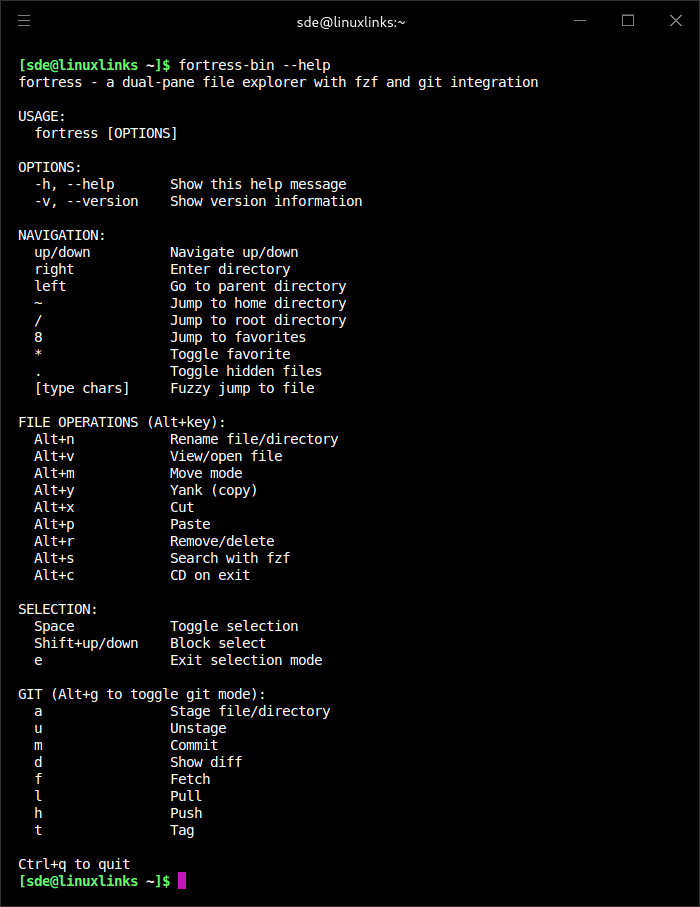
- Fuzzy finding with fzf – press ‘s’ to search recursively and jump to files.
- CD on exit – press ‘c’ to navigate your shell to selected directory.
- Dotfiles toggle – press ‘.’ to show/hide dotfiles.
- File Operations:
- Move mode – press ‘v’ to enter move mode, navigate to destination, ‘v’ to confirm, ‘q’ to cancel.
- Rename – press ‘n’ to rename files or directories.
- Delete – press ‘r’ to remove/delete with confirmation prompt.
- Shows yellow warning for directories.
- Requires explicit ‘y’ confirmation.
- Handles both files and directories recursively.
- Open files – press ‘o’ to open with default application (respects $EDITOR/$VISUAL).
- Clipboard operations (vim-style):
- Copy – press ‘y’ to yank (copy) file/directory to clipboard.
- Cut – press ‘x’ to cut file/directory to clipboard.
- Paste – press ‘p’ to paste:
- On directory: pastes INTO that directory.
- On file: pastes NEXT TO that file (into current directory).
- On “.”: pastes into current directory.
- On “..”: pastes into parent directory.
- Copy clipboard persists for multiple pastes.
- Cut clipboard auto-clears after paste.
- Smart duplicate handling – automatically appends -1, -2, etc. if destination exists.
- USAGE.md → USAGE-1.md, USAGE-2.md, etc.
- Works with any file extension or directories.
- Works on files and directories – all operations support recursive directory handling.
Website: github.com/FortranGoingOnForty/fortress
Support:
Developer: Matthew Wolffe
License: MIT License
Fortress is written in Fortran. Learn Fortran with our recommended free books and free tutorials.
Related Software
| TUI File Explorers | Language | License |
|---|---|---|
| NERDTree | VimL | WTFPL License |
| xplr | Rust | MIT License |
| nvim-tree | Lua | GNU General Public License v3.0 |
| Treemacs | Emacs Lisp | GNU General Public License v3.0 |
| browsr | Python | MIT License |
| termscp | Rust | MIT License |
| vim-fern | VimL | MIT License |
| tere | Rust | European Union Public License 1.2 |
| CHADTree | Python | GNU General Public License v3.0 |
| FileSSH | Rust | MIT License |
| Rust-Traverse | Rust | MIT License |
| fex | Zig | GNU General Public License v3.0 |
| transgender | Rust | BSD 2-Clause “Simplified” License |
| rovr | Python | MIT License |
| StygianSift | Rust | GNU Affero General Public License v3.0 |
| Fortress | Fortran | MIT License |
| runa | Rust | MIT License |
| sdn | C++ | 0BSD License |
| twf | Go | Developer did not reply to license info request |
| kupo | Python | Developer did not reply to license info request |
| Hop | Python | MIT License |
| FTB | C++ | MIT License |
| faint | Shell | GNU General Public License v2.0 |
Read our verdict in the software roundup.
 Explore our comprehensive directory of recommended free and open source software. Our carefully curated collection spans every major software category. Explore our comprehensive directory of recommended free and open source software. Our carefully curated collection spans every major software category.This directory is part of our ongoing series of informative articles for Linux enthusiasts. It features hundreds of detailed reviews, along with open source alternatives to proprietary solutions from major corporations such as Google, Microsoft, Apple, Adobe, IBM, Cisco, Oracle, and Autodesk. You’ll also find interesting projects to try, hardware coverage, free programming books and tutorials, and much more. Know a useful open source Linux program that we haven’t covered yet? Let us know by completing this form. |