
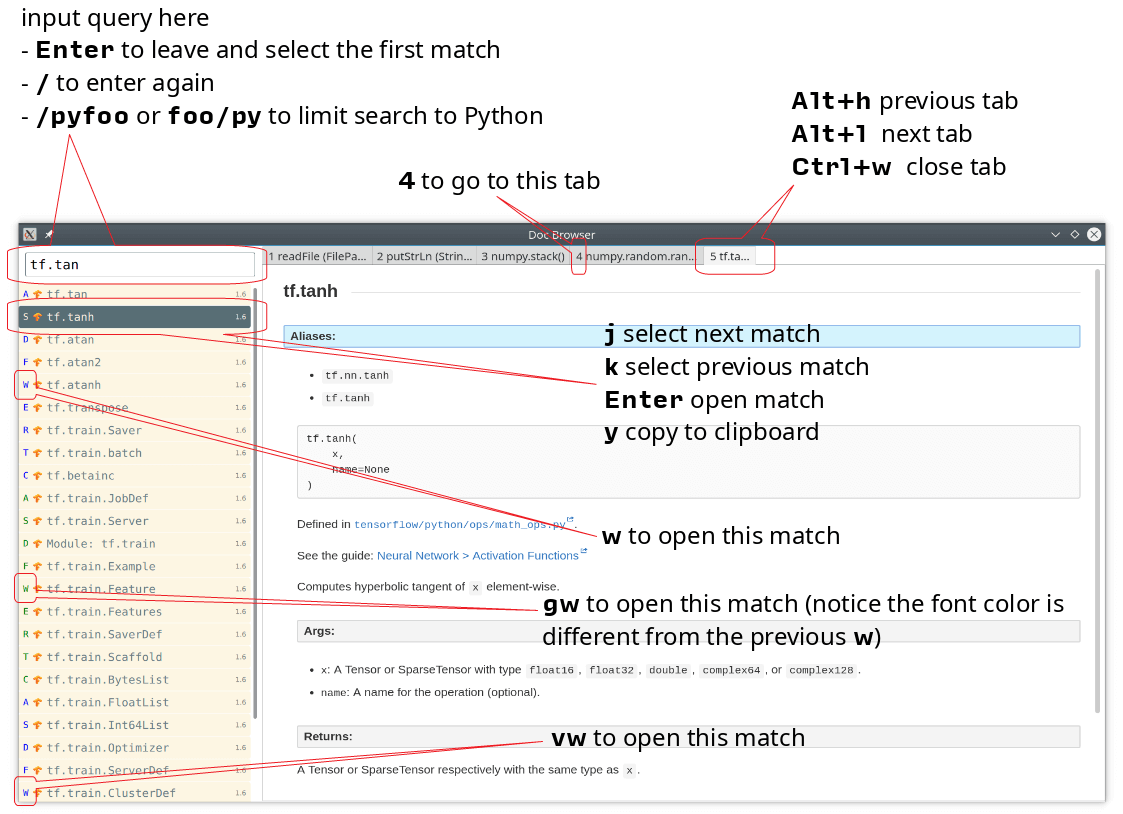
Doc Browser is an API documentation browser with support for DevDocs, Dash and Hoogle.
There’s offline support. The documentation files themselves are downloaded to your disk when doc-browser –install-devdocs, doc-browser –install-dash or doc-browser –install-hoogle is invoked, however, to display the documentation, some additional Cascading Style Sheet or JavaScript files are needed, some of these are not packaged with the documentation files.
This is free and open source software.
Key Features
- Native desktop application.
- Works offline.
- Near real-time fuzzy search. For example, it it takes less than 50ms to search through 39,499 entries.
- Easy-to-type shortcuts.
- DevDocs support.
- Dash support (incomplete) – Dash’s docset works offline out of the box.
- Hoogle integration.
- Customizable.
- HTTP interfaces – interact with this application using HTTP requests.
- Neovim integration. Editor integration is just a HTTP request away.
Website: github.com/qwfy/doc-browser
Support:
Developer: Incomplete
License: Mozilla Public License 2.0
Doc Browser is written in Haskell and QML. Learn Haskell with our recommended free books and free tutorials.
Related Software
| API Documentation Browsers | |
|---|---|
| DevDocs | API documentation browser written in Ruby and JavaScript |
| Zeal | Simple offline documentation browser |
| Qt Assistant | Tool for viewing on-line documentation in Qt help file format |
| Biblioteca | Browse and read GNOME documentation |
| Devhelp | Developer tool for browsing and searching API documentation |
| dedoc | Terminal-based viewer for DevDoc |
| dasht | Search API docs offline in your terminal or browser |
| Ferritin | Terminal-based Rust documentation viewer |
| quickDocs | Developer docs reader |
| Doc Browser | API documentation browser with support for DevDocs, Dash and Hoogle |
Read our verdict in the software roundup.
 Explore our comprehensive directory of recommended free and open source software. Our carefully curated collection spans every major software category. Explore our comprehensive directory of recommended free and open source software. Our carefully curated collection spans every major software category.This directory is part of our ongoing series of informative articles for Linux enthusiasts. It features hundreds of detailed reviews, along with open source alternatives to proprietary solutions from major corporations such as Google, Microsoft, Apple, Adobe, IBM, Cisco, Oracle, and Autodesk. You’ll also find interesting projects to try, hardware coverage, free programming books and tutorials, and much more. Discovered a useful open source Linux program that we haven’t covered yet? Let us know by completing this form. |
Please read our Comment Policy before commenting.