
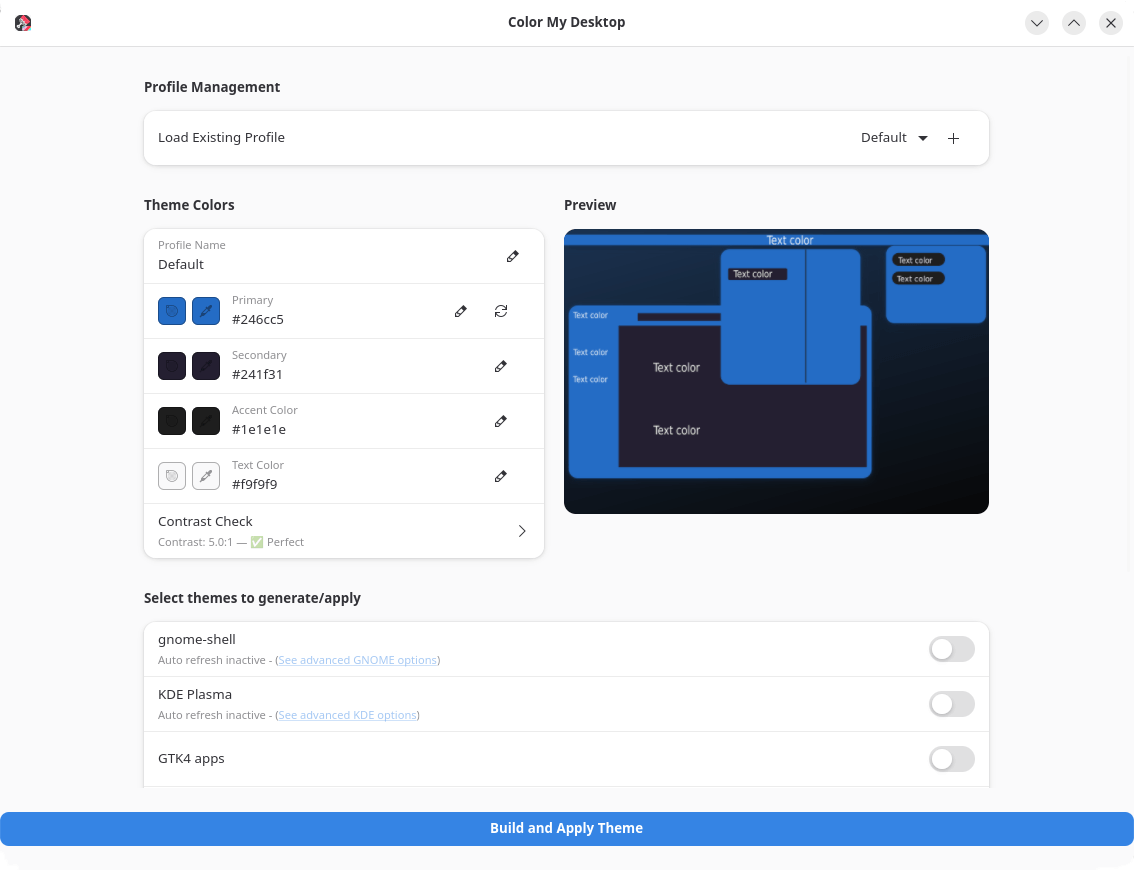
Color My Desktop is an easy to use tool for creating, managing, and applying custom color palettes to custom generated themes for the gnome-shell/ KDE-Plasma / GTK4 apps.
It also includes options for creating Vesktop, Zen-browser, and YouTube themes with your colors, allowing for easy and uniform customization of your desktop environment.
This is free and open source software.
Key Features
- Picking hex color values for
- Primary (main color used on top bar, window bar, and main window elements)
- Secondary (used for window backgrounds and some accents)
- Tertiary (used mostly for accents and some backgrounds)
- Text color.
- Apply colors to / create themes for
- GNOME.
- KDE-Plasma.
- Zen-browser.
- Youtube (Zen browser only).
- Vesktop.
- Papirus Icons.
- GTK4 Apps.
Website: github.com/Schwarzen/colormydesktop
Support:
Developer: Schwarzen
License: Apache License 2.0
Color My Desktop is written in Python. Learn Python with our recommended free books and free tutorials.
 Explore our comprehensive directory of recommended free and open source software. Our carefully curated collection spans every major software category. Explore our comprehensive directory of recommended free and open source software. Our carefully curated collection spans every major software category.This directory is part of our ongoing series of informative articles for Linux enthusiasts. It features hundreds of detailed reviews, along with open source alternatives to proprietary solutions from major corporations such as Google, Microsoft, Apple, Adobe, IBM, Cisco, Oracle, and Autodesk. You’ll also find interesting projects to try, hardware coverage, free programming books and tutorials, and much more. Know a useful open source Linux program that we haven’t covered yet? Let us know by completing this form. |