

There are many ways you can transfer files between computers. Here’s a few methods. We can transfer files between two hosts on Linux using the scp command. The scp command establishes a secure connection between the two hosts and it uses the standard SSH port in order to transfer files. Alternatively, many people send files as attachments although there are often limitations with this method. Or users frequently use file hosting services in the cloud, WebTorrents, a personal server, wormhole and many others.
We are always on the look out for easy, simple and secure ways to transfer files and folders.
This roundup focuses exclusively on terminal-based tools. GUI and web-based software are covered in separate roundups.
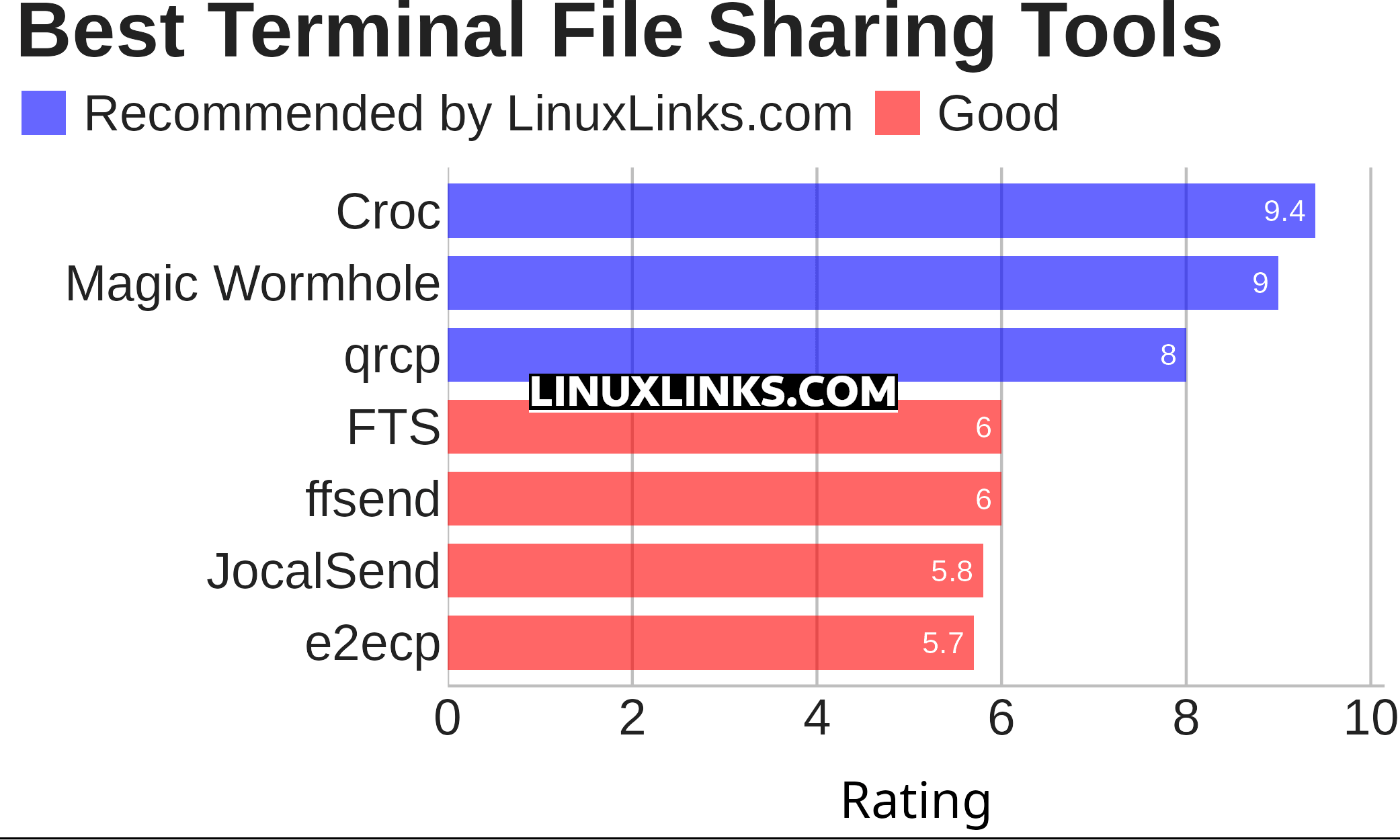
Here’s our verdict captured in a legendary LinuxLinks-style ratings chart. Only free and open source software is eligible for inclusion here.
Click the links in the table below to explore each tool.
| Terminal-Based File Sharing Tools | |
|---|---|
| Croc | Securely transfer files and folders |
| Magic Wormhole | Provides a library and a command-line tool named wormhole |
| qrcp | Transfer files over Wi-Fi from your computer to a mobile device |
| FTS | Fast local-network file transfers and communication |
| ffsend | Securely share files from the command line |
| JocalSend | TUI LocalSend implementation |
| e2ecp | Cross-platform tool |
 Explore our comprehensive directory of recommended free and open source software. Our carefully curated collection spans every major software category. Explore our comprehensive directory of recommended free and open source software. Our carefully curated collection spans every major software category.This directory is part of our ongoing series of informative articles for Linux enthusiasts. It features hundreds of detailed reviews, along with open source alternatives to proprietary solutions from major corporations such as Google, Microsoft, Apple, Adobe, IBM, Cisco, Oracle, and Autodesk. You’ll also find interesting projects to try, hardware coverage, free programming books and tutorials, and much more. Know a useful open source Linux program that we haven’t covered yet? Let us know by completing this form. |