

Desktop wiki applications offer a different approach to note taking from conventional note apps. Rather than storing information as a collection of separate, disconnected notes, they let you build a structured body of knowledge with linked pages, hierarchical organisation, and easy cross-referencing. This makes them particularly well suited to users who want to manage research, technical documentation, journals, project notes, or personal knowledge bases from a traditional desktop interface.
Linux is well served with note taking software, and desktop wiki GUI applications fill an important niche. They combine the convenience of a graphical interface with the organisational strengths of a wiki, helping users capture information and then expand it over time into something more coherent and searchable. Some emphasise simplicity and lightweight text editing, while others provide richer formatting, attachments, plugins, and more advanced notebook features.
In this article, we focus on the best free and open source desktop wiki GUI note applications for Linux. These programs make it easy to create, organise, and navigate interconnected notes, offering a practical way to keep everything from everyday thoughts to extensive reference material in one place.
Here’s our verdict captured in a legendary LinuxLinks-style ratings chart. Only free and open source software is eligible for inclusion here.
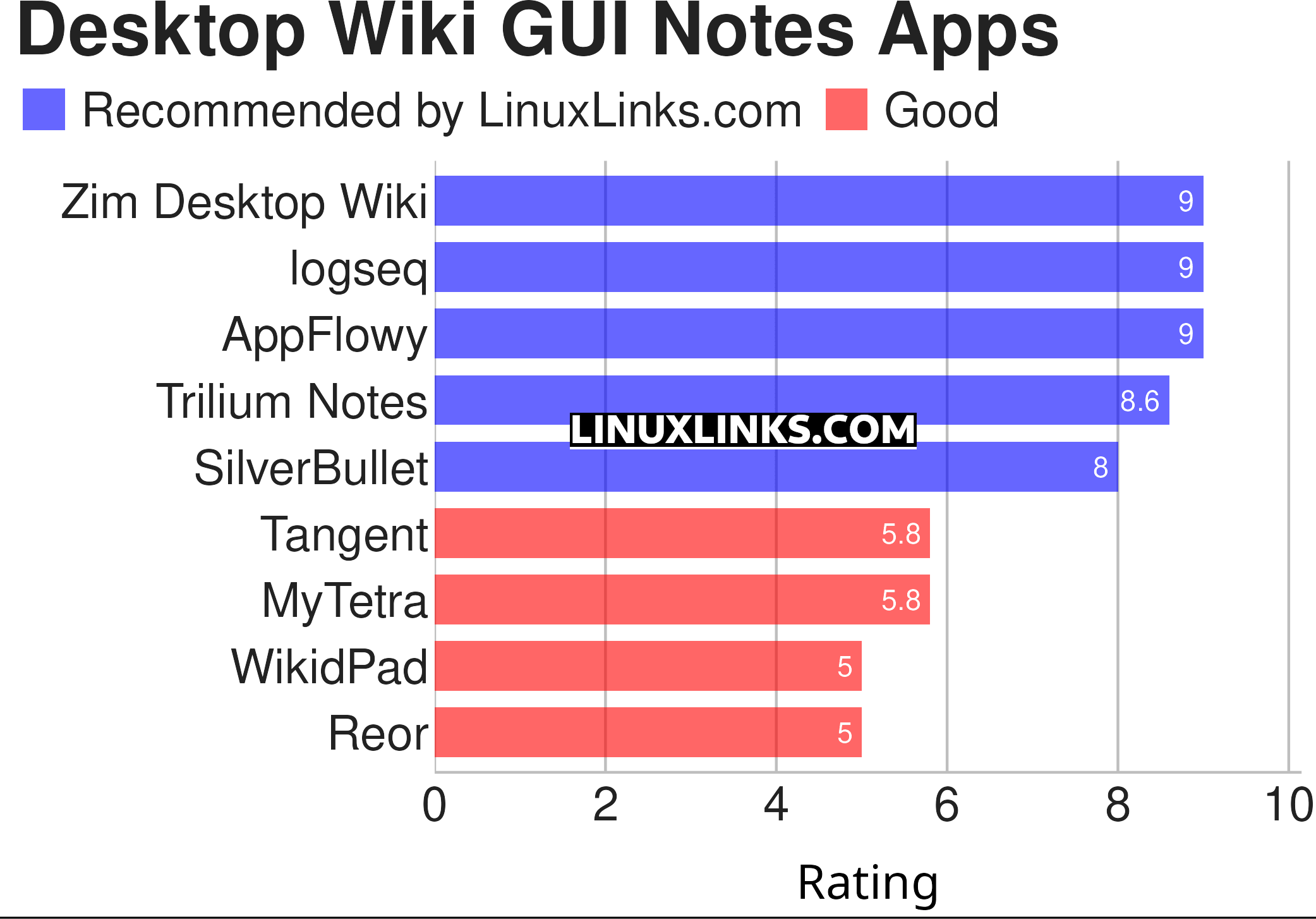
Click the links in the table below to learn all the apps.
| Desktop Wiki GUI Notes Apps | |
|---|---|
| Zim Desktop Wiki | Brings the concept of a wiki to your desktop |
| logseq | Privacy-first platform for knowledge management and collaboration |
| AppFlowy | Bring projects, wikis, and teams together with AI. |
| Trilium Notes | Hierarchical note taking application |
| SilverBullet | Note-taking application optimized for people with a hacker mindset |
| Tangent | Designed to let you write the way you think |
| MyTetra | Smart manager for information collecting |
| WikidPad | Wiki-like notebook for storing your thoughts, ideas, todo lists |
| Reor | AI note-taking app |
 Explore our comprehensive directory of recommended free and open source software. Our carefully curated collection spans every major software category. Explore our comprehensive directory of recommended free and open source software. Our carefully curated collection spans every major software category.This directory is part of our ongoing series of informative articles for Linux enthusiasts. It features hundreds of detailed reviews, along with open source alternatives to proprietary solutions from major corporations such as Google, Microsoft, Apple, Adobe, IBM, Cisco, Oracle, and Autodesk. You’ll also find interesting projects to try, hardware coverage, free programming books and tutorials, and much more. Know a useful open source Linux program that we haven’t covered yet? Let us know by completing this form. |