
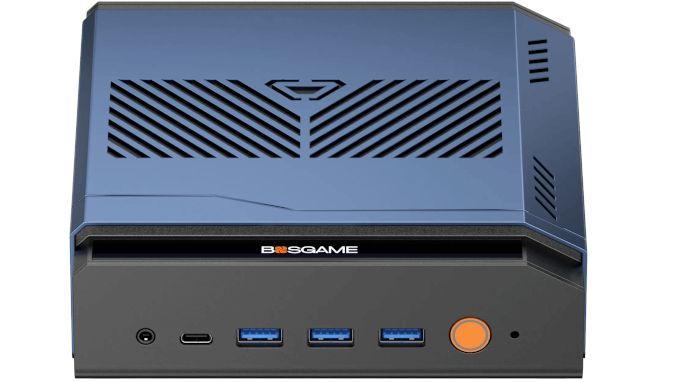
This is a new series looking at the BOSGAME M6 HX370 AI PC running Linux. In this series, I’ll examine every aspect of this Mini PC in detail from a Linux perspective. I’ll compare the machine with other machines, including desktop machines, to put the results into context.
The BOSGAME M6 HX370 AI PC is the latest addition to the wide range of mini PCs from BOSGAME. This mini PC is based on the AMD Ryzen AI 9 HX 370 processor with integrated AMD Radeon 890M iGPU. The processor has 12 cores (24 threads) with a CPU Mark of around 35104. The machine came with 32GB of RAM and a 1TB NVMe disk which will be sufficient for most use cases.
For this article in the series, I’ve run a series of benchmarks on the machine. Most of the tests use the Phoronix Test Suite. I’ll compare its results with 6 other mini PCs. These are the the BOSGAME M4 Plus (with AMD Ryzen 9 7940HS), Minisforum UM890 Pro (with AMD Ryzen 9 8945HS), the Minisforum AI X1 Pro (with AMD Ryzen AI 9 HX 370), ASRock NUC Box-255H (with Intel Core Ultra 7 255H), Intel NUC 13 Pro (with Intel i7-1360P), and an Intel N100 machine, together with two desktop machines with 10th and 12th generation Intel processors.
Note both the BOSGAME M6 HX370 and Minisforum AI X1 Pro have the same AMD Ryzen AI 9 HX 370 processor with integrated AMD Radeon 890M iGPU. When considering the benchmarks you also need to factor in the price difference between the machines. For the same spec machines the BOSGAME is currently priced at £665, whereas the Minisforum is considerably more expensive (its 32GB RAM and 1TB model is priced at £919). So the M6 is hundreds of pounds cheaper.
The N100 machine is extremely inexpensive; it’s included simply to put in perspective the performance improvement offered by the higher specification machines, to help you evaluate whether they are worth the extra outlay for your needs and requirements.
Each machine is tested with the same software and configured to ensure consistency between results. All power management functionality is disabled when running the benchmarks. Where available, I enabled Performance Mode in the Power Limit mode section in the BIOS. Every performance enhancing technique is used e.g. the performance governor is used for all tests, each machine was running with as few processes running as possible (e.g. no X11/Wayland is running except for the graphic benchmarks).
I’ll begin with some processor benchmarks.
$ phoronix-test-suite benchmark smallpt
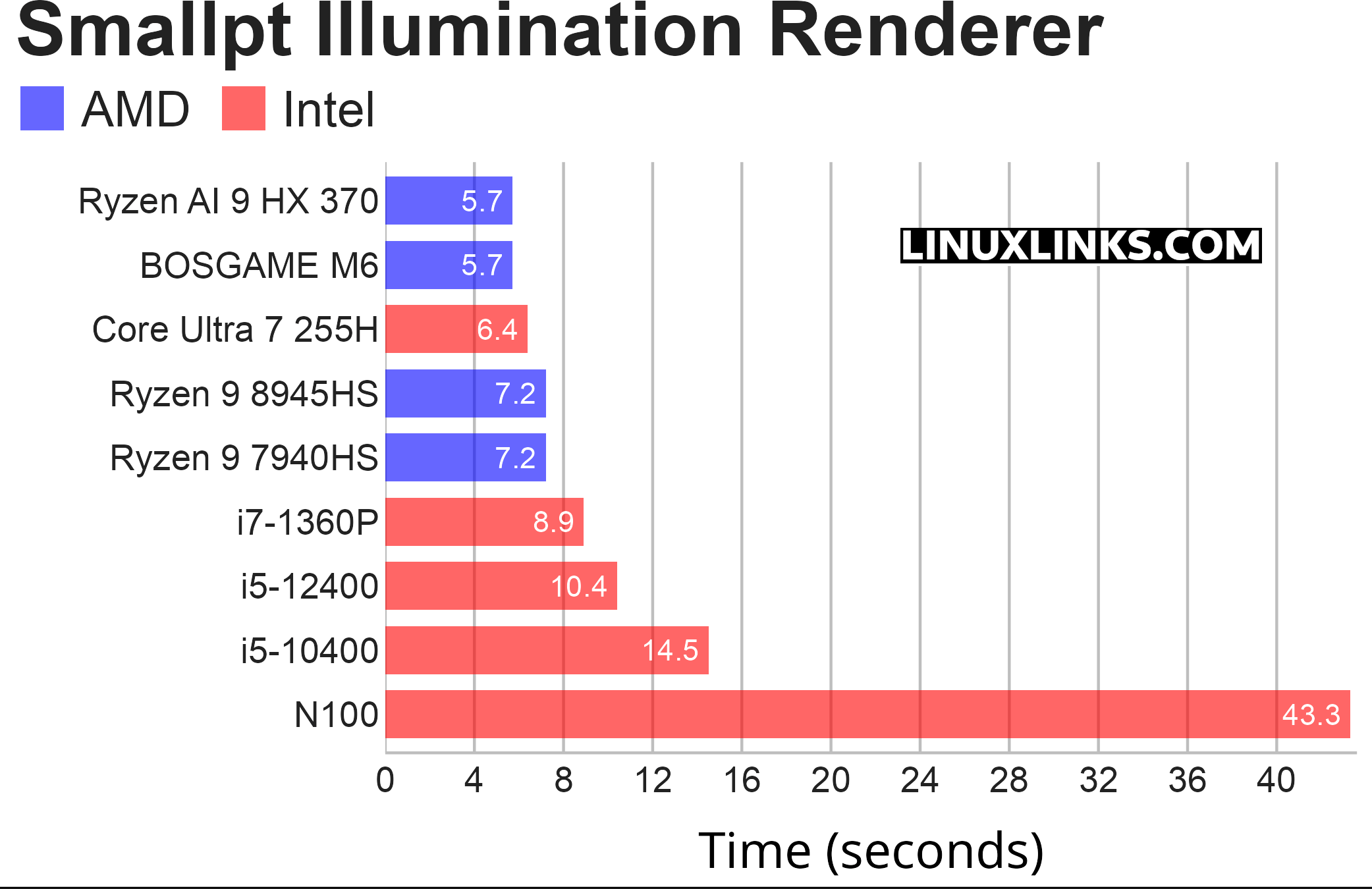
Smallpt is a C++ global illumination renderer written in less than 100 lines of code. Global illumination is done via unbiased Monte Carlo path tracing and there is multi-threading support via the OpenMP library. As this benchmark uses all cores, a CPU with many cores complete the test considerably quicker.
As anticipated, the BOSGAME M6 delivers results comparable to the Minisforum machine, given that they both feature the same processor. Considering that the M6 is significantly more affordable, it offers much better value for money. While the Minisforum does come with some additional features like WiFi 7 instead of WiFi 6e, an extra NVMe slot, and a fingerprint reader, these extras may not justify the higher price. For instance, if you really need three drives, USB4 offers faster transfer speeds than the third slot in the Minisforum machine.
The M6 finishes the test notably quicker than its other competitors, including ASRock’s NUC, which features the Intel Core Ultra 7 255H processor.
$ phoronix-test-suite benchmark compress-pbzip2
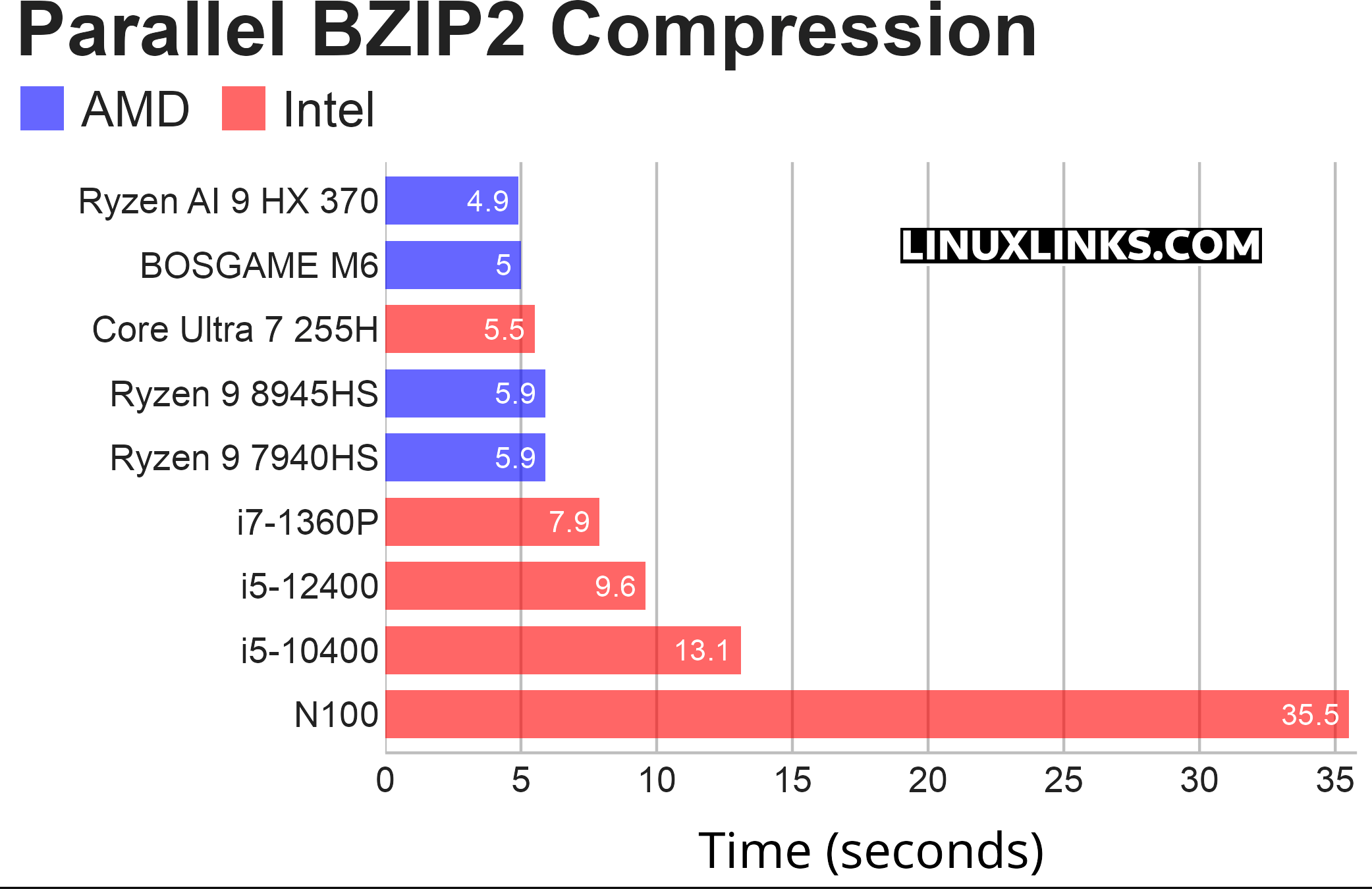
pbzip2 is a parallel implementation of the bzip2 block-sorting file compressor that uses pthreads and achieves near-linear speedup on SMP machines.
This test measures the time needed to compress a file (a .tar package of the Linux kernel source code) using BZIP2 compression. Like the smallpt benchmark, this test uses all the cores.
The results of this test yielded a comparable outcome.
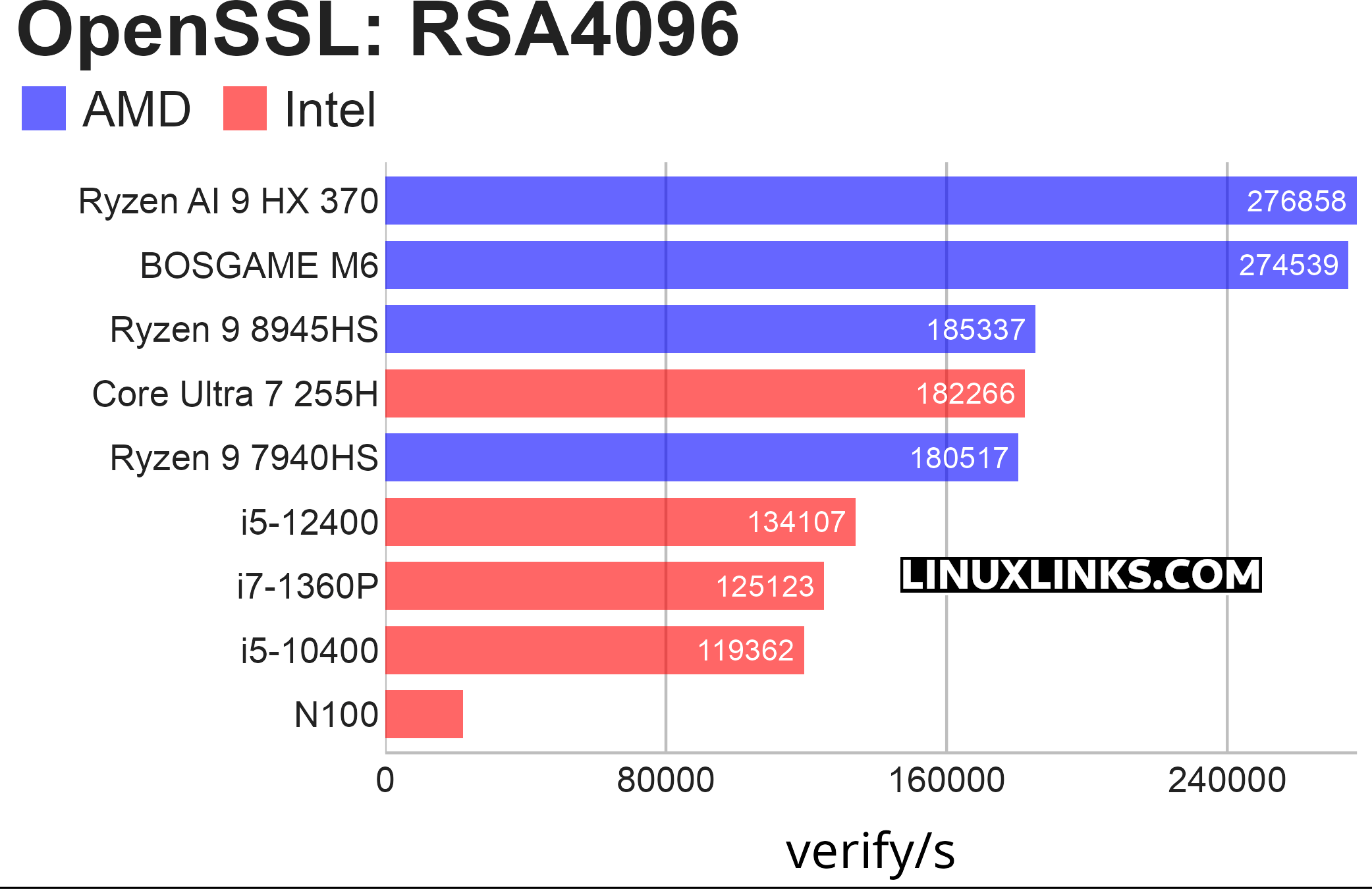
$ phoronix-test-suite benchmark openssl
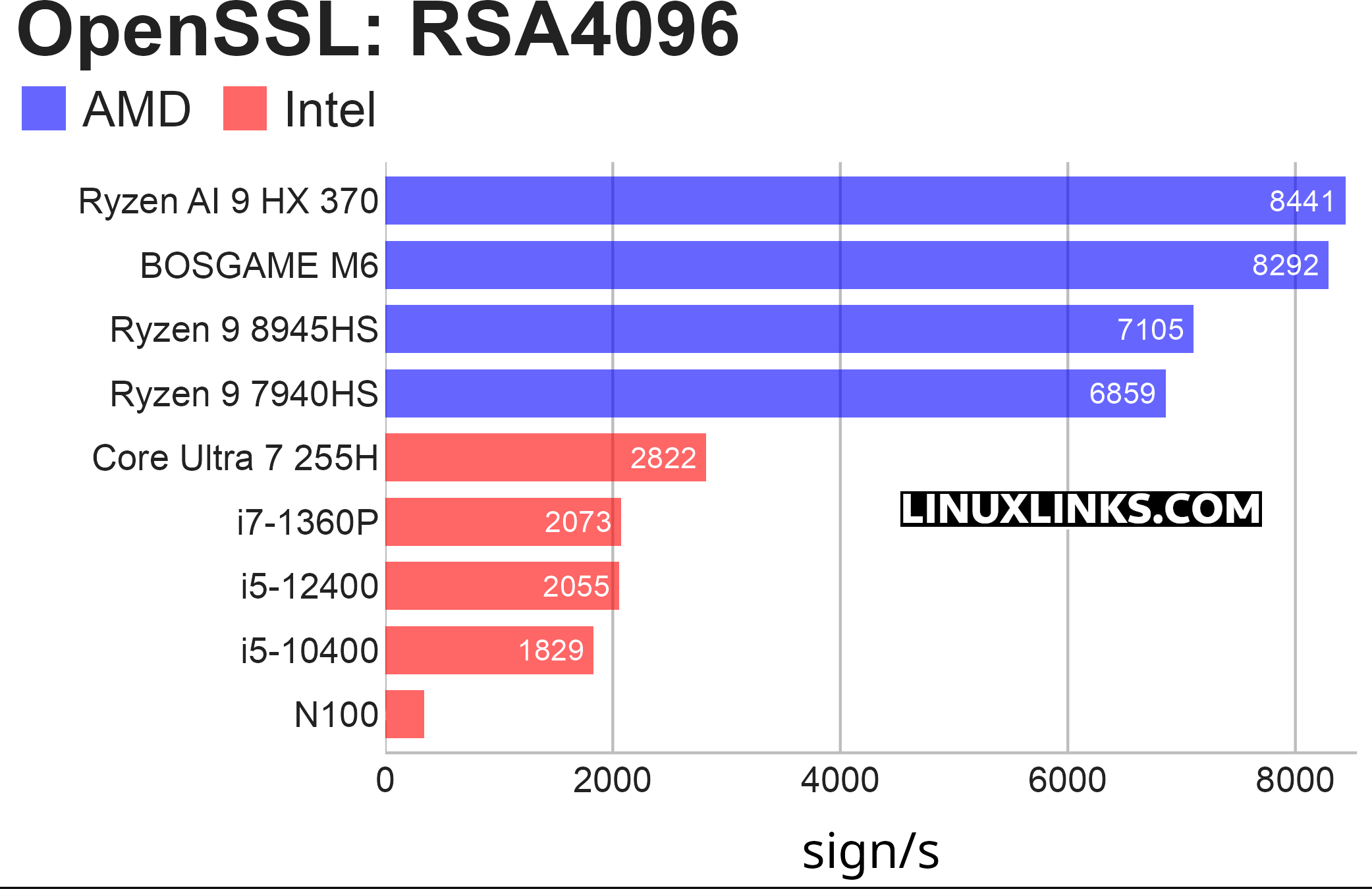
OpenSSL is an open-source toolkit that implements SSL (Secure Sockets Layer) and TLS (Transport Layer Security) protocols. This test profile makes use of the built-in “openssl speed” benchmarking capabilities.
There are various algorithms that can be used for this benchmark. I focused on the RSA4096 algorithm since it serves as a good representative for the other options. This benchmark includes two charts: one for signing speeds and another for verification speeds.
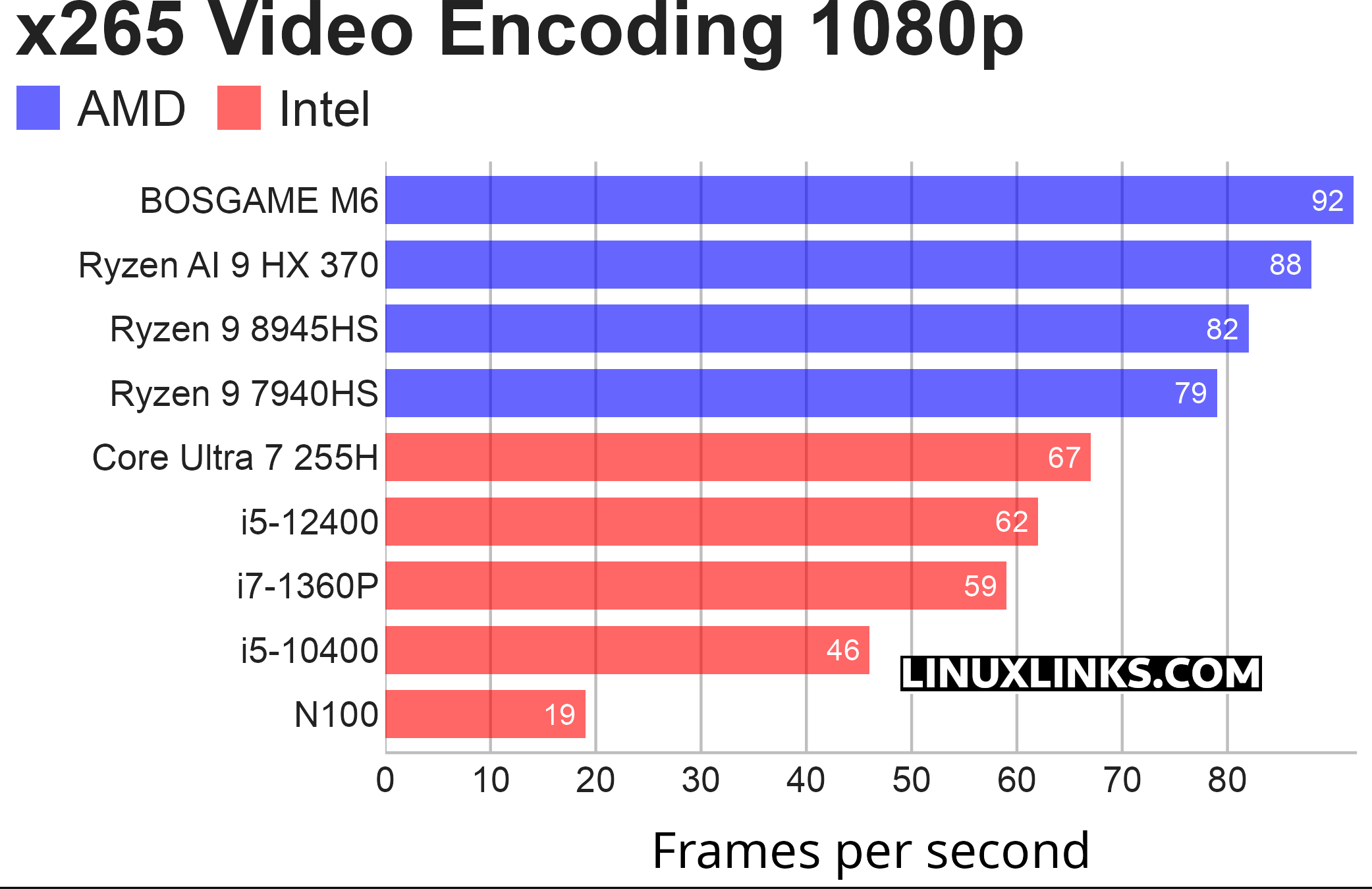
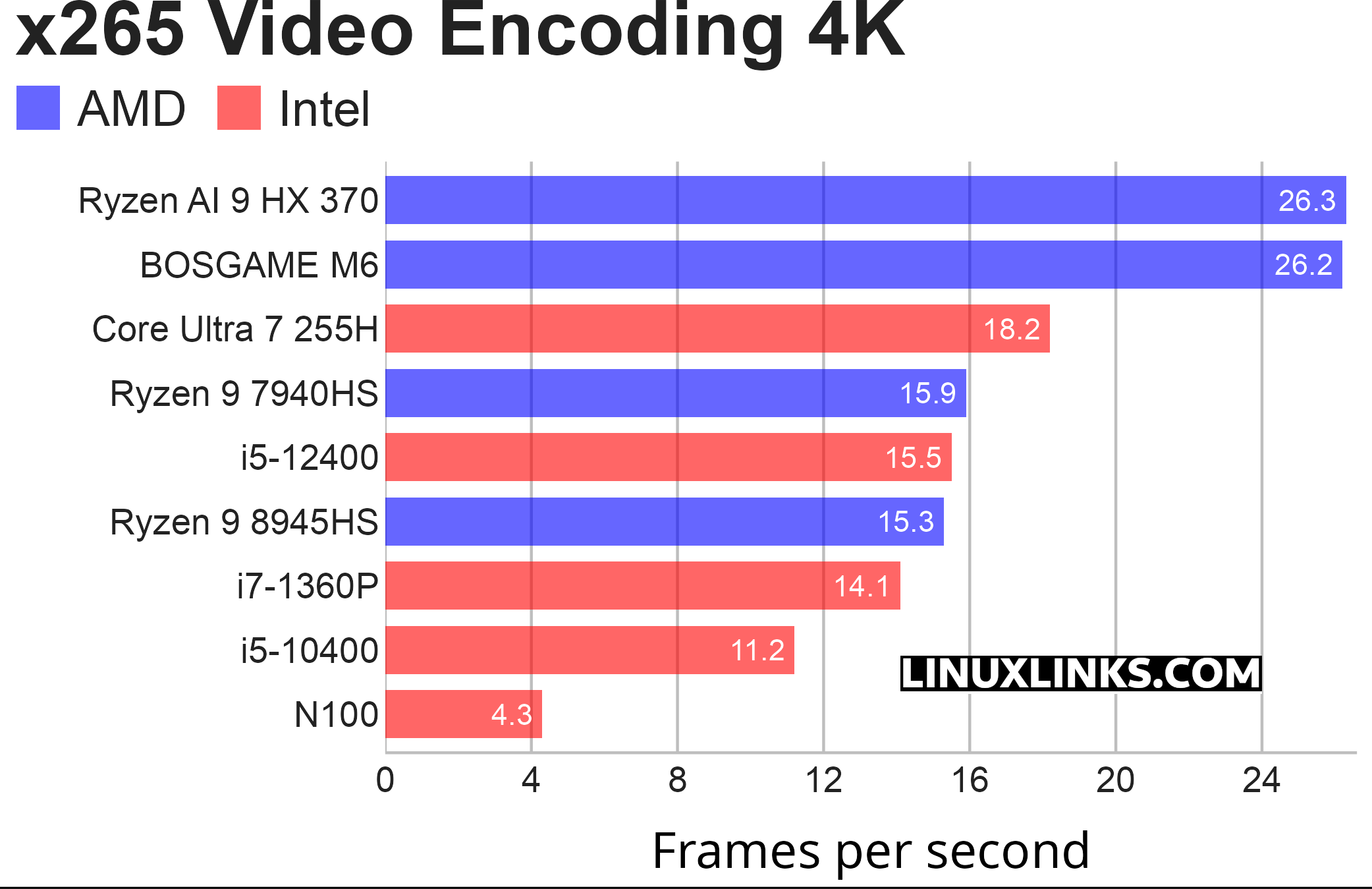
$ phoronix-test-suite benchmark x265
This is a simple test of the x265 encoder run on the CPU with a sample 1080p video file, and repeated with a sample 4K video file.
At 1080p the M6 beats the other mini PC with the AMD Ryzen AI 9 HX 370 processor, although there’s no difference with 4K encoding. If you’re upgrading from an N100 processor, you can expect a significant boost in performance.
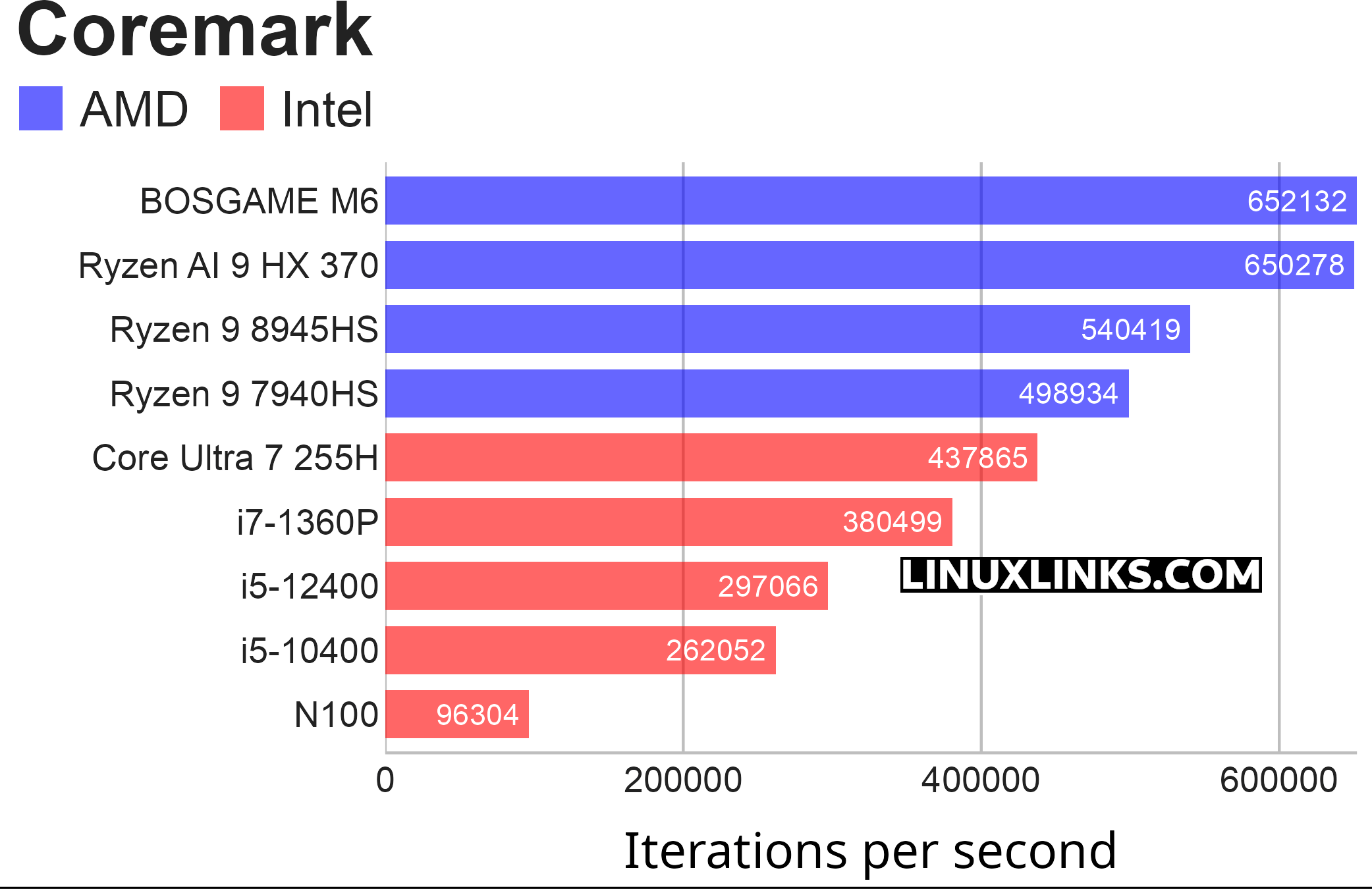
$ phoronix-test-suite benchmark coremark
Coremark is a benchmark that measures the performance of central processing units (CPU) used in embedded systems.
The M6 is top of the group again in this roundup although its result is not statistically significantly better than the other machine with the same processor. All the Ryzen processors featured put in decent results.
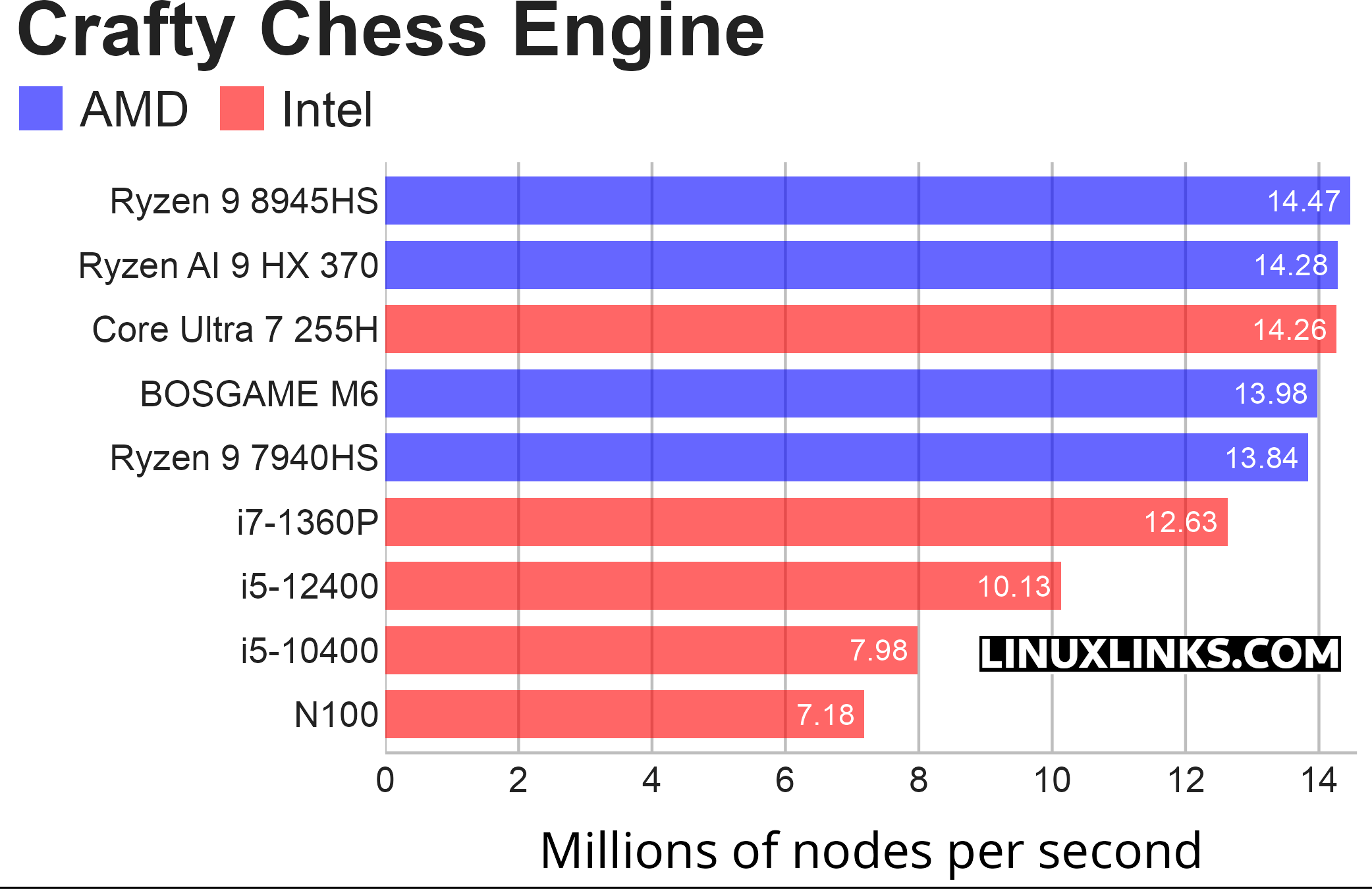
$ phoronix-test-suite benchmark crafty
Crafty is a chess program directly derived from Cray Blitz, winner of the 1983 and 1986 World Computer Chess Championships.
This is a benchmark looking at the CPU’s performance through a chess benchmark. This benchmark only uses a single core.
The M6 fares comparatively less well with this single core benchmark.
Pages in this article:
Page 1 – Introduction / Processor
Page 2 – Graphics
Page 3 – Memory
Page 4 – Disk / Summary
Complete list of articles in this series:
| BOSGAME M6 HX370 AI Mini PC | |
|---|---|
| Introduction | Introduction to the series and interrogation of the machine |
| Benchmarks | Benchmarking the BOSGAME M6 HX370 AI Mini PC |
| Power | Testing and comparing the power consumption |
| BIOS | In the world of computing, BIOS, which stands for Basic Input/Output System, plays a crucial role |
| Noise | How quiet is this mini PC? |