
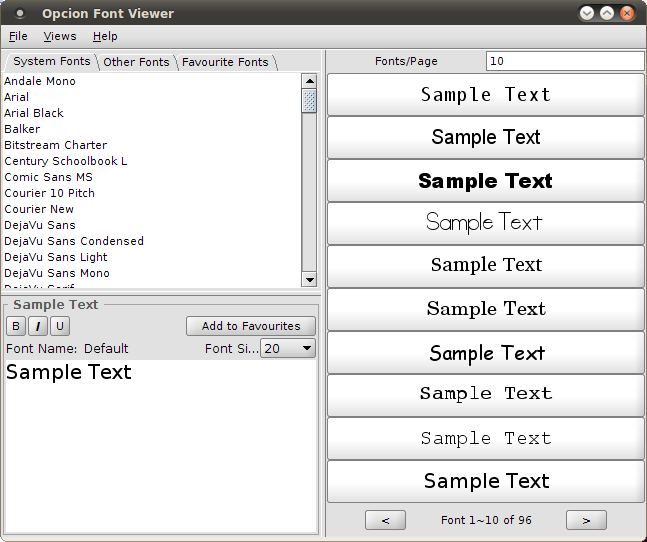
Opcion Font Viewer is a Java based font viewer that allows users to view (un)installed TrueType fonts one or many at a time.
This utility allows you to select and save your favourite fonts, apply font styles, and set your own sample/preview text.
Opcion Font Viewer requires Java 1.4.0+ to run.
Key Features
- View installed and uninstalled fonts.
- List view of installed and uninstalled fonts.
- Add and remove favourite fonts.
- Favourites list can then be saved for future reference.
- Customizable sample/display text.
- Customizable font size.
- Customizable font properties (bold, italic, etc.) in sample text area.
- Changeable fonts displayed per page in List View.
- Shortcut keys for navigating fonts.
Website: opcion.sourceforge.net
Support:
Developer: Paul Chiu
License: GNU General Public License v2.0
Opcion Font Viewer is written in Java. Learn Java with our recommended free books and free tutorials.
Related Software
| Font Viewers | |
|---|---|
| fontpreview | Search and preview fonts |
| GNOME Fonts | View fonts on your system |
| fntsample | PDF and PostScript font samples generator |
| cfonts | Command line tool for sexy ANSI fonts |
| Opcion Font Viewer | Java based font viewer |
| moji | Search, download, convert and inspect fonts |
| Sitra | Get fonts from online sources |
| fontvuer | Cross-platform font viewer |
| Font Viewer | View and install fonts |
| TTFviewer | Utility for viewing and inspecting TrueType fonts |
| Lipi | Install fonts from Google Fonts GitHub Repo |
| qfontviewer | Font viewer with an integrated character table |
| KFontview | View and install different types of fonts |
Read our verdict in the software roundup.
 Explore our comprehensive directory of recommended free and open source software. Our carefully curated collection spans every major software category. Explore our comprehensive directory of recommended free and open source software. Our carefully curated collection spans every major software category.This directory is part of our ongoing series of informative articles for Linux enthusiasts. It features hundreds of detailed reviews, along with open source alternatives to proprietary solutions from major corporations such as Google, Microsoft, Apple, Adobe, IBM, Cisco, Oracle, and Autodesk. You’ll also find interesting projects to try, hardware coverage, free programming books and tutorials, and much more. Discovered a useful open source Linux program that we haven’t covered yet? Let us know by completing this form. |
Please read our Comment Policy before commenting.
The thing I’m finding frustrating about all the fontviewers I have is that the features are not always fully explained, and when there is a screenshot, that’s all there is – one screenshot.
On Windows I use Free and East Fontviewer. In addition to listing all your installed fonts, you can get a full character map from which you can copy individual characters or symbols. This is very important for symbol fonts. I can copy the symbol and want and paste in into my document. Your single screen capture doesn’t indicate that you can get a character map.