
Last Updated on July 11, 2021
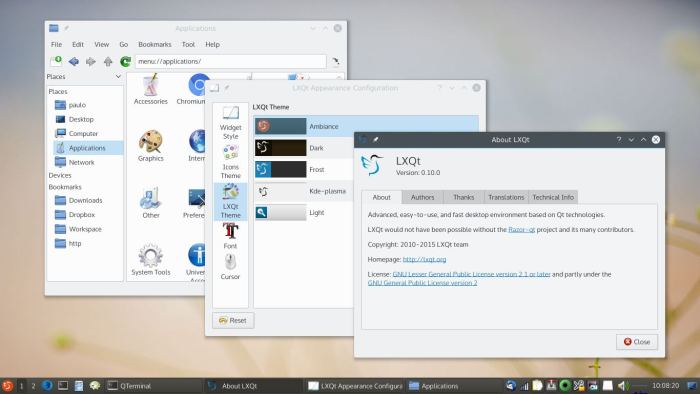
LXQt is billed as an advanced, easy-to-use, and fast desktop environment based on Qt technologies. It is the product of the merge between the LXDE-Qt and the Razor-qt projects. The idea of pooling resources between the two projects is to give users an impressive experience, yet retaining a lot of the development effort of the two projects.
LXQt offers users a fast and stable desktop environment. It is getting close to be ready for use in production desktop machines, though there’s still some work to do. Whilst this desktop environment is not yet available to install from the Ubuntu Software Center, it can be easily installed by typing the following commands in a terminal:
sudo add-apt-repository ppa:lubuntu-dev/lubuntu-daily

sudo add-apt-repository ppa:gilir/q-project

sudo apt-get update

sudo apt-get install lxqt-metapackage lxqt-panel openbox
While LXQt is not quite as memory efficient as LXDE or Xfce, the difference is not significant.
Features include:
- Modular architecture, allowing users and maintainers to easily swap out components of the desktop for third party apps.
- PCManFM-Qt, the Qt port of LXDE’s desktop and file manager.
- Efficient program launcher.
- Good power management tools.
- Ongoing support for the Wayland display protocol.
- Experimental Raspberry Pi support.
- Additional packages including the LXQt image viewer, a lightweight Qt terminal emulator, Qt port of ObConf, compatible Qt theme.
- Full Qt5 support.
- Translated into many languages including Russian, Danish, Greek, Basque, Chinese, Romanian, Greek, Spanish, Italian, Finnish, Ukrainian, and Esperanto.
Website: lxqt-project.org
Support:
Developer: LXQt Team and contributors
License: GNU GPL v2
LXQt is written in C and C++. Learn C with our recommended free books and free tutorials. Learn C++ with our recommended free books and free tutorials.
Return to Lean Desktop Environments
| Explore Linux | |
|---|---|
 | Best Free and Open Source Software - A huge collection of recommended free and open source software covering every major category. |
 | In-depth Linux Software Reviews - Detailed assessments of Linux software covering features, usability and overall quality. |
 | The Big List of Active Linux Distros - An extensive collection of actively developed Linux distributions. |
 | Open Source Alternatives - Alternatives to software and services from Google, Microsoft, Apple, Adobe, IBM, Autodesk, Oracle and others. |
 | Essential Linux System Tools - Indispensable utilities for monitoring, maintaining and managing Linux systems. |
 | Linux Productivity Tools - Useful utilities for improving productivity and streamlining everyday tasks. |
 | Alternatives to Popular CLI Tools - Modern alternatives to familiar command-line utilities supplied with Linux systems. |
 | Awesome Free Linux Game Tools - Tools, utilities and companion software that improve gaming on Linux. |
 | Machine Learning on Linux - Machine learning and deep learning software, self-hosted applications and practical tools. |
 | Saving Money with Linux - Practical ways to reduce electricity consumption and lower computing costs with Linux. |
 | Linux Candy - Fun, entertaining and sometimes delightfully quirky software from the lighter side of Linux. |
Please read our Comment Policy before commenting.
I liked it but I don’t like the x 11 depedency. Progress seems to be slow. A lot of the most popular desktops seems to be for X11 like Deepin, Cinnamon, XFCE etc. What compostor to use? Kwin, Mir or Openbox.Will it stil be lightweight? Hopefully it will work with wayland in Ubuntu 21.10.