
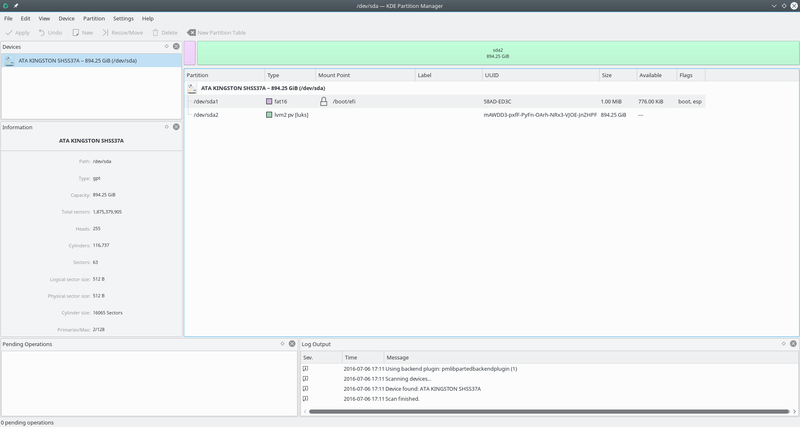
KDE Partition Manager is an open source disk partitioning application for the KDE Platform.
This software allows you to easily create new partitions, create file systems on new or existing partitions, copy, move or delete partitions and also to modify a partition’s size without losing the data on it. Additionally, KDE Partition Manager can back up file systems to files and restore such backups.
Besides the main view showing the currently selected device in a graphical and a tree view, KDE Partition Manager uses Qt’s “dock widgets” (or “panels”) to display some information and allow selections.
KDE Partition Manager is a standalone application to be launched from a desktop environment’s start menu, a KPart that integrates with operating system installers and a KControl module available from within KDE’s System Settings application. KDE Partition Manager makes use of external tools to support a long list of file systems.
KDE Partition Manager is written in the C++ programming language and uses the Qt GUI toolkit.
Key Features
- Supports a large number of file systems, including ext2/3/4, reiserfs, NTFS, FAT16/32, JFS, XFS and more.
- Makes use of already available external programs to get its job done.
- Uses libparted to detect and manipulate devices and partition tables.
- Available as a bootable Live CD, the operating system is based on the OpenSUSE Linux distribution.
- Uses operations, jobs and commands to logically divide up the work it does.
Website: www.kde.org
Support: Handbook
Developer: Volker Lanz
License: GNU General Public License v2.0
Learn C++ with our recommended free books and free tutorials.
Related Software
| Partitioning Tools | |
|---|---|
| GParted | Popular partition editor for graphically managing your disk partitions |
| KDE Partition Manager | Disk partitioning application for the KDE Platform |
| GNOME Disks | The disk utility in GNOME |
| Parted | GParted and KDE Partition Manager use the Parted libraries |
| GPT fdisk | Set of text-mode partitioning tools |
| disktui | TUI for disk management and partitioning |
| blivet-gui | Graphical tool for storage configuration |
Read our verdict in the software roundup.
 Explore our comprehensive directory of recommended free and open source software. Our carefully curated collection spans every major software category. Explore our comprehensive directory of recommended free and open source software. Our carefully curated collection spans every major software category.This directory is part of our ongoing series of informative articles for Linux enthusiasts. It features hundreds of detailed reviews, along with open source alternatives to proprietary solutions from major corporations such as Google, Microsoft, Apple, Adobe, IBM, Cisco, Oracle, and Autodesk. You’ll also find interesting projects to try, hardware coverage, free programming books and tutorials, and much more. Discovered a useful open source Linux program that we haven’t covered yet? Let us know by completing this form. |
Please read our Comment Policy before commenting.