

In a nutshell, collaborative writing is writing done by more than one person. There are benefits and risks of collaborative working. Some of the benefits include a more integrated / co-ordinated approach, better use of existing resources, and a stronger, united voice. For us, the greatest advantage is one of the most transparent. That’s when we need to take colleagues’ views. Sending files back and forth between colleagues is inefficient, causes unnecessary delays and leaves people (i.e. us) unhappy with the whole notion of collaboration.
With good collaborative software, we can share notes, data and files, and use comments to share thoughts in real-time or asynchronously. Working together on documents, images, video, presentations, and tasks is made less of a chore.
There are many ways to collaborate online, and it has never been easier. This article highlights our favourite open source tools to collaborate on documents in real time.
Google Docs is a polished productivity application with most of the features we need. It serves as a collaborative tool for editing documents in real time. Documents can be shared, opened, and edited by multiple users simultaneously and users can see character-by-character changes as other collaborators make edits. While Google Docs is free for individuals, it is not open source.
Here is our take on the finest open source collaborative editors which help you focus on writing without interruption, yet work mutually with others.
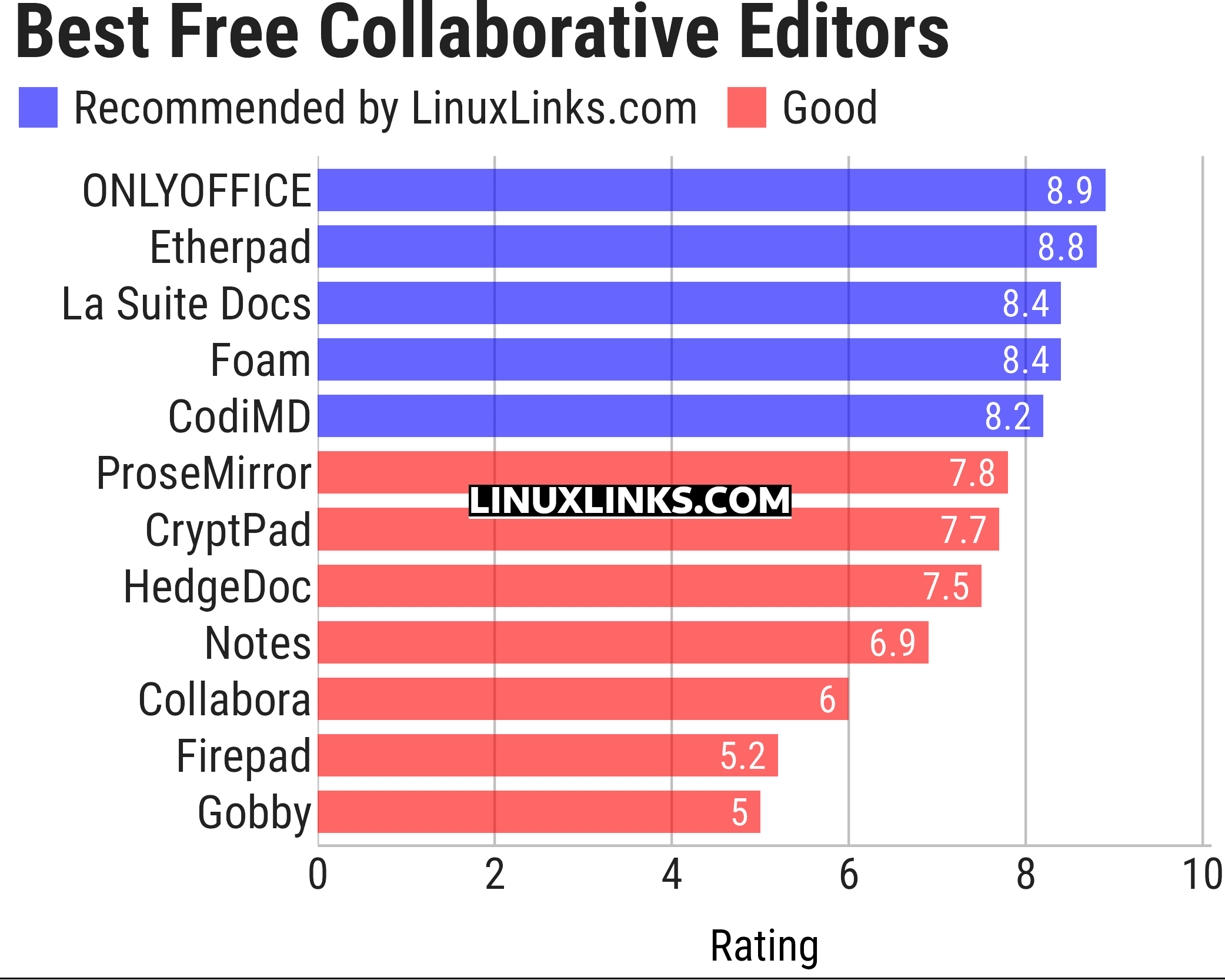
Click the links in the table below to learn more about each tool.
| Collaborative Editing Tools | |
|---|---|
| ONLYOFFICE | Multifunctional cloud online office suite |
| Etherpad | Web-based collaborative real-time editor |
| La Suite Docs | Collaborative writing platform to create, organize, and share knowledge |
| Foam | Personal knowledge management and sharing system |
| CodiMD | Realtime collaborative markdown notes taking inspiration from Hackpad |
| ProseMirror | Rich semantic content editor |
| CryptPad | Realtime collaborative editor |
| HedgeDoc | Create real-time collaborative markdown notes |
| Notes | Distraction free notes taking app for Nextcloud |
| Collabora | Desktop office suite |
| Firepad | Full-featured text editor |
| Gobby | Supporting multiple documents in one session and a multi-user chat |
This article has been updated to reflect the changes outlined in our recent announcement.
 Explore our comprehensive directory of recommended free and open source software. Our carefully curated collection spans every major software category. Explore our comprehensive directory of recommended free and open source software. Our carefully curated collection spans every major software category.This directory is part of our ongoing series of informative articles for Linux enthusiasts. It features hundreds of detailed reviews, along with open source alternatives to proprietary solutions from major corporations such as Google, Microsoft, Apple, Adobe, IBM, Cisco, Oracle, and Autodesk. You’ll also find interesting projects to try, hardware coverage, free programming books and tutorials, and much more. Know a useful open source Linux program that we haven’t covered yet? Let us know by completing this form. |
Please read our Comment Policy before commenting.