

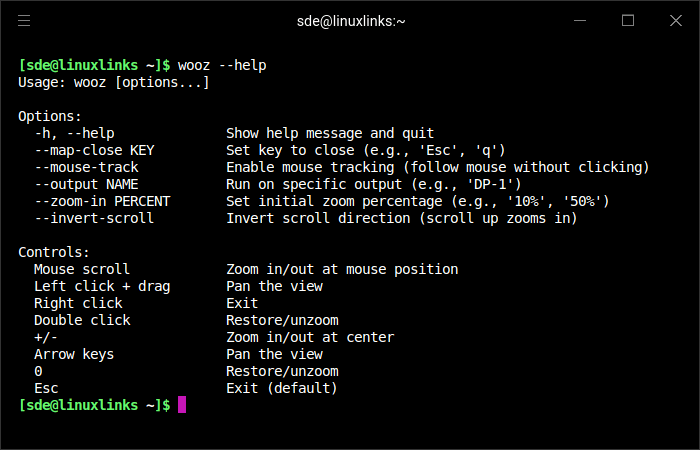
wooz is a Wayland magnifier utility that provides a zoomed view of the screen with mouse and keyboard controls. It is designed for Wayland compositors and offers features such as zooming at the mouse position, panning, mouse tracking, output selection, and customizable close key bindings.
This is free and open source software.
Key Features
- Magnifies the screen on Wayland compositors.
- Supports zooming in and out with the mouse scroll wheel.
- Lets you pan the view with mouse drag or keyboard arrow keys.
- Offers optional mouse tracking so the viewport follows the pointer.
- Can be restricted to a specific display output.
- Includes configurable key bindings for closing the application.
- Provides a restore option to return to the original unzoomed view.
Website: github.com/negrel/wooz
Support:
Developer: Alexandre Negrel
License: MIT License
wooz is written in C. Learn C with our recommended free books and free tutorials.
Related Software
| Magnifying Tools | |
|---|---|
| KMagnifier | Screen magnifier for KDE Plasma |
| magnifiqus | Qt based screen magnifier |
| Magnus | Very simple screen magnifier. It’s designed for Ubuntu |
Read our verdict in the software roundup.
 Explore our comprehensive directory of recommended free and open source software. Our carefully curated collection spans every major software category. Explore our comprehensive directory of recommended free and open source software. Our carefully curated collection spans every major software category.This directory is part of our ongoing series of informative articles for Linux enthusiasts. It features hundreds of detailed reviews, along with open source alternatives to proprietary solutions from major corporations such as Google, Microsoft, Apple, Adobe, IBM, Cisco, Oracle, and Autodesk. You’ll also find interesting projects to try, hardware coverage, free programming books and tutorials, and much more. Discovered a useful open source Linux program that we haven’t covered yet? Let us know by completing this form. |